PAM/OTP authentication via PHP
Translation of the original in Catalan. Read it in: CatalàCastellano
A good way to keep delving into the OTP subject and also into PAM, after the article: Shellinabox and OTP, is to explain to you how I have gone about adding OTP support to PHP, so that when we program with PHP the authentication can be delegated to the linux PAM system. Obviously that has certain restrictions because PHP runs with the permissions of the Apache user, or else, of the FSGI user, etc. The important thing to point out is that it is not usual to launch PHP code with 'root' permissions. So then, depending on what action we make PAM perform it will not be able to carry it out, for example, it will not be able to access the /etc/shadow file to validate the system password. In fact, since what I want is to work with OTP that is not relevant.
The first thing to do is to install the php5-auth-apm package and restart Apache:
apt-get install php5-auth-pam
/etc/init.d/apache2 restart
Now we go to the /etc/pam-script.d directory and we do:
cd /etc/pam-script.d
rm pam_script_acct
# creem fitxer pam_script_acct
echo '#!/bin/sh' > pam_script_acct
echo 'exit 0' >> pam_script_acct
chmod 755 pam_script_acct
Now it is time to create the /etc/pam.d/php file, with the following content:
auth    sufficient      pam_script.so onerr=fail dir=/etc/pam-script.d/
account  required       pam_script.so onerr=fail dir=/etc/pam-script.d/
With that we already have enough to go and play with php, the first thing is with a phpinfo(); to validate that something like this appears:
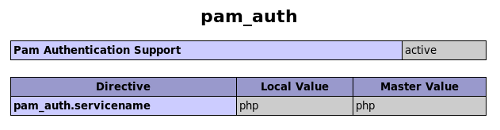
and afterwards we can write code as simple as this:
<?php
    $result=pam_auth('user','password-otp',&$error);
    var_dump($result);
    var_dump($error);
?>
The key command as you can see is pam_auth, you pass as a parameter the name of the user, the password that your OTP password generating application has given you and the variable you want to collect the errors you pass it by reference. In case of an authentication error this command will contain the description of the error. This same function returns a boolean code with the result of the authentication.