New organisation of the emails
Translation of the original in Catalan. Read it in: CatalàCastellano
Part 1 of 2A new way to organise my email
- New organisation of the emails
- New organisation of the emails (part 2)
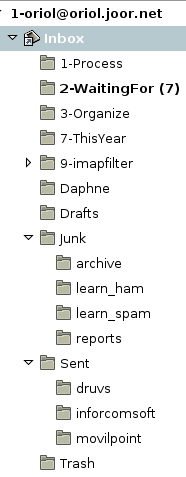
I had wanted to reorganise my emails according to the GTD theories for days. The basic idea is to always keep the INBOX completely empty. So as to always have the emails well classified. On the right side of the article you have a screenshot with the folders of the oriol_@_oriol.joor.net account, which is the account that groups the accounts of: joor.net, movilpoint.com, inforcomsoft.net and druvs-systems.com. The functions of the current folders:
- Inbox: as always where the emails that are not automatically classified into any folder come in. In other words, emails I have to review as soon as possible. All the emails that come into this folder and that involve less than two minutes of work or that I am able to answer on the spot, I have to do them. After reading any email from the folder it has to go to another folder.
- Process: emails that come from inbox and about which I have to take some action. For example, do something and then reply (do it), tasks I cannot do myself and have to delegate (delegate it), some task I am not ready to answer or do not have time to do right now (defer it). The emails that come into this folder I mark again as unread and that way at a glance I know the number of tasks I have in process. From this point tasks can be derived towards MonkeyGTD.
- Waiting for: tasks that come from the process folder or from the inbox folder. Basically they are tasks that are stopped for some reason. For example, a delegated task (delegated) or a deferred one (deferred). That is good, because that way it doesn't bother process and I don't waste time looking again at what I have in the process folder. So the most I can do with these tasks is at the end of the day or at the beginning, send reminders to whoever can unblock the task.
- Organize: emails I have to classify manually when I have a moment, into some folder of the archive account or any other special project folder. For example, the emails exchanged to solve some bug in an application, etc.
- This Year: basically it is the typical collection of emails that we have in the inbox. So if we have to look for something we can do it here.
- imapfilter: emails that belong to some mailing list. These emails are classified every 1h through the imapfilter application.
- Junk: all the emails marked as spam are put in this folder. Every 1h they are marked as read so that they don't bother (thanks to the imapfilter program). Emails older than 7 days are kept in Junk/archive, there they are kept for 90 days. The reports of the emails marked as spam are kept in Junk/reports, there the reports older than 30 days are deleted. Into the learn_ham and learn_spam folders I drag the false positives and the false negatives respectively, every night spamassassin incorporates them into its database.
The rest of the folders are the normal ones, where the sent emails are kept according to the account I have used to send them, the drafts folder, the rubbish folder and perhaps the only strange one would be Daphne's folder, which is where I keep the emails Daphne sends me. There is no more to this folder, let's call it the special and highest priority folder ;)
All this I complement with two more mail accounts archive and mailinglists. Both IMAP, just like oriol_@_oriol.joor.net. Thanks to imapfilter, in these two accounts the emails to be archived and the emails belonging to the mailing lists I am subscribed to are gradually classified. All this allows me to keep my main account at a reasonable size. The most serious problem is that until now the personal account had 4Gb and was very heavy. With this scheme I have the weight of the accounts much better distributed.
One of the big advantages is that when I use offlineimap, which synchronises the personal IMAP account from the server to the laptop, it is done much faster. Since it does not have to go through as many folders as before to check whether I have the same emails on the laptop as on the server. As for the other two accounts archive and mailinglists I synchronise them only every 1h and that way I don't have such long and heavy synchronisations for the network.