New organisation of the emails (part 2)
Translation of the original in Catalan. Read it in: CatalàCastellano
Part 2 of 2A new way to organise my email
- New organisation of the emails
- New organisation of the emails (part 2)
I have been applying an idea I had for a couple of days, let's see what you think. It is a complement to the article "new organisation of the emails". It consists of putting a blind copy of all the emails I send to myself. The mail client itself takes care of doing this automatically. So everything I send comes back to the inbox, then when it comes in I can put the email in the folder: ThisYear, Process or Waiting for depending on what I have to do with this email.
If I place it in ThisYear what I do is organise the folder in the form of a thread showing the recipient and the from, that way I have the emails grouped by subject and when I have to look for something I don't have to look separately for what I wrote from what they wrote to me.
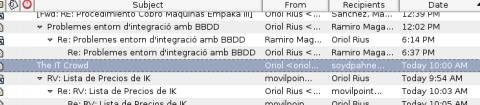
Obviously if I drag it to Process it means I have to do some task with that email. For example, maybe someone has asked me for a price list and I answer that they will have it next week, so that I don't forget to send it I place the copy of the email I wrote inside Process and that way I always keep in mind that I have to do this task.
The behaviour of the Waiting for folder is similar but the other way round, for example, if I write an email asking for something they have to send back to me, so that I don't forget that I asked for it I place the copy I receive of the email I wrote in Waiting for.
Once they send me back the email with the information I asked for or they get it to me by any other system then I drag the email to the ThisYear folder.
It is a somewhat cumbersome complement but it is interesting in order not to forget the things they have to send back to us or that we have to do/send and that later we overlook.
Update 9/2/2007: Another advantage of having a copy in the inbox of what is sent is that this way I also have on the BlackBerry a copy of the emails I send, not only of the ones I receive, and when I am not at the computer or on the internet, I can consult them, resend them, etc.
3 comments
Comments from the old blog, as they were written. Comments are closed.
someone
Trobo interessant aquest mètode per ordenar els correus.
Per cert, waiting s'escriu amb una sola T i no amb dues.
Sento dir-t'ho, però és que ja em feia mal als ulls desprès de veure-ho a un parell de posts.
Dani
És bona idea, és com la filosofia del GMail, tot el contingut a un sol fil. El client de mail del Nokia E61 fa una cosa semblant, pot enviar-te còpia de tots els mails que envia (però en aquest cas per una raó diferent, i és que no sap desar-te una còpia del mail a la carpeta 'enviats').
Per cert, volia aplicar aquest sistema al correu de la feina, però tot just l'hem començat a allotjar a GMail, i allò està fet per 'vagos', ni carpetes ni res... I les etiquetes no són el mateix.
—
[1]
Moltíssimes gràcies per avisar. I no ho sentis, m'agrada que em corregeixin així aprenc millor les coses. De fet, és molt molest equivocar-se que ningú et digui res i descobrir després que tenies errors tan garrafals. Així doncs, moltíssimes gràcies per la correcció.