mailgateway: postfix+amavisd+clamav+spamassassin+sasl
Translation of the original in Catalan. Read it in: CatalàCastellano
Some companies have mail servers with truly complex internal infrastructures and, following computing's golden rule, the best thing we can do is: if something works, don't touch it. The problem is that often these such complex structures have no malicious mail filters. That is, they are not capable of running antivirus on the mail, filtering spam and controlling other malicious mail sendings. What's more, trying to add software inside the server itself to do these things to the Mail Transport Agent (MTA) we already have running is an unnecessary risk and often not very cost-effective.
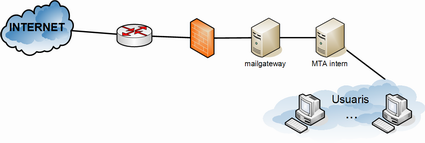
A solution that is often used is to add a server just to filter the mail that enters and leaves the company and to try to eliminate all unwanted mail with this mail-gateway. So basically what we do is place the mail-gateway's SMTP (Simple Mail Transport Protocol) as the entry point for external mail. Then we modify the internal mail server so that all mail it has to send outside does so through the mail-gateway. That is, we set the gateway's MTA address as the internal server's fixed relay server.
With this scenario users don't have to change anything at all, since we're only intervening on port 25/tcp, that is, SMTP. What's more, on the internal mail server we can create a malicious mail management account, for example mailgateway@exemple.com (exemple.com being our domain). In that account we create two folders, one called spam and the other called ham. What we'll do is synchronize the mail of those accounts with a folder on the mail-gateway (if the accounts are IMAP it's a good idea to synchronize them with offlineimap). Once we have that mail on the mail-gateway we'll tell the antispam's Bayesian filters to learn what the malicious mail it isn't able to filter looks like and what the mail it has filtered that was legitimate looks like.
This mail account (mailgateway@exemple.com) that we've created on the internal server, we can set it up as a secondary mail account for a network administrator. That way they can manage the maintenance without having to touch the mail-gateway. In the event that there's some network user who wants to locate a mail that has been filtered, the administrator will be able to do it from this account.
What's more, for users who are outside the company, branch offices or other similar ones, we may be interested in authenticating SMTP so that those users can use the mailgateway's SMTP to send mail. So, we'll take advantage of the internal server's IMAP (Internet Message Access Protocol) service to validate authentication on SMTP. It sounds a bit strange but the method is quite simple. It's about taking advantage of the account, user and password that users have on the internal IMAP server; then the MUA is configured to use that data as information to authenticate SMTP and the MTA server, when it receives an authentication via SMTP, what it does is open an IMAP connection against the internal server and try the user and password the client has sent it on SMTP; if that's correct the MTA allows sending mail to the MUA with whatever origin and destination it wants.
You can find the documentation for this project on the wiki:
Having it on the wiki lets me keep improving it and it's always in one place.
If there's anything that isn't clear, or any request or demand of whatever kind about this documentation, you can post your comments in this post.
2 comments
Comments from the old blog, as they were written. Comments are closed.
angel
Hola,
Molt bon article.
Una petita consulta.
Perque utilitzes el offlineIMAP en comptes del fetchmail ?
Gracies
Salut.
—
[1]
el fetchmail bàsicament serveix per descarregar el correu. En canvi l'offlineIMAP el que fa és sincronitzar el 'maildir' del servidor IMAP una còpia en local del 'maildir'. Llavors pots configurar el client de correu (MUA), per exemple evolution, perquè treballi directament contra aquest repositori de 'maildir' en local. Així sempre tinc tot el correu disponible tan si estic online com offline, a més l'offlineIMAP s'encarrega de que ambdós repositoris tinguin exactament el mateix contingut.
Per exemple, si entro per webmail i consulto el correu (maildir del servidor) puc respondre un email, borrar o classificar correu. Després quan sincronitzo això al portàtil, amb offlineIMAP, tinc una còpia de la última versió del 'maildir' del servidor. Amb l'email enviat, el correu borrat i els que he classificat.
Suposo que ha quedat claríssima l'avantatge de treballar amb offlineimap. No?