Mail gateway with amavisd-new
Documentation of a mail gateway with postfix, amavisd-new, clamav, spamassassin and SMTP authenticated against the internal IMAP, with the configuration files.
Translation of the original in Catalan. Read it in: CatalàCastellano
This page was on the oriol.joor.net and oriolrius.cat wiki (2006–2012). I recover it here as it was.
Comments, questions and requests
Anything you want to ask me, tell me, suggest, or simply complain about because it doesn't work for you, you can do it in the article mailgateway: postfix+amavisd+clamav+spamassassin+sasl
Changelog
- 12/06/2007 - We add the ability to check whether the recipients of a mail from a local domain exist. Explained in Postfix: We verify recipients from the mail gateway
Introduction and Goal
Some companies have mail servers with really complex internal infrastructures and, following the golden rule of computing, the best we can do is: if something works, don't touch it. The problem is that these complex structures often have no malicious mail filters. That is, they are not able to run antivirus on the mail, filter spam and control other malicious mail deliveries. Moreover, trying to add software inside the server itself to do these tasks on top of the Mail Transport Agent (MTA) we already have running is an unnecessary and often unprofitable risk.
A solution that is often used is to add a server only to filter the mail that comes in and goes out of the company and to try to remove with this mail-gateway all the unwanted mail. Basically then what we do is to place the SMTP (Simple Mail Transport Protocol) of the mail-gateway as the entry point for external mail. Then we modify the internal mail server so that all the mail it has to send outside goes through the mail-gateway. That is, we set the address of the gateway MTA as the fixed relay server of the internal server.
In this scenario users don't have to change anything at all, since we are only intervening on port 25/tcp, that is, SMTP. Moreover, on the internal mail server we can create an account for managing malicious mail, for example mailgateway@exemple.com (exemple.com being our domain). In this account we create two folders, one called spam and the other called ham. What we will do is synchronise the mail of these accounts with a folder on the mail-gateway (if the accounts are IMAP it is a good idea to synchronise them with offlineimap). Once we have these mails on the mail-gateway we will tell the bayessians filters of the antispam to learn what the malicious mail it is not able to filter looks like and what the mail it filtered, and that was legitimate, looks like.
This mail account (mailgateway@exemple.com) that we have created on the internal server we can set up as a secondary mail account of a network administrator. That way they will be able to manage the maintenance without having to touch the mail-gateway. If any user of the network wants to locate a mail that has been filtered the administrator will be able to do it from this account.
Moreover, for users who are outside the company, branches or similar, we may be interested in authenticating SMTP so that these users can use the mailgateway SMTP to send mail. So we will take advantage of the IMAP (Internet Message Access Protocol) service of the internal server to validate the authentication in SMTP. It sounds a bit strange but the method is quite simple. It is about taking advantage of the account, user and password that users have on the internal IMAP server; then the MUA is configured to use this data as information to authenticate to SMTP, and the MTA server, when it receives an authentication via SMTP, opens an IMAP connection against the internal server and tries the user and password that the client has sent to SMTP; if that is correct the MTA allows sending mail to the MUA with whatever origin and destination it wants.
Network diagram
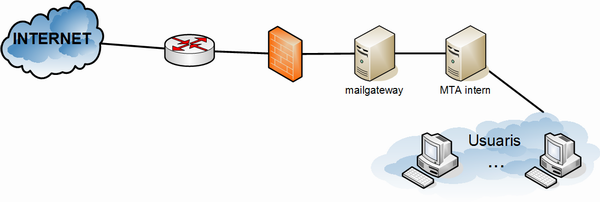
Diagram of the services and mail handling
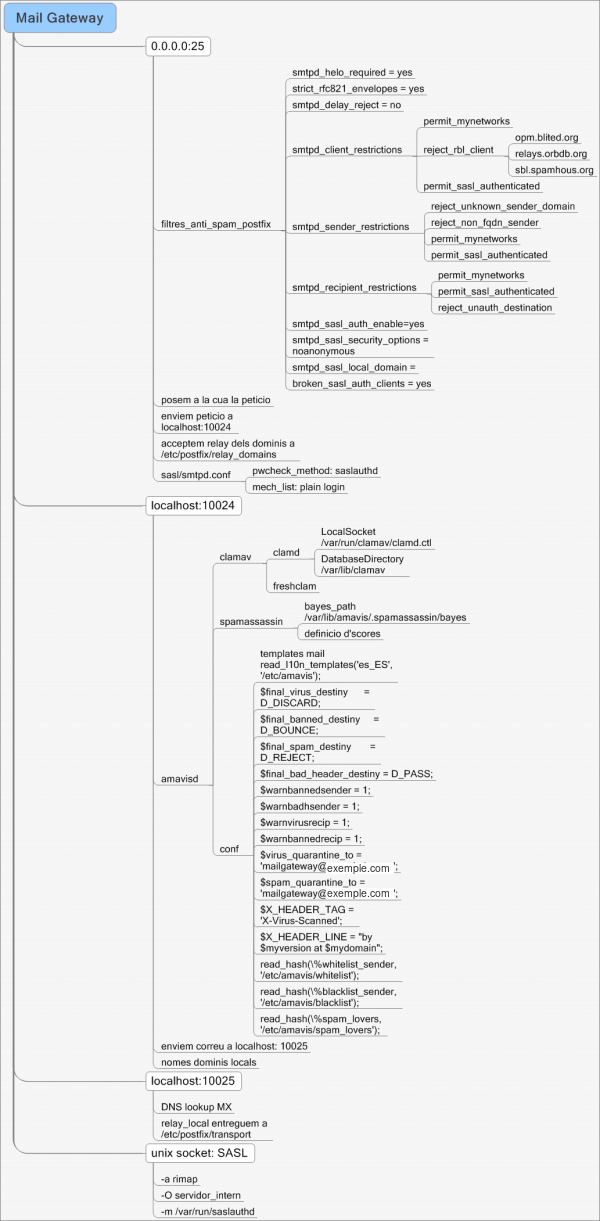
In this diagram you can see the 3 TCP ports that we will publish to filter the mail and the main configuration options of the services that publish the ports.
Mail flow
When an SMTP server, either from our network or from an external network, sends mail to the mail-gateway, logically it does so on port 25/TCP to the SMTP server, in our case postfix. This, as we can see in the diagram, forwards the mail to port 10024 of the localhost IP. Moreover, this port is only able to receive requests from localhost to avoid security problems. The port we are talking about, if we look at the diagram, you can see that it is being published by amavis.
amavis is the program in charge of supervising the antispam and antivirus filters; it is the one that will make the relevant calls to third-party programs and the one that will capture the errors and send the log, email and other messages to whoever it corresponds to. If no anomaly is detected in the mail, it will be forwarded to the port localhost:10025/TCP.
According to the diagram, port 10025/TCP is also being published by postfix. Specifically, what SMTP will do in this case is to look for who the mail is addressed to, whether a local destination (local_relay) or a remote destination (MX dns lookup).
Configuring the services
postfix
The SMTP server basically has two main configuration files. Which in our case are not especially long. So it will be relatively easy for us to know if something is not working.
File /etc/postfix/master.cf:
The content of the file is at the end of this page.
As you can check in this file, this is the one that explains what the mail flow will be; we tell postfix what the order will be in which it will try to process the mail and who will handle it at each moment.
File /etc/postfix/main.cf:
The content of the file is at the end of this page.
As we can see in this file, above all we apply basic filters to avoid having the mail relay open. We allow sending mail from and to wherever we want, as long as we are inside our own network. But SMTPs connecting from other networks have quite a few restrictions as we can see from the comment Anti-spam filters. The rest of the configuration is quite typical. We have to realise that if we don't want the mail-gateway to keep any mail we have to make its domain differ from the domain of the internal mail server. Then, for mail generated locally, if we want to override this domain we can use the myorigin variable.
From these configuration files two more files are produced, one where we say which are our local domains (those of our network, not those of the mailgateway) and the other where we say which is the server that must explicitly handle the mail for the destination domain, whatever the DNS says.
File /etc/postfix/relay_delays:
joor.net	OK
oriol.joor.net	OK
File /etc/postfix/transport:
local		smtp:IP_SERVIDOR_INTERN:25
oriol.joor.net 	smtp:IP_SERVIDOR_INTERN:25
joor.net	smtp:IP_SERVIDOR_INTERN:25
oriolrius.cat	smtp:IP_SERVIDOR_INTERN:25
The local domain refers to the domain defined in the mydomain configuration variable. So no mail will ever be stored on the mailgateway.
amavisd
amavisd-new basically has one important configuration file. This file is extremely long and very hard to analyse. The previous diagram summarises its most important options. Nevertheless, to configure it properly you have to read it carefully and test everything you enable to check that the behaviour is the expected one.
configuration file (/etc/amavis/amavisd.conf)
Here we define things as important as deciding what to do when we receive a mail with a virus: should we notify the person who sent it to us? should we notify the recipient? the system administrator? and if the mail was spam? and if it was simply a badly formatted mail?
There are also other things defined such as: which port amavis publishes to receive the mail from postfix (127.0.0.1:10024/tcp). Which antivirus program we will use, clamav in our case. And spamassassin, how we will pass it the mail so that it checks whether the mail we are handling carries a virus.
Moreover, from here most of the spamassassin parameters are also defined, such as the whilelist, blacklist and spam_lovers list. Specifically we have forwarded them to external hash files: /etc/amavis/whitelist, /etc/amavis/blacklist and /etc/amavis/spam_lovers.
It is good advice to spend a good while playing with this file, since it is the one that will mark the most important behaviour of the mailgateway.
clamav-daemon or clamd
The antivirus configuration is quite simple; once the daemon is started it publishes a unix socket; if we run netstat -lpn|grep clamd we will be able to see exactly where the socket is, in our case:
# netstat -lpn|grep clam
unix  2      [ ACC ]     STREAM     LISTENING     644309   29823/clamd         /var/run/clamav/clamd.ctl
It is important to know where this unix socket is because the previous /etc/amavis/amavisd.conf file refers to it. Here we can see that we have it at /var/run/clamav/clamd.ctl.
After this we only have to start the clamav-freshclam daemon, which takes care of updating the virus definitions with the periodicity we tell it and from the repository that suits us best.
spamassassin
It is called from amavisd-new but no port is published. But we also have our own configuration file where we tell it where the data it needs to work is:
# This is the right place to customize your installation of SpamAssassin.
#
# See 'perldoc Mail::SpamAssassin::Conf' for details of what can be
# tweaked.
#
###########################################################################
#
# rewrite_header Subject *****SPAM*****
# report_safe 1
# trusted_networks 212.17.35.
# lock_method flock

report_safe 0

use_bayes 1
bayes_path /var/lib/amavis/.spamassassin/bayes

skip_rbl_checks 0
use_razor2 1
use_dcc 1
use_pyzor 0

dns_available yes

header LOCAL_RCVD Received =~ /.*\(\S+\.domain\.com\s+\[.*\]\)/
describe LOCAL_RCVD Received from local machine
score LOCAL_RCVD -50

## Optional Score Increases
score DCC_CHECK 4.000
score SPF_FAIL 10.000
score SPF_HELO_FAIL 10.000
score RAZOR2_CHECK 2.500
score BAYES_99 4.300
score BAYES_90 3.500
score BAYES_80 3.000
Testing the server
Sending a mail via SMTP through telnet/netcat
Sometimes we are interested in testing directly against the SMTP port and not having to reconfigure the mail client (MUA) every time. An example of how to do it:
 $ nc -vvv IP_SERVIDOR 25
(UNKNOWN) [IP_SERVIDOR] 25 (smtp) open
220 Mail Gateway
helo exemple.com
250
mail from:<oriol@oriol.joor.net>
250 Ok
rcpt to:<oriol@oriol.joor.net>
250 Ok
data
354 End data with <CR><LF>.<CR><LF>
provant
.
250 Ok: queued as 0281C874FD
quit
221 Bye
 sent 101, rcvd 140
At this point the server is already routing the mail to its destination, since it has informed us that it has queued it.
Looking at the logs
To view the logs of the mail arriving at and leaving the server you have to look at the file /var/log/mail.log; if we want to view the file in real time we can use the command:
$ tail -f /var/log/mail.logTo interpret the log you only need a little patience and to pay close attention to who is the source of the entry. Whether the trace has been sent by postfix, amavis, etc. Then we will be able to see the details of what this application has done and we will be able to follow all the hops between applications described earlier in this document.
Reading the email headers
Being able to read the email headers allows us to know where a mail has been. Moreover, in our case it helps us to see the hops it has made inside the mailgateway; specifically, if we look at the email headers that have crossed our antispam server we can see something like:
Received: from localhost (localhost.localdomain [127.0.0.1])
	by mailgateway (Postfix) with ESMTP id 61D7E187508
	for <desti@exemple2.com>; Tue,  2 May 2006 14:58:35 +0200 (CEST)
Received: from mailgateway ([127.0.0.1])
	by localhost (mailgateway.subdomini.exemple1.com [127.0.0.1]) (amavisd-new, port 10024)
	with ESMTP id 07387-13 for <desti@exemple2.com>;
	Tue, 2 May 2006 14:58:33 +0200 (CEST)
Received: from mini2 (unknown [IP_PUBLICA_PROVES])
	by mailgateway (Postfix) with ESMTP id 69D44187506
	for <desti@exemple2.com>; Tue,  2 May 2006 14:58:33 +0200 (CEST)
Obviously the mail has more headers but these always show up. Which are those of the filters we explained earlier. Moreover, inside the header TAGS we will also be able to see this:
X-Virus-Scanned: by amavisd-new-20030616-p10 at subdomini.exemple1.comIt is a watermark that amavisd-new leaves on the mails it examines.
To know how to interpret email headers there are a huge number of web pages that explain how to do it; below I attach a few:
- Reading Email Headers - stopspam.org
- Reading Email Headers - uic.edu
- Support Center
- Anatomy of an Email Message
- What Email Headers Can Tell You About the Origin of Spam - About Email
- Analyzing e-mail headers and tracking e-mail
Active services
Active Internet connections (only servers)
Proto Recv-Q Send-Q Local Address           Foreign Address         State       PID/Program name
tcp        0      0 127.0.0.1:10024         0.0.0.0:*               LISTEN     6353/amavisd (maste
tcp        0      0 127.0.0.1:10025         0.0.0.0:*               LISTEN     9371/master
tcp        0      0 127.0.0.1:783           0.0.0.0:*               LISTEN     6370/spamd.pid
tcp        0      0 127.0.0.1:53            0.0.0.0:*               LISTEN     10176/named
tcp        0      0 0.0.0.0:25              0.0.0.0:*               LISTEN     9371/master
tcp6       0      0 :::22                   :::*                    LISTEN     8444/sshd
udp        0      0 0.0.0.0:53              0.0.0.0:*                          10176/named
udp        0      0 127.0.0.1:53            0.0.0.0:*                          10176/named
udp6       0      0 :::39827                :::*                               10176/named
Active UNIX domain sockets (only servers)
Proto RefCnt Flags       Type       State         I-Node PID/Program name    Path
unix  2      [ ACC ]     STREAM     LISTENING     2598578  9371/master         private/smtp-amavis
unix  2      [ ACC ]     STREAM     LISTENING     2609624  10176/named         /var/run/ndc
unix  2      [ ACC ]     STREAM     LISTENING     2598589  9371/master         public/cleanup
unix  2      [ ACC ]     STREAM     LISTENING     2598596  9371/master         private/rewrite
unix  2      [ ACC ]     STREAM     LISTENING     2598600  9371/master         private/bounce
unix  2      [ ACC ]     STREAM     LISTENING     2598604  9371/master         private/defer
unix  2      [ ACC ]     STREAM     LISTENING     2598608  9371/master         public/flush
unix  2      [ ACC ]     STREAM     LISTENING     2598612  9371/master         private/proxymap
unix  2      [ ACC ]     STREAM     LISTENING     2598616  9371/master         private/smtp
unix  2      [ ACC ]     STREAM     LISTENING     2598620  9371/master         private/relay
unix  2      [ ACC ]     STREAM     LISTENING     2598624  9371/master         public/showq
unix  2      [ ACC ]     STREAM     LISTENING     644309   29823/clamd         /var/run/clamav/clamd.ctl
unix  2      [ ACC ]     STREAM     LISTENING     2598628  9371/master         private/error
unix  2      [ ACC ]     STREAM     LISTENING     2598632  9371/master         private/local
unix  2      [ ACC ]     STREAM     LISTENING     2598636  9371/master         private/virtual
unix  2      [ ACC ]     STREAM     LISTENING     2598640  9371/master         private/lmtp
unix  2      [ ACC ]     STREAM     LISTENING     1623569  32625/acpid         /var/run/acpid.socket
unix  2      [ ACC ]     STREAM     LISTENING     2598644  9371/master         private/maildrop
unix  2      [ ACC ]     STREAM     LISTENING     2598648  9371/master         private/trace
unix  2      [ ACC ]     STREAM     LISTENING     2598652  9371/master         private/verify
unix  2      [ ACC ]     STREAM     LISTENING     2598656  9371/master         private/tlsmgr
unix  2      [ ACC ]     STREAM     LISTENING     2598660  9371/master         private/anvil
unix  2      [ ACC ]     STREAM     LISTENING     2598664  9371/master         private/scache
unix  2      [ ACC ]     STREAM     LISTENING     2598668  9371/master         private/discard
unix  2      [ ACC ]     STREAM     LISTENING     2596380  8961/saslauthd      /var/run/saslauthd/mux
Managing the internal account (mailgateway@exemple.com)
Needs of the internal account
- Create two folders in the account:
- ham - we will put the mail flagged as a false positive
- spam - we will put the mail that was spam and the server did not detect
- Being able to query it over IMAP
We synchronise the IMAP account with the mailgateway
We will do this with offlineimap; we can run it as a user.
$ cat .offlineimaprc
[general]
accounts = servidor_intern

[Account servidor_intern]
localrepository = Local
remoterepository = Remote

[Repository Local]
type = Maildir
localfolders = ~/mailgateway
sep=/

[Repository Remote]
type = IMAP
remotehost = IP_SERVIDOR_INTERN
remoteuser = mailgateway
remotepass = ___
We can see that the email will be saved in the home (~) of the user we choose, specifically in the mailgateway folder.
The file is quite simple; you can see how we define the servidor_intern account and then we define the local and remote repository of this account. The local one will be a simple maildir and the remote one an imap.
Misc
Let's educate the anti-spam filter
spamassassin, the more example spam mails it has the better it is at making detections because these are done through bayessian functions. That means that the more data it has in the DB the more accurate it is. The command used to feed the spamassassin DB is sa-learn.
How to create a hash file (.db)
Often the configuration files of amavis and postfix are in hash format; to transform a normal configuration file into its hash version you only have to do the following:
postmap fitxer_de_configuracióand after this we will get, in addition to our configuration_file, another file called configuration_file.db, that is, the file in hash format.
References
- IMAP protocol cookbook on how to use the IMAP protocol from a TCP session.
Configuration files
master.cf file
/etc/postfix/master.cf:
# ==========================================================================
# service type  private unpriv  chroot  wakeup  maxproc command + args
#               (yes)   (yes)   (yes)   (never) (100)
# ==========================================================================
#smtp      inet  n       -       n       -       -       smtpd
smtp      inet  n       -       n       -       -       smtpd
	-o content_filter=smtp-amavis:[127.0.0.1]:10024
smtp-amavis unix        -       -       n       -       10       smtp
	-o smtp_data_done_timeout=1200
	-o disable_dns_lookups=yes
127.0.0.1:10025 inet    n       -       n       -       -       smtpd
	-o local_recipient_maps=
	-o smtpd_restriction_classes=
	-o smtpd_client_restrictions=
	-o smtpd_helo_restrictions=
	-o smtpd_sender_restrictions=
	-o smtpd_recipient_restrictions=permit_mynetworks,reject
	-o strict_rfc821_envelopes=yes
#smtps	  inet	n	-	n	-	-	smtpd
#  -o smtpd_tls_wrappermode=yes -o smtpd_sasl_auth_enable=yes
#submission	inet	n	-	n	-	-	smtpd
#  -o smtpd_enforce_tls=yes -o smtpd_sasl_auth_enable=yes
#628      inet  n       -       n       -       -       qmqpd
pickup    fifo  n       -       n       60      1       pickup
cleanup   unix  n       -       n       -       0       cleanup
qmgr      fifo  n       -       n       300     1       qmgr
#qmgr     fifo  n       -       n       300     1       nqmgr
#tlsmgr	  fifo	-	-	n	300	1	tlsmgr
rewrite   unix  -       -       n       -       -       trivial-rewrite
bounce    unix  -       -       n       -       0       bounce
defer     unix  -       -       n       -       0       bounce
flush     unix  n       -       n       1000?   0       flush
proxymap  unix  -       -       n       -       -       proxymap
smtp      unix  -       -       n       -       -       smtp
relay     unix  -       -       n       -       -       smtp
#       -o smtp_helo_timeout=5 -o smtp_connect_timeout=5
showq     unix  n       -       n       -       -       showq
error     unix  -       -       n       -       -       error
local     unix  -       n       n       -       -       local
virtual   unix  -       n       n       -       -       virtual
lmtp      unix  -       -       n       -       -       lmtp
#
# Interfaces to non-Postfix software. Be sure to examine the manual
# pages of the non-Postfix software to find out what options it wants.
#
# maildrop. See the Postfix MAILDROP_README file for details.
#
maildrop  unix  -       n       n       -       -       pipe
  flags=R user=vmail argv=/usr/bin/maildrop -d ${recipient}
#  flags=DRhu user=vmail argv=/usr/bin/maildrop -d ${recipient}
#  flags=R user=vmail argv=/usr/bin/maildrop -d ${recipient}
#
# The Cyrus deliver program has changed incompatibly, multiple times.
#
#old-cyrus unix  -       n       n       -       -       pipe
#  flags=R user=cyrus argv=/cyrus/bin/deliver -e -m ${extension} ${user}
# Cyrus 2.1.5 (Amos Gouaux)
#cyrus     unix  -       n       n       -       -       pipe
#  user=cyrus argv=/cyrus/bin/deliver -e -r ${sender} -m ${extension} ${user}
#uucp      unix  -       n       n       -       -       pipe
#  flags=Fqhu user=uucp argv=uux -r -n -z -a$sender - $nexthop!rmail ($recipient)
#ifmail    unix  -       n       n       -       -       pipe
#  flags=F user=ftn argv=/usr/lib/ifmail/ifmail -r $nexthop ($recipient)
#bsmtp     unix  -       n       n       -       -       pipe
#  flags=Fq. user=foo argv=/usr/local/sbin/bsmtp -f $sender $nexthop $recipient
trace     unix  -       -       -       -       0       bounce
verify    unix  -       -       -       -       1       verify
tlsmgr    unix  -       -       -       1000?   1       tlsmgr
anvil     unix  -       -       -       -       1       anvil
scache    unix  -       -       -       -       1       scache
discard   unix  -       -       -       -       -       discard
main.cf file
/etc/postfix/main.cf:
mail_owner = postfix

# nom de la maquina local http://www.postfix.org/basic.html#myhostname
myhostname = srvgat
# domini local, posem un subdomini pq no es quedi els correus que volem fer-los relay
# http://www.postfix.org/basic.html#mydomain
mydomain = subdomini.exemple1.com
# domini dels correus que genera la maquina local http://www.postfix.org/basic.html#myorigin
myorigin = exemple1.com
# dominis que rep el servidor local http://www.postfix.org/basic.html#mydestination
mydestination= $myhostname, localhost.$mydomain, localhost, $mydomain
# xarxes locals http://www.postfix.org/basic.html#mynetworks
mynetworks = 172.16.0.0/16, 127.0.0.0/8, ********

biff = no
# Si queden menys de 120M de disc lliures no rebem emails
# http://www.postfix.org/postconf.5.html#queue_minfree
queue_minfree = 120000000
# Message max_size 20M
message_size_limit = 20480000

relayhost = mailserver.exemple1.com
relay_domains = hash:/etc/postfix/relay_domains
transport_maps = hash:/etc/postfix/transport

# http://www.postfix.org/postconf.5.html#notify_classes
#notify_classes = delay, policy, protocol, resource, software
notify_classes = delay
# http://www.postfix.org/postconf.5.html#disable_vrfy_command
disable_vrfy_command = yes
# http://www.postfix.org/postconf.5.html#smtpd_banner
smtpd_banner = ESMTP Mail Gateway
#

# Auth rIMAP
smtpd_sasl_auth_enable = yes
smtpd_sasl_security_options = noanonymous
smtpd_sasl_local_domain =
broken_sasl_auth_clients = yes

#
# Restriccions anti-spam
#
# http://www.postfix.org/postconf.5.html#smtpd_delay_reject
smtpd_delay_reject = no
# http://www.postfix.org/postconf.5.html#smtpd_helo_required
smtpd_helo_required = yes
# http://www.postfix.org/postconf.5.html#strict_rfc821_envelopes
strict_rfc821_envelopes = yes
# http://www.postfix.org/postconf.5.html#smtpd_client_restrictions
smtpd_client_restrictions =
	permit_mynetworks,
	permit_sasl_authenticated
#	reject_rbl_client opm.blited.org,
#	reject_rbl_client relays.orbdb.org,
#	reject_rbl_client sbl.spamhous.org
# http://www.postfix.org/postconf.5.html#smtpd_sender_restrictions
smtpd_sender_restrictions =
	permit_mynetworks,
        reject_unknown_sender_domain,
        reject_non_fqdn_sender,
	permit_sasl_authenticated
smtpd_recipient_restrictions =
        permit_mynetworks,
	permit_sasl_authenticated,
	reject_unauth_destination
# no l'uso per res però esta requerit
alias_maps = hash:/etc/aliases