OpenVPN roadwarrior (windows client)
Translation of the original in Catalan. Read it in: CatalàCastellano
Part 2 of 3OpenVPN roadwarrior
- OpenVPN roadwarrior (server and linux client)
- OpenVPN roadwarrior (windows client)
- OpenVPN roadwarrior over PROXY
As I commented in my previous article OpenVPN roadwarrior (server and linux client) we can also have a roadwarrior of our VPN working with windows. So I will describe briefly how to configure this client a configuration that is practically identical to that of the linux client.
The first thing we have to do is of course, download the openVPN package for windows, you can find it on the website of openVPN GUI for Windows. After downloading it you can install it wherever you like most once that is done the interesting part begins.
NOTE: if you read the openVPN documentation for windows you will see that I have not placed the configuration files in the addresses where it expects to find them. And I do not use the windows service property that the program can have either. But if you want to do it as 'God commands' you only have to modify the routes and work with the windows service instead of my script. But I have preferred to do it this way in order to have a more personal control of the program. I hate the transparency of windows, I prefer my system. It is all a matter of taste.
NOTE II: macs also have an openVPN client called Tunnelblick GUI for mac OS X. But I do not have the pleasure of having a mac to test and explain to you how it works, you will have to make do with the instructions on its web page.
Client certificate
This part is the same as in linux, that is, you can look at the post I mentioned above and you will know how it is done. Once we have the client certificate and the private key, we copy these two files together with the 'root CA' to a windows folder. What I have done is create a folder called openvpn on the desktop and inside it I have created the certs directory, where I have copied the three files.
Client configuration
Inside the openvpn folder I mentioned in the previous point I have created a configuration file called local.conf with the following content:
client
verb 1
remote 2.2.2.2 443
dev tun
comp-lzo
nobind
proto tcp-client
ca ./certs/cacert.pem
cert ./certs/vpn-clientwin-cert.pem
key  ./certs/vpn-clientwin-key.pem
As you can see the file is practically identical to the linux one, I have only lowered the debug level (verb 1) because here the log output will be done by console and if we raise the debug level a lot it fills the console with rubbish.
TAP/Win-32 interface configuration
After installing the openvpn package for win you will see that you have a new network interface:
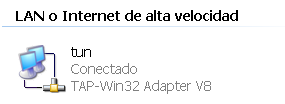
This interface as you can see I have renamed it and I have called it tun in the configuration file you have seen above I also use the tun interface and not the tap which is the name of the interface driver. The truth is I do not know if this has much to do with it but I had had some problems when configuring and in the end it has ended up as you see it works.
We need to have the interface configured in DHCP mode, in order for it to take the tunnel IP automatically:
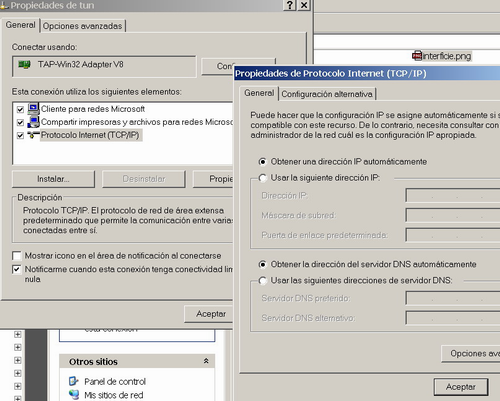
Launch script
Finally what I have done is a small script (.bat) to launch the VPN I have called it vpn.bat and the content is as simple as:
cd "H:\Documents and Settings\Oriol\Escritorio\openvpn"
openvpn --config local.conf
Place myself in the folder where all the files are and then launch openvpn telling it which configuration file it has to use. It is important to indicate the working folder this way the configuration file as you can see uses relative addresses to refer to the certificates. Much simpler than having to write the 'huge' absolute directory.
Debugging and use tests
Here you can do the same tests as with linux, you will also see that the tun interface has the 'network cable disconnected' until the VPN is connected when it goes to 'connected' mode. If you do an ipconfig /all from the windows console you will also be able to see the tun interface with the tunnel IP once connected and if you do a route print the static routes that the VPN server has assigned to it when it is created. Remember that the server did this through the push command.
3 comments
Comments from the old blog, as they were written. Comments are closed.
ramon.roca
No m'ha funcionat, al client em dona error.
Els certificats els he fet diferent, amb el mètode que he trovat a la documentació del openvpn, em pensava que seria igual... he inetal·lat al client el ca.crt, el cient.crt i el client.req, que veig que son diferents dels que fas servir.
Només per si veus alguna cosa ràpid, si has de googlejar ja m'espabilaré (quan tingui temps :))
Acompanyo el log aqui sota.
Salut a un dels millors blocs que conec, no només pel bloc, sinò pel tio que el fa.
Fri Nov 04 23:36:12 2005 OpenVPN 2.0.5 Win32-MinGW [SSL] [LZO] built on Nov 2 2005
Fri Nov 04 23:36:12 2005 IMPORTANT: OpenVPN's default port number is now 1194, based on an official port number assignment by IANA. OpenVPN 2.0-beta16 and earlier used 5000 as the default port.
Fri Nov 04 23:36:12 2005 WARNING: No server certificate verification method has been enabled. See http://openvpn.net/howto.html#mitm... for more info.
Fri Nov 04 23:36:12 2005 Cannot load certificate file C:\Documents and Settings\Administrador\Escritorio\openvpn\client_elserrat.crt: error:0906D06C:PEM routines:PEM_read_bio:no start line: error:140AD009:SSL routines:SSL_CTX_use_certificate_file:PEM lib
Fri Nov 04 23:36:12 2005 Exiting
—
Mirat l'article on explico tot el rollazo dels certificats amb calma. No és difícil és mirar-ho. Sinó aprofita aquest cap de setmana que estaré 'trankil' que la Daphne serà a Holanda en un curs i t'ajudo amb el que calgui.
Com comentes a Comesfa seria bona idea montar una entitat certificadora propia aprofitant cacert.org i simplificar la vida a tothom jo ho volia fer. Però ja sé sap sempre volem fer massa coses.
Potser el problema que tens és una mica més de concepte si vols em fas un truc en un moment i et faig un resum ràpid del tema i després ho veuràs tot súper clar.
kingdos
aaaaaaaaaaa