Parte 4 de 4AMQP y RabbitMQ
- AMQP y RabbitMQ [TOC]
- ¿Qué es AMQP? y la arquitectura
- A fondo dentro de AMQP
- Hello World usando la librería 'kombu' y python
A veces los esquemas y los fragmentos de código no necesitan grandes descripciones. Si crees que en este caso no es suficiente, dímelo y añadiré explicaciones.
Usando una librería de python llamada kombu como abstracción para hablar con el broker AMQP, vamos a desarrollar diferentes rutas de mensajes configurando cada tipo de Exchange. Como backend usé RabbitMQ con la configuración por defecto.
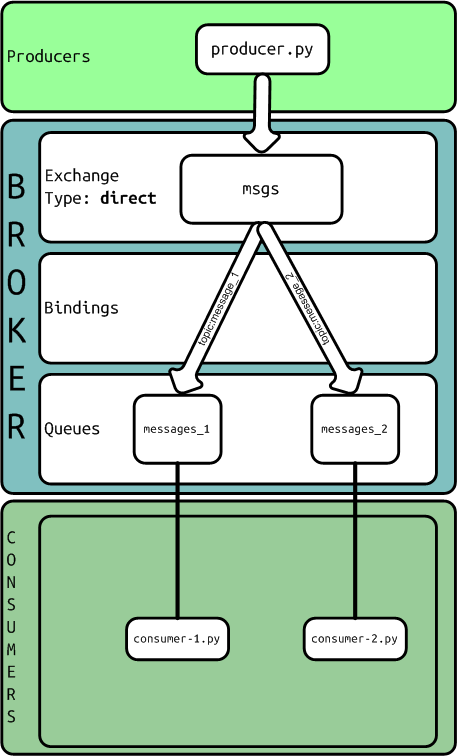
Esquema AMQP usando un exchange de tipo direct
Definición de la cola:
from kombu import Exchange, Queue

task_exchange = Exchange("msgs", type="direct")
queue_msg_1 = Queue("messages_1", task_exchange, routing_key = 'message_1')
queue_msg_2 = Queue("messages_2", task_exchange, routing_key = 'message_2')
El productor:
from __future__ import with_statement
from queues import task_exchange

from kombu.common import maybe_declare
from kombu.pools import producers


if __name__ == "__main__":
    from kombu import BrokerConnection

    connection = BrokerConnection("amqp://guest:guest@localhost:5672//")

    with producers[connection].acquire(block=True) as producer:
        maybe_declare(task_exchange, producer.channel)

        payload = {"type": "handshake", "content": "hello #1"}
        producer.publish(payload, exchange = 'msgs', serializer="pickle", routing_key = 'message_1')

        payload = {"type": "handshake", "content": "hello #2"}
        producer.publish(payload, exchange = 'msgs', serializer="pickle", routing_key = 'message_2')
Un consumidor:
from queues import queue_msg_1
from kombu.mixins import ConsumerMixin

class C(ConsumerMixin):
    def __init__(self, connection):
        self.connection = connection
        return

    def get_consumers(self, Consumer, channel):
        return [Consumer( queue_msg_1, callbacks = [ self.on_message ])]

    def on_message(self, body, message):
        print ("RECEIVED MSG - body: %r" % (body,))
        print ("RECEIVED MSG - message: %r" % (message,))
        message.ack()
        return


if __name__ == "__main__":
    from kombu import BrokerConnection
    from kombu.utils.debug import setup_logging

    setup_logging(loglevel="DEBUG")

    with BrokerConnection("amqp://guest:guest@localhost:5672//") as connection:
        try:
            C(connection).run()
        except KeyboardInterrupt:
            print("bye bye")
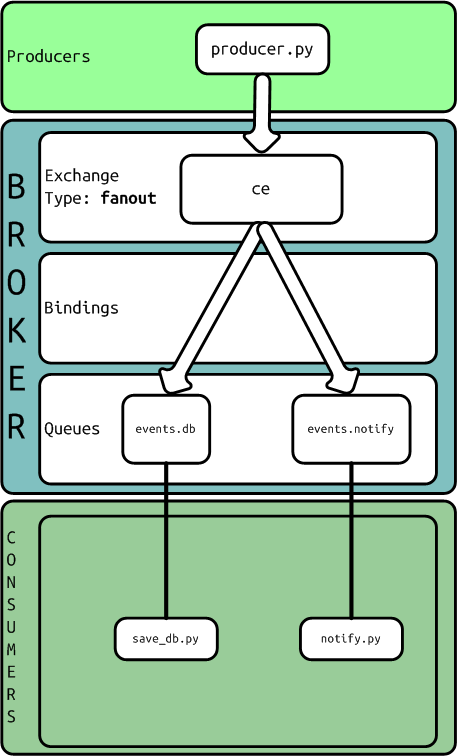
Esquema AMQP usando un exchange de tipo fanout
Definición de la cola:
from kombu import Exchange, Queue

task_exchange = Exchange("ce", type="fanout")
queue_events_db = Queue("events.db", task_exchange)
queue_events_notify = Queue("events.notify", task_exchange)
El productor:
from __future__ import with_statement
from queues import task_exchange

from kombu.common import maybe_declare
from kombu.pools import producers


if __name__ == "__main__":
    from kombu import BrokerConnection

    connection = BrokerConnection("amqp://guest:guest@localhost:5672//")

    with producers[connection].acquire(block=True) as producer:
        maybe_declare(task_exchange, producer.channel)

        payload = {"operation": "create", "content": "the object"}
        producer.publish(payload, exchange = 'ce', serializer="pickle", routing_key = 'user.write')

        payload = {"operation": "update", "content": "updated fields", "id": "id of the object"}
        producer.publish(payload, exchange = 'ce', serializer="pickle", routing_key = 'user.write')
Un consumidor:
from queues import queue_events_db
from kombu.mixins import ConsumerMixin

class C(ConsumerMixin):
    def __init__(self, connection):
        self.connection = connection
        return

    def get_consumers(self, Consumer, channel):
        return [Consumer( queue_events_db, callbacks = [self.on_message])]

    def on_message(self, body, message):
        print ("save_db: RECEIVED MSG - body: %r" % (body,))
        print ("save_db: RECEIVED MSG - message: %r" % (message,))
        message.ack()
        return


if __name__ == "__main__":
    from kombu import BrokerConnection
    from kombu.utils.debug import setup_logging

    setup_logging(loglevel="DEBUG")

    with BrokerConnection("amqp://guest:guest@localhost:5672//") as connection:
        try:
            C(connection).run()
        except KeyboardInterrupt:
            print("bye bye")
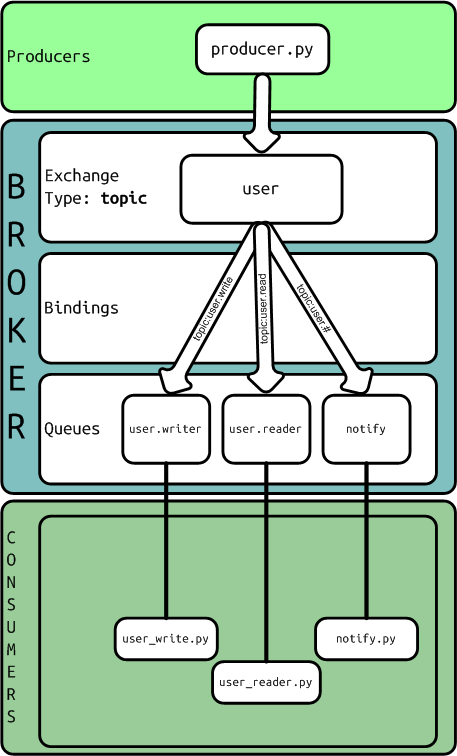
Esquema AMQP usando un exchange de tipo topic
Definición de la cola:
from kombu import Exchange, Queue

task_exchange = Exchange("user", type="topic")
queue_user_write = Queue("user.write", task_exchange, routing_key = 'user.write')
queue_user_read = Queue("user.read", task_exchange, routing_key = 'user.read')
queue_notify = Queue("notify", task_exchange, routing_key = 'user.#')
El productor:
from __future__ import with_statement
from queues import task_exchange

from kombu.common import maybe_declare
from kombu.pools import producers


if __name__ == "__main__":
    from kombu import BrokerConnection

    connection = BrokerConnection("amqp://guest:guest@localhost:5672//")

    with producers[connection].acquire(block=True) as producer:
        maybe_declare(task_exchange, producer.channel)

        payload = {"operation": "create", "content": "the object"}
        producer.publish(payload, exchange = 'user', serializer="pickle", routing_key = 'user.write')

        payload = {"operation": "update", "content": "updated fields", "id": "id of the object"}
        producer.publish(payload, exchange = 'user', serializer="pickle", routing_key = 'user.write')

        payload = {"operation": "delete", "id": "id of the object"}
        producer.publish(payload, exchange = 'user', serializer="pickle", routing_key = 'user.write')

        payload = {"operation": "read", "id": "id of the object"}
        producer.publish(payload, exchange = 'user', serializer="pickle", routing_key = 'user.read')
Un consumidor:
from queues import queue_events_db
from kombu.mixins import ConsumerMixin

class C(ConsumerMixin):
    def __init__(self, connection):
        self.connection = connection
        return

    def get_consumers(self, Consumer, channel):
        return [Consumer( queue_events_db, callbacks = [self.on_message])]

    def on_message(self, body, message):
        print ("save_db: RECEIVED MSG - body: %r" % (body,))
        print ("save_db: RECEIVED MSG - message: %r" % (message,))
        message.ack()
        return


if __name__ == "__main__":
    from kombu import BrokerConnection
    from kombu.utils.debug import setup_logging

    setup_logging(loglevel="DEBUG")

    with BrokerConnection("amqp://guest:guest@localhost:5672//") as connection:
        try:
            C(connection).run()
        except KeyboardInterrupt:
            print("bye bye")
Colas simples
Kombu implementa SimpleQueue y SimpleBuffer como solución sencilla para colas con exchange de tipo 'direct', con el mismo nombre de exchange, routing key y nombre de cola.
Quien publica:
from kombu import BrokerConnection

connection = BrokerConnection("amqp://guest:guest@localhost:5672//")
queue = connection.SimpleQueue("logs")

payload = { "severity":"info", "message":"this is just a log", "ts":"2013/09/30T15:10:23" }
queue.put(payload, serializer='pickle')

queue.close()
Quien consume:
from kombu import BrokerConnection
from Queue import  Empty

connection = BrokerConnection("amqp://guest:guest@localhost:5672//")

queue = connection.SimpleQueue("logs")

while 1:
    try:
        message = queue.get(block=True, timeout=1)
        print message.payload
        message.ack()
    except Empty:
        pass
    except KeyboardInterrupt:
        break
    print message

queue.close()
Los ficheros
Descarga todos los ficheros de ejemplo: kombu-tests.tar.gz
5 comentarios
Los comentarios del blog antiguo, tal como se escribieron. Los comentarios están cerrados.
Richard Loo
thanks for sharing, great post.
I have one question, what is "maybe_declare" used for?
Oriol Rius
It's used to create, if it's necessary, the entities of RabbitMQ: exchange, binding and queues. If the entities was created before it does nothing.
Germán Larraín
It's like "create if it does not exist"
Anuj
I know this question does not make sense..But can I extend this to run on Django Web Server and create an IOS app that use API to send and receive message, more like chat application ?
gamesbook
Rather look to use Django REST API and a tool such SwampDragon.