12h with Arduino
Translation of the original in Catalan. Read it in: CatalàCastellano
In a drawer I had kept an
and a bunch of sensors, finally this past Saturday I couldn't avoid it and I had to get to it. The temptation was too strong. So, in this post what I want is to tell you how I spent my first 12h on this
platform. So much time working with the Open Source concept and for the first time I start talking about Open Hardware, that is a feeling that is priceless.
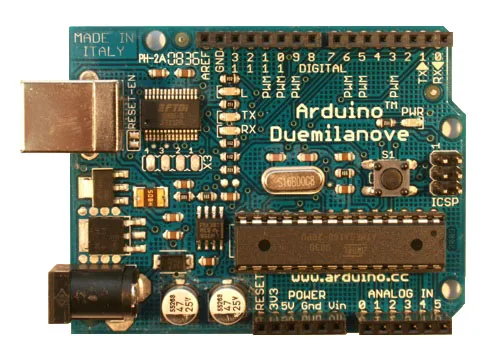
Well then, first of all to comment that the programming language is very simple. So much so that I spent about 2h reviewing all the Arduino books I have in search of more functions or uses of it that would complicate things a bit, thinking that it couldn't all be so simple. I would say that I have spent too much time with high level languages and going back to the world close to hardware everything changes so much that I didn't know how to cope. So, with very few hours I assure you that you will handle all or almost all the instructions of the language. What could seem more difficult, although from my point of view I think it isn't at all, is getting used to the idea that after starting the system all the logic will be enclosed in an infinite loop that is waiting for the sensors to capture some kind of input to trigger the logic. Maybe the most interesting thing is the fact of being able to introduce the concept of hardware interrupts that allow you to hijack the execution thread at any moment of the code to launch a routine.
After doing the typical tests with LEDs and push buttons, I set about investigating the analogue inputs and outputs with temperature, humidity, proximity, luminosity and other similar sensors. Knowing and mastering all this is a matter of very little time but I think it is worth going through it to feel comfortable with the programming tools and the hardware itself. I recommend trying to remember all the pins the board has, when it comes to understanding the code it is much simpler.
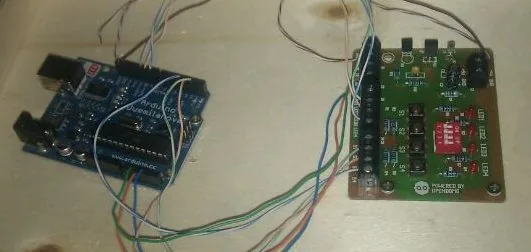
Reaching this point I discovered that using the serial console to show debugging information is one of the simplest ways to check whether the programs are doing what interests us. So, at this point I used the serial port to dump all kinds of explanatory comments to follow the thread of the code as a work console. Therefore, I recommend having a 'minicom' open constantly at hand to be able to collect all the feedbak that interests us.
Where the thing really hooked me is when I started to get into infra-red topics; specifically when it came to decoding frames sent by remote controls and other similar gadgets. It is really interesting to make manual implementations of this topic using the internal clocks the device has. It helps you understand 100% how the encodings of infra-red remote controls work. Then you discover that the thing can be simplified a great deal using libraries that manage everything for you and that offer you a series of higher level interfaces that allow you to develop very simple applications without having to worry about the details of the internals I mentioned before. Then it is when you can really come to do interesting things both when receiving and sending information by infra-red.
The obvious step that came after this was to start playing with wireless communication protocols, since I have a telematics vocation for something, right? the truth is that thanks to a high level library called '
' that talks about how to use 433MHz transmitters and receivers modulated with
to send and receive frames through the air I understood 100% how the remote control system for blinds and heating that I have at home worked. In fact, I was left wanting to keep playing with this topic for lack of electronic components that I didn't have at hand. Following this line although I didn't do tests I was seeing that it is quite simple to work with SPI and I2C data buses. Something that opens a world of possibilities when it comes to making interconnections with certain devices.
I have to say that if you are people who find it hard to understand analogue electronics, like me, you shouldn't worry, miracles can be done with Arduino without having any idea of why a resistor is usually placed in front of an LED. That said, there comes a moment when the very motivation for everything you are doing leads you to re-read, even diagonally, the chapters dedicated to electronics that many Arduino books have. At least in my case with about 30-40min I had enough to put back in my head all the concepts I had studied back in the day and be able to go on with my experiments with more knowledge of the cause.
Although for what I did next it was not necessary to have done the review on electronics I couldn't avoid consulting how to work with the Ethernet,
and Wifi modules that Arduino has. Since I didn't have all this hardware I only did this part at a theoretical level but the truth is that it was already very useful to me. It allowed me to understand how you could work with all of it. That said, now the 'bug' I have is with ZigBee technology (IEEE 802.15.4) which I have never touched first hand, so, maybe for Christmas I'll give myself some module of this technology to tinker a bit, to see how all this 'mesh-networking' thing is with this protocol that has gained so many followers in the embedded world.
I have to say that of the 12h about 4h I spent leafing through and reading carefully books and more books I have on the subject, that served me to see different ways of doing things and the scope of the projects people do with the Arduino, something that is really interesting to become familiar with the technology. Maybe I went over about 50 projects with those hours and I looked closely at about 10, something that went very well for me to know in depth many topics that for lack of hardware and electronic components I couldn't reproduce at home.
By the way, if someone expected this article to be a manual on how to get started with Arduino I'm very sorry but I would say that doing that makes no sense since on the internet there are a huge number of manuals that explain how to do it to start. Besides, there are also a huge number of books available in bookshops and libraries from which you can get more than good and detailed tutorials on how to start with this topic. So, it seemed to me that it was more useful to tell you the experience of my first 12h with this technology.
6 comments
Comments from the old blog, as they were written. Comments are closed.
Ernest
Bona lectura, aviam si ho he entes. En la foto tens dues plaques, una es l'arduino, i l'altre?
proclamo
Molt interessant això de l'Arduino. Per falta de temps no em puc posar mai a jugar amb l'electrònica pero ganes no m'hi falten! Tinc una capsa plena de components de vells ordinadors a punt de ser desmantelats per construïr-hi un petit robot, i l'Arduino sembla que em podria ajudar. Gràcies per l'article.
Santi
Hola
En el post comentas que tienes
varios libros sobre Arduino
¿podrías indicar cuales ?
Y cual te ha sido más útil.
Gracias.
Santi.
Oriol Rius
@ernest:
es una placa de sensores, concretamente esta:
http://opendomo.org/wiki/index.php?title=Placa_de_sensores
incluye: LEDs, botones, sensor de temperatura, de luz e infra-rojos.
@proclamo:
ànims, sé el que costa trobar temps però compensa.
@santi:
* Beginning Arduino Programming (Brian Evans)
* 30 Arduino Projects for the Evil Genius (Simon Monk)
* Make: Arduino Bots and Gadgets: Six embedded projects with Open HW and SW (Tero Karvinen & Kimmo Karvinen)
* Arduino: A Quick Start Guide (Maik Schmidt)
* Arduino Cookbook (Michael Margolis & Nicholas Robert Weldin)
* Getting Started with Arduino
* Building Wireless Sensor Networks: with ZigBee, XBee, Arduino and Processing (Robert Faludi)
* Beginning Arduino (Michael McRoberts)
* Practical Arduino: Cool Projects for Open Source Hardware (Jonathan Oxer & Hugh Blemings)
Santi
Gracias
FerCa
Wow! Ja ens ensenyaras que et montes!
Tinc unes ganes de fotre-li ma a un bitxo d'aquests! M'he de fer amb un llibre i començar a mirar-m'ho!