pfSense and VMWare: problems with bridged interfaces [solved]
Translation of the original in Catalan. Read it in: CatalàCastellano
Yesterday Joan and I spent 11h finding out that our big incompatibility problem between pfSense and VMWare ESX 3.5 was nothing more than a tiny configuration mistake in a virtual switch (vSwitch) that joined the virtual interfaces of the firewall.
Well, let's describe the scenario. Imagine a pfSense as a VMWare virtual machine with two physical legs, or one physical and one virtual, however you like, the problem is the same. If both are virtual I haven't tried it, but I imagine the same thing happens. The point is that if we make both legs of the pfSense run in bridge mode, that is, as if the pfSense weren't there and both subnets were joined into a single one, then traffic between one network and the other doesn't flow. In other words, we can't pass ICMP, TCP or UDP packets. But we can pass ARP packets. Curious, eh!?
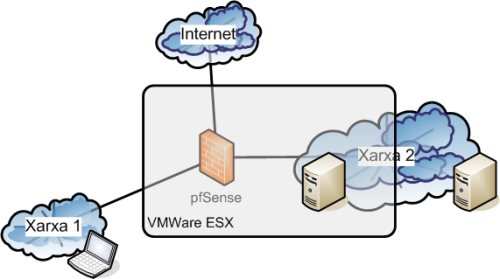
The drawing above shows the example scenario we were testing. That is, a laptop on a physical network, then on another network we had a physical server and a virtual one. The pfSense always virtual, that is, inside VMWare ESX. On the other hand we had another real leg connecting us to the internet. But that isn't relevant, I only mention it so it's clear that the pfSense had three legs and that the ones doing the bridge weren't the LAN and the WAN. But the LAN and an OPT1. The real scenario and the following tests complicated this basic scenario by adding one more leg of the pfSense also in bridge mode with the first one, the tests worked too.
For those of you who aren't familiar with VMWare, to do this you need to define two vSwitches, one joining the pfSense LAN with the real network card of the VMWare and Network 1. Another vSwitch must join the pfSense with Network 2, which has a virtual machine connected to it and a network card of the VMWare connected to a real switch with a physical computer. Well then, these two pfSense interfaces are put in bridge mode and the computers on network 1 and 2 can share a collision domain and the pfSense can do packet filtering in stealth mode since the users don't even notice that their packets go through a firewall.
I'd say it's already clear what was happening, so well, Joan and I spent 11h fighting and investigating where the problem could come from that made packets not go from one side of the pfSense to the other. In fact, what we observed to begin with is that the network interface of the pfSense didn't receive the packets from network 1 unless they were addressed to the IP of the leg explicitly, or the packets that wanted to use the firewall as a gateway to browse.
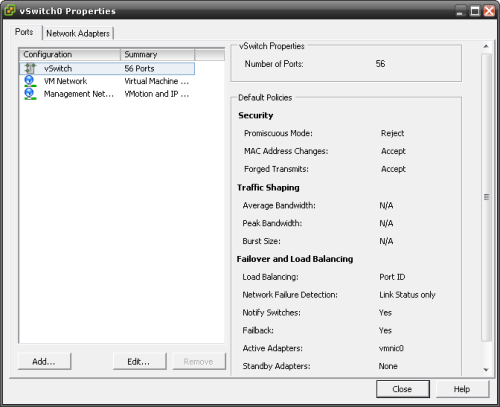
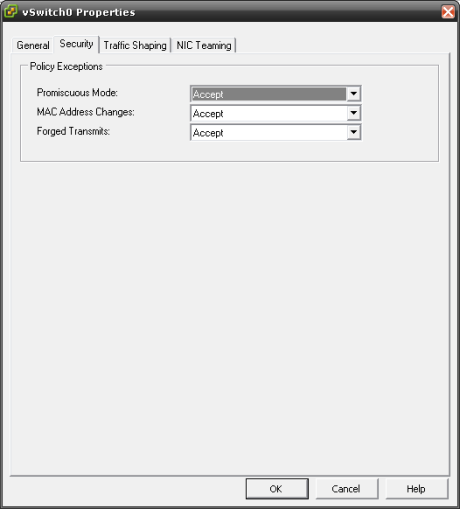
Well then, the thing is that the VMWare vSwitches must have the parameter "Promiscous Mode", which by default is set to "Reject", set to ""Accept". Doing this on both vSwitches the packets flow from one side of the firewall to the other without problems. Incredible, isn't it? well yes. One of the many joys computing gives you when, after getting up at 4 in the morning to put the system into production, at 6 in the evening you discover in a simulated environment that the problem came from this.
Below I attach a couple of screenshots where you can see how by default the parameter is set to "Reject" :
and simply by editing the properties of the vSwitch we can set it to "Accept":
This will mean that tomorrow at 8 I'll have to work again and that at last I can put the system into production. Let's hope the proof-of-concept tests done in the simulated environment we set up yesterday afternoon keep working as well in the real environment tomorrow morning. So that's it, I just want to thank Joan for his patience and for carrying on testing and testing shoulder to shoulder with me to reach this solution.