openfiler: powerful and complicated to configure
Translation of the original in Catalan. Read it in: CatalàCastellano
It took me blood, sweat and tears to get openfiler working, in the end it was a matter of honour. After trying the pre-installed version as an appliance and two versions installed by me there was no way to get the whole thing working the way I wanted.
Problem recognising pre-created logical volumes
The first big problem was that I already had a volume group created, with two logic volumes (logical information units used by LVM). Well then, although linux returned them to me without problems with vgdisplay and lvdisplay, when I went to the openfiler interface there was no way the logical volumes would show up. The volume group did appear but the logical ones didn't. Well then I found the solution after a lot of searching through the forums in this thread: How to get volumes back after reinstallation without config backup.
The trick lies in a script that basically generates an XML configuration file that openfiler uses to know which volumes there are in the system: /opt/openfiler/etc/volumes.xml. The file is quite simple and only has a list of logical volumes related to a volume group. The script also adds to /etc/fstab the necessary lines so that these logical volumes get mounted when the system boots.
Copy of the script I found in the forum: remake_vol_info.
Problem with LDAP with all the services and especially with SMB
Well then, taking advantage of the fact that openfiler ships an LDAP server I wanted to manage the accounts of all the services through a single point. So, the first problem was knowing how to enable the server it ships internally because the documentation doesn't explain it too well, since if we go to services and we do an enable without any error showing up it doesn't start for love nor money. I take the opportunity to mention that the openfiler graphical interface is really awful and hard to understand. In addition, the user experience is very poorly looked after because many things throw errors and it doesn't explain or return anything. So you have to fend for yourself by monitoring the linux log files it has behind it.
Then I tried to update the system through the update function that the interface itself has. Well then, it failed too so I tried it from the command line with a simple:
conary updateallThe thing failed with the same error:
...
Warning: Unhandled exception occured when invoking callback
/user/lib/pgthon2.4/site-packages/conary/streams.py:416
...
After googling for a good while, the solution was:
conary update conary --replace-files
conary updateall --replace-files
With this I finally managed to update. But the problem with LDAP carried on the same. In the end I deduced that if I put the information in accounts -> authentication. With the password I set when installing for the web configuration user, the users and groups part seemed to activate and the LDAP server started working all by itself.
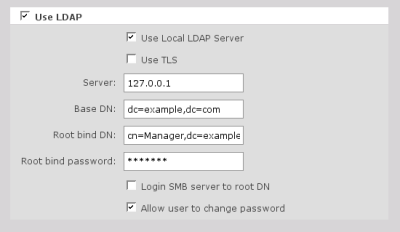
So, I could access the account management and create a user group and a test user. Well then, after sweating blood to understand the whole shares management thing and to see that there was no way to access the shared resources in an authenticated way, I decided to take advantage of my linux experience to see how everything was configured.
The thing is that I saw that both SMB, FTP, HTTP/WebDav, etc. were going against PAM but this one had no link configured towards LDAP, therefore, no matter how well it worked it was impossible for it to ever authenticate any user.
Then I ran authconfig to configure PAM authentication against LDAP, and I left it like this:
<div class="imatge" style="text-align: center;"><img title="authconfig screenshot" src="http://fitxers.oriolrius.cat/2185/authconfig_thumb.png" alt="authconfig.png"><br><br><a href="http://fitxers.oriolrius.cat/2185/authconfig.png">original size</a></div>When checking LDAP authentication for SMB, don't miss it, it told me the pam_smb package was missing, that is, the PAM package that has the handler capable of managing the connection against LDAP for samba. Can anyone explain to me how the openfiler people intended to authenticate samba with LDAP if that wasn't installed? here I've already reached the conclusion that this openfiler thing is very green indeed.
Well then, after sweating a bit with all this I'm mentioning everything now works against LDAP perfectly!!! I really have to admit that I'm a stubborn person,eh!? because there's enough to just let it go. After everything I've explained and the hours I've had to invest to find it out.
5 comments
Comments from the old blog, as they were written. Comments are closed.
Kim
Hola! Has probat amb FreeNas?
Kim
Ups! Ara m'enrecordat que ja vas fer un article sobre ell, segur que si que ho has fet!
battery
good read
Guy
Hola Oriol,
Gràcies per el teu post. Estic intentant fer funcionar el LDAP + Samba amb el OpenFiler, però es resisteix. Com tu dius no existeix el pam_smb, però no se com el puc instal·lar. Podries donar-me un cop de mà ? Moltes gràcies per la teva ajuda.
Eduardo Urrea
En la línea de comandos del Openfiler pon "conary update pam_smb --replace-files", se lo descargara e instalara y después ya podrás seguir con las pruebas. Un saludo.