MonkeyGTD as a ToDo list
Translation of the original in Catalan. Read it in: CatalàCastellano
In the article How do I organise my tasks? (latest addition MonkeyGTD) I already referred to MonkeyGTD, it is a tool programmed in html and javascript with a huge number of interactive features. So much so that sometimes you wonder how on earth they did it to program those features inside a browser. So the user experience is excellent although it has to be said that it is a bit laggy because of the javascript which, being interpreted inside the browser, is not quite as fast as a program compiled for our operating system. Perhaps with a machine more powerful than my Pentium M at 1.2GHz you wouldn't even notice.
Well then, with very good interactivity, an impeccable finish and a GUI that is really pleasant for the user I would say it is one of the most powerful tools for keeping our to-do list (ToDo list) in the purest GTD style. Once you get used to using the contexts of the tasks you really become addicted to the power of the tags associated with the list. Imagine things as complex to maintain, consult or enter as for example delegated tasks or tasks you are waiting for someone to do, or for example, tasks that can only be done if we are online. But perhaps one of the contexts I like most is being able to know which tasks require little energy to carry out, that is, which are a simple bit of administration. After reading the book El Poder del Pleno Compromiso I really learnt that the difficult thing is not having time to do things but energy. For example, right now I have stopped working not because I am hungry or because Daphne will be arriving soon and even less because I felt like writing this. But simply because I could no longer think about algorithms and problems in the code I was debugging. So, I have devoted myself to doing this task I had pending, which does not require much mental effort for me to do.
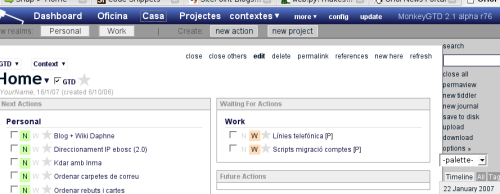
Going back to the MonkeyGTD tool, it is a modification of the wiki called TiddlyWiki, basically it is from this concept that the ability to work with MonkeyGTD online or offline is taken. As well as working with a very curious unit of information, the Tiddler. Thanks to that it is very simple to manage MonkeyGTD updates, so much so that right now I am working with the alpha version of it. What is more, thanks to the tiddlyspot service you can create your TiddlyWiki, MonkeyGTD, etc. account completely free and online. As I have already said, if you want, you can download the MonkeyGTD file locally and then upload it to tiddlyspot or to your server by just clicking.
Obviously it is not perfect and it has some flaws, for example: the password, username and basic configuration options are stored in a cookie so when we do an upload, if we work locally, these are lost every time we restart the browser. That does not happen if we always work online. Other little things that still need polishing are the ability to publish our task list by RSS, since it comes out practically cryptic and is very difficult to consult. I am sure that if I started thinking I would find many other little details to polish, but let's not forget that I use an alpha version of the code and that despite that it is super stable and has a thousand and one features that have me in love with it: it makes autobackups, the upgrades are very easy to do, it does not lose data when updating, everything can be customised enormously so that it fits our way of working as closely as possible. Just as with the flaws I could go on and on, but I would say the idea is more than clear.
Perhaps the most important thing you have to remember is that if you know the GTD method, this tool, by running inside the browser and being usable via the internet or from the hard disk, opens up enormously the possibilities of compatibility between architectures and systems. So much so that I use GTD for both work and personal tasks. Perhaps one of the big outstanding tasks I find is the possibility of integrating it with tasks pro, whether via RSS, or via iCal. As well as doing so also with evolution, of course. So the great pending subject of MonkeyGTD is integration with other applications. But despite that it has already become an essential piece within my personal organisation system.
11 comments
Comments from the old blog, as they were written. Comments are closed.
javivf
He començat a provar-lo i realment engantxa. M'ha costat una mica al principi fer-me amb els conceptes pero ara ja tinc la taula una mica mes neta de papers.
Molt aconsellable per a desorganitzats como jo... O:)
—
[1]
Doncs me'n alegro que t'hagi agradat perquè quan escric articles com aquest sempre penso: vols dir que això li interessa a algú? de fet, són solucions una mica complexes com tu ja has dit. Costa una mica posar-s'hi i la pantalla inicial fa una mica de por. Però realment si fas el petit esforç per entendre què vol dir cada cosa és realment molt útil i després ja no pots viure sense l'eina.
albir
Iep Oriol
Aquests posts de com organitzarse sempre van be als lectors desendrecats com jo. Sobretot al gener , quan encara ens queda una mica dels bons proposits de principi d'any.
Pensament tipic : "Aquest any m'organitzare més i aprofitare millor el temps aixi podre fer tot el qeu no vaig fer l'any passat"...
f(^_^)
albir
Altre cop jo,
Que no trobo la URL per baixar-lo ?!?!!
Aqui http://monkeygtd.tiddlyspot.com/#Download... vaig a una
pagina on no hi se veure res...
d'on el vas baixar, o cal baixar primer TiddlyWiki?
merci.
—
[4]
on posa que apretis allà i facís 'guardar como...' no pots descarregar??? si és que no avisa que et diré un altre 'truquillo'.
albir
Iep Oriol,
Ho he provat amb FF i IE, boto dret, desar enllaç com i em baixa una pagina html que te el nom de "empty_monkeygtd.htm" i 359 Kb.
Es molt estrany aixo...no hauria de ser algun fitxer comprimit?
que n'opines?
merci!
—
[6]
No no... és això el programa. Guardal on vulguis i a disfrutar. Tot s'ho fa dintre del .html a partir del JavaScript. A més si vols com comento a l'article el pots usar online i llestos. No cal ni que el descarreguis.
albir
Merci Oriol,
Evidentment no ho havia entes be. El nom de fitxer amb la paraula 'empty' em descolocava una mica, ara ja ho he baixat
Tot i que em costa d'entendre una mica com funciona pero hi donare alguna volta.
gracies.
schilke
unfortunately I don't speak Catalan (what the entries here seem to be...) - so hopefully I will be understood in English...
I came to this site because the author of MonkeyGTD posted a link to here in his MonkeyGTD Blog.
From what I understand some people seemed either to have no good idea how to download - or having problems with downloading a copy of mGTD... So I decided to leave a comment with some probably useful links (sorry - English also...). Thought this could be helpful:
TiddlyWiki in General:
TiddlyWiki for the rest of us - An easy-to-use entry-level TiddlyWiki tutorialTiddlyWikiTutorial - Learn the Basics of TiddlyWiki(unofficial)TiddlyWiki | Google GroupsTiddlyWikiTips.com - Your TiddlyWiki Tips Resource! (TW v2.0.11)
MonkeyGTD specific:
[url=http://monkeygtd.blogspot.com/]The MonkeyGTD Blog[/url]
Getting started with MonkeyGTD 2.1 alpha - TiddlyWikiGuidesGTD TiddlyWiki | Google Groups
schilke
sorry for spamming - but - huh - my links seem to have messed up a bit - feel free to adjust that mess ;-)
TiddlyWiki in General:
TiddlyWiki for the rest of us - An easy-to-use entry-level TiddlyWiki tutorial
TiddlyWikiTutorial - Learn the Basics of TiddlyWiki
(unofficial) TiddlyWiki Guides
TiddlyWiki | Google Groups
TiddlyWikiTips.com - Your TiddlyWiki Tips Resource! (TW v2.0.11)
MonkeyGTD specific:
The MonkeyGTD Blog
Getting started with MonkeyGTD 2.1 alpha - TiddlyWikiGuides
GTD TiddlyWiki | Google Groups
—
[9]
You do not worry about the Spam. I hope to have this weekend awhile and I translate the article to the English.