Types of VPNs
Translation of the original in Catalan. Read it in: CatalàCastellano
When we talk about VPNs almost everyone is clear about what they are for and what they do. The tough part is when we start talking about what type of implementation has to be used or has been used to set it up. That makes a whole bunch of acronyms start jumping onto the table and in the end if we don't have a very good technical base we are unable to understand what they refer to. Taking advantage of an article that has appeared in Network Systems DesignLine, in fact, it's the first part of a still incomplete series called Compare, design, and deploy VPNs--A tutorial--Part I I've decided to write a small summary of the most common types of VPN.
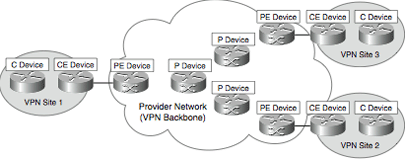
Devices in a VPN
In order to speak properly when we talk about the elements of a VPN, below we try to define a little the devices that take part (or can take part) in a VPN and where they are located.
On the client side:
- Customer (C) devices the C devices are simple, for example routers and switchos inside the client's network. These devices are not connected to the service provider's network. These devices can't tell whether they are inside a VPN or not.
- Customer Edge (CE) devices they are the client's devices that give connectivity to the service provider's network.(via Provider Edge [PE]).
In CE-based VPNs, the CE devices are indeed available to be used with the VPN. If the VPNs are PE-based, the CE devices are not available for the VPN.
In site-to-site VPNs, the service provider's devices can be classified as:
- Service Provider (P) devices the P devices such as routers and switches inside the provider's network that do not connect directly to the client's network.
- Service Provider Edge (PE) devices connected directly to the client's network through the CE devices. In PE-based VPNs these devices are visible from the VPN, in CE-based ones they are not visible.
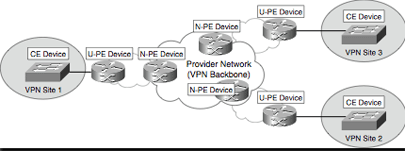
Layer 2 VPNs, such as VPLS, add a level to the hierarchy to be more scalable (VPLS then becomes Hierarchical VPLS [H-VPLS]). In this case, the functionality of the PE devices is split into two parts, U-PE and N-PE.
We must not forget that the U-PE and the N-PE are equivalent to the PE-CLE and the PE-POP, respectively. When we have a layer 2 PE-U device, we can refer to it as an MTU-s.
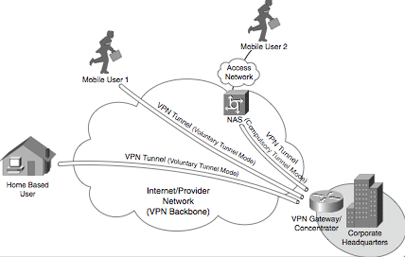
Other devices in a VPN can be the NAS and the VPN concentrators or gateways. A NAS is a device that acts as an interface between the access network (such as PSTN) and the packet switching networks (such as an IP backbone). In a remote VPN access the NAS can work as a tunnel terminator.
Depending on the protocol used to establish a remote access the NAS can be called in different ways Layer Two Forwarding (L2F) Protocol NAS, Layer Two Tunneling Protocol (L2TP) Access Concentrator (LAC), or Point-to-Point Tunneling Protocol (PPTP) Access Concentrator (PAC).
A VPN gateway or concentrator acts as the endpoint of a tunnel (VPN endpoint), especially when we talk about remote accesses or CE-based VPNs (site-to-site).
Depending on the protocol used by these remote accesses the VPN gateway or concentrator can be called, for example, L2F Home Gateway, L2TP Network Server (LNS), or PPTP Network Server (PNS).
Technologies and protocols used in Site-to-Site (or LAN-to-LAN) VPNs
In site-to-site (or LAN-to-LAN) VPNs the client's information travels between CE devices or between PE devices.
- IPsec is a set of protocols designed to protect IP traffic between gateways or hosts. This protocol is normally used to establish VPNs between CEs.
- GRE used to create tunnels and transport multiprotocols between CEs. GRE's security is low or not inherent to the protocol, but if we want we can take advantage of IPSsec to secure the tunnels built on GRE.
- Draft Martini (Any Transport over MPLS--AToM) allows point-to-point protocols to be transported, such as Frame Relay, ATM, Ethernet, Ethernet VLAN (802.1Q), High-Level Data Link Control (HDLC), and PPP traffic over MPLS.
- L2TPv3 allows protocols such as Frame Relay, ATM, Ethernet, Ethernet VLAN, HDLC, and PPP traffic to be transported over IP or other backbone protocols.
- IEEE 802.1Q tunneling (Q-in-Q) allows service providers to transport tagged Ethernet (802.1Q) between client networks through a shared backbone. To do this, all that is done is to add another label on top of the one added by the client network's 802.1Q, this time the 802.1Q label is the provider network's.
- MPLS LSPs (Label Switch Routers) packets are switched according to the label added to the packet. LSPs can receive signals from TDP, LDP, or RSVP.
Technologies and protocols used in remote accesses
- The Layer Two Forwarding (L2F) Protocol is proprietary to Cisco. It was basically designed to create PPP (or SLIP) tunnels over links between NAS and VPN gateways in head offices. Remote users connect to the NAS, and the remote user's PPP frames are sent through the tunnel towards the VPN gateway.
- The Point-to-Point Tunneling Protocol (PPTP) was developed by Microsoft, 3com and Ascend Communications. Like L2F, PPTP allows creating tunnels for remote accesses through PPP frames between a NAS and a VPN gateway. PPTP also allows creating tunnels between the remote user and the VPN gateway. PPP encapsulates the packets sent through the PPTP tunnels and often MPPE is used as a protection method.
- The Layer 2 Tunneling Protocol versions 2 and 3 (L2TPv2/L2TPv3) is an IETF standard and combines the best features of L2F and PPPTP. In a remote access environment, L2TP allows sending the client's PPP frames through the NAS against the VPN gateway or tunnel concentrator. L2TP has security as an intrinsic element, often IPSec is used to protect them.
- IPSec allows establishing site-to-site (LAN-to-LAN>) tunnels, remote accesses or mobile users.
- The Secure Sockets Layer (SSL) is a security protocol that was developed by Netscape Communications (SSL v1,v2 and v3). It allows us to create secure remote links for mobile users. Functionally it is very limited, because we don't need a VPN client. We must not forget that TLS is an IETF standard very similar to SSLv3.
In order to enjoy a more powerful set of features you have to install a specific SSL VPN client.
Modelling and Characterising VPNs
A good map so as not to get lost in the world of VPNs:
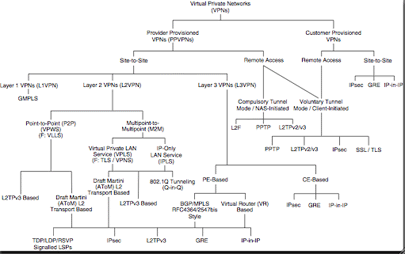
VPNs created by the provider or by the client
Examples of VPNs created by providers:
- Virtual Private Wire Service (VPWS) VPNs
- Virtual Private LAN Service (VPLS) VPNs
- IP-Only Private LAN Service (IPLS) VPNs
- BGP/MPLS (RFC4364/2547bis) VPNs (BGP/MPLS VPNs are also known as MPLS Layer 3 VPNs.)
- Virtual Router (VR)-based VPNs
- IPsec VPNs
Examples of VPNs created on the client:
- GRE VPNs
- IPsec VPNs
- SSL VPNs
Site-to-Site and remote access VPNs
Whether the VPNs are created by the provider or by the client, they can only offer two types of access:
- Site-to-site they offer connectivity between geographically distant networks connecting them as if it were a local network. Basically two types are distinguished, intranet and extranet, depending on whether they connect networks of the same organisation or of different organisations, respectively.
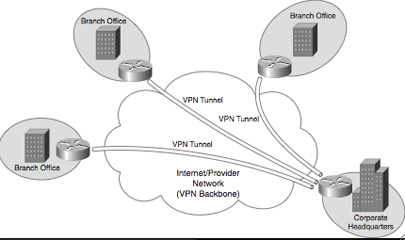
- Remote access also called access VPNs, they allow a mobile or home user to access the organisation's network and access its network resources as if they were physically on the network.
4 comments
Comments from the old blog, as they were written. Comments are closed.
Ernest
A nivell de soft avui casualment he vist un tal Hamachi
Però no puc opinar al respecte
—
[1]
Doncs no coneixia aquest software. Fa temps en vaig provar un que feia VPNs a través d'un applet de java i el servei era de pagament, malgrat tenia una versió de demo. De fet el varem provar el benja i jo durant quasi 1 dia sencer i era un desastre... tan dolent que no val la pena ni buscar el nom que tenia.
Pere Tuset
Hola Oriol,
Em dic Pere. Ja fa temps que segueixo el teu diari (i el del Pof) i aquest article m'hagúes anat molt bé per un treball que vaig haver de fer a l'assignatura d'Administració, Gestió i Seguretat de Sistemes. Llàstima que l'hagis publicat massa tard! I si, jo també estudio Telemàtica allà a Mataró... :)
Bé, només queda dir que els articles d'aquesta pàgina estan molt interessants. Segueix així!
—
Malgrat han publicat la segona part de l'article, no crec que sigui prou interessant com per ampliar el que jo vaig escriure, així per si mai fes falta aquí hi ha l'enllaç:
Compare, design and deploy VPNs--A tutorial--Part II
còpia local