Trick: Linksys WRT54G configuration via tftp
Translation of the original in Catalan. Read it in: CatalàCastellano

This August I 'posted' the new network map of Torrelavit. Well then, as you'll have seen in the diagram the APs have in many cases multiple virtual interfaces and static routes. Since, due to the nature of our small and modest citizens' network, the whole dynamic routing via OSPF thing and other such cool stuff doesn't fit us very well. So we found ourselves in the dilemma of how to put more than one IP on each interface, which the router's web interface doesn't allow. Also, to add static routes without using dynamic addressing such as RIP2 or OSPF the graphical interface doesn't allow us to either.
In order to solve these problems and to centralise the AP configuration system in one point. What we've done is set up a TFTP server on the firewall. With access only from the AP IPs. A good manual to configure atftp on gentoo: Gentoo Linux based Netboot HOWTO (cache) just look at the section: The tftpd Daemon.
One of the interesting things we've done is to use only one configuration file for all the APs, so that this script is clever enough to be able to configure the different particularities of each AP. Later I'll explain how we did it. Before getting into the subject I should also tell you that everything I explain we've only tried with Alchemy. I imagine it can also be done with other firmwares but we haven't tried it.
The first difficulty is how to tell the Linksys that after booting it has to connect to the TFTP server, download the configuration file and run it after downloading it. Also what we didn't want is that the TFTP step could fail and the AP would be left unconfigured waiting for us to reset it again. That is, the TFT has to be repeated until it manages to connect and grab the file. A perfect solution isn't needed either, but one with a minimum of error control.
As you'll know, if we access the Linksys via telnet we can do an nvram show to see the variables that are stored in the NVRAM (non-volatile RAM) where the AP's configuration is really stored. Well then, the variable we're concretely interested in is rc_startup, we can check its value: nvram get rc_startup. Well then, what we want is to place the following code inside the variable:
while sleep 30s;
do
 if ping -c 1 172.25.0.2>/dev/null;
 then
  tftp -g -l /tmp/s.sh -r s.sh 172.25.0.2;
  sh /tmp/s.sh;
  break;
 fi;
done
As you can see, the code does is that every 30s it tries to download the s.sh file via TFTP and saves it in /tmp, then it runs it. This is repeated until the cycle can be completed successfully. Now all that's left is to fix this code inside the rc_startup variable and then save the code in the NVRAM.
We can do it like this:
nvram set rc_startup="while sleep 30s;do if ping -c 1 172.25.0.2>/dev/null;then tftp -g -l /tmp/s.sh -r s.sh 172.25.0.2;sh /tmp/s.sh;break;fi;done"
nvram commit
Now we can focus on the script in question. To make things more complicated, here I'll only explain how we create the interface aliases and the static routes, I won't put any firewalling or MAC filtering option. As I've said, the beauty of the script is that it's the same for all the APs on the network, so the specific parameters of each AP have to be stored somewhere. Well then, to do this we've used a little 'trick'. It's about using the static route definition interface that the web interface has in order to enter all the addresses we're interested in.
This graphical interface is used by the dynamic protocols RIP2 and OSPF to define static routes. If we mark the dynamic routing option as 'disable' then we can add routes to the system configuration that won't be executed due to what I've just said, but they are indeed saved in the configuration. This is what we'll take advantage of to later collect the information and, following the logic below, use it in our script:
The logic is very simple, think that when we want to define the alias of a network interface essentially we only need its IP and its mask. So in the static routes interface we'll only have to define these two data if we want the information to serve to declare the alias.
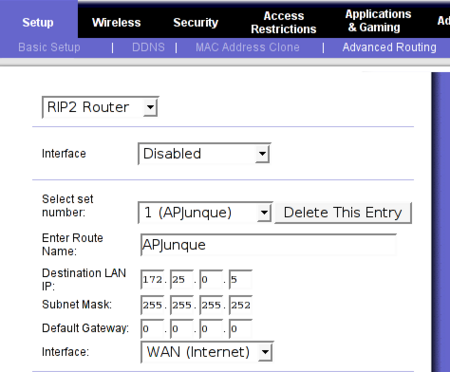
If, on the contrary, what we want to add to the interface is a static route, this will have to use a gateway. That is, a network address, a mask and a gateway, this will be interpreted by the script to define a static route.
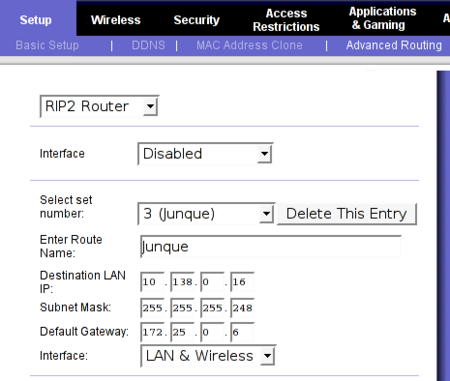
With this little 'trick' we already have an interface that allows us in a very simple way on each AP to store the information that will differentiate it from its neighbours. Then what our s.sh script does is look at the NVRAM variables where they're stored and process this information according to the logic I've mentioned above. Next I'll paste a chunk of the content of s.sh where you can see how this is done.
# Rutes i interficies virtuals
COMPTADOR=0
for AD in `nvram get static_route`;
do
        IP=`echo $AD | cut -f 1 -d ":"`
        MASK=`echo $AD | cut -f 2 -d ":"`
        GW=`echo $AD | cut -f 3 -d ":"`
        IF=`echo $AD | cut -f 4 -d ":"`
        echo $IP $MASK $GW $IF
        # es un enllas punt a punt
        if [ $GW = "0.0.0.0" ];
        then
                # creem les ips virutals de la interficie lan/wlan
                # trafic backbone
                COMPTADOR=`dc $COMPTADOR 1 + p`
                ifconfig br0:$COMPTADOR $IP netmask $MASK
        else
                # afegim rutes cap a trafic d'usuaris
                route add -net $IP netmask $MASK gw $GW
        fi
done
Even if it seems hard to believe, what cost the most in this script was implementing the counter, since Alchemy's shell is very reduced and doesn't allow us to implement counters directly. To do this we found a small package that comes installed on the system called dc, it's similar to bc, the famous CLI-format calculator that linux systems carry, but the syntax is a bit different. So the thing made us sweat for a good while.
The rest of the script has no mystery as you can verify. Obviously it can be greatly improved and many more functions can be integrated, but as an introduction to the idea I think I've already given enough data, otherwise I think I'd complicate it too much. So I hope it's useful to you and if you want more or you have any doubt you know where I am.
2 comments
Comments from the old blog, as they were written. Comments are closed.
elrojo
Collons que guapo que es veu aixó.
Ha de ser molt util, ja veurem com funciona quan ho probem a Vila.
Carita
transsexuels video ^@^ amusement nympho ^@^ sekretar fitta samlag i sangen ^@^ servitris fitta samlag pa kontoret ^@^ koulutytto lesbo toiminta ^@^ kaunotar lehmitytto naida ^@^ ecoliere merde au lit ^@^ sous les jupes porno ^@^ ung holdene i huset ^@^ ryper erotikk i fred ^@^ babe strippen in bed ^@^ lief grietje ^@^ loistava aitikka ^@^ natti bootsit ^@^ plus frais maman quarante ^@^ plus chaude mpeg ^@^ ornella sexy ^@^ nane nude ^@^ maagd groepssex ^@^ bedeesd maagdelijk ^@^