Secure Wi-Fi Network: freeRadius + WRT54G = 802.1x (WPA-radius EAP/TLS)
Translation of the original in Catalan. Read it in: CatalàCastellano
ENGLISH VERSION Secure wi-fi Net : freeRadius + WRT54G = 802.1x (WPA-radius EAP/TLS)

I had to set up a Wi-fi network with a proper level of security, not like the one being set up nowadays with WEP and nonsense. So I set up a FreeRadius server to work with a Linksys WRT54G. Basically the idea was to install HyperWRT on the WRT54G (a tip from the Pof) and then I made it work with WPA-Radius against the FireWall where I installed FreeRadius. This step is not necessary if you don't want to, since the stock firmware of the WRT54G already supports WPA-radius.
Diagram of the network we want to set up, we only need to look at the firewall and the AP part, the rest is assumed and is not important:
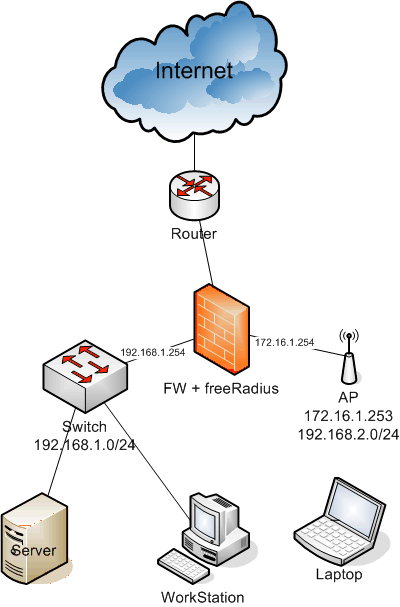
To configure the whole thing the only thing I did was follow the instructions of the 802.1x HOWTO. Anyway I put together a short guide below:
-
We install freeradius on the firewall: emerge freeradius
-
We configure freeradius to work with EAP/TLS
-
We generate the certificates
-
We check that freeRadius works correctly
-
We configure the AP (Linksys WRT54G)
-
We configure the Windows XP clients with SP2
-
We configure the clients with Linux
The configuration files I used in freeRadius are the following:
-
/etc/raddb/radiusd.conf general radius configuration file, we define auth systems and others to use. There are many parts of the file I did not use, I left them as they came. I thank the Pof for letting me look at his files to create mine.
-
/etc/raddb/clients.conf IPs and networks of the systems that can be radius clients, in our case the AP (172.16.1.253).
Despite the power of the Radius, it can do much more than what I used in this case, the documentation and the time to experiment don't allow for much more. But if anyone feels like refining what I did and tells me about it, I will be very grateful.
As for generating the certificates, obviously the idea is that a certification authority issues them, but since that only happens in the 'movies' and in well-funded companies, which I don't think is our case. We will take our OpenSSL and use it to do the whole job. If you don't have it, you know: emerge openssl. Also, since PKI and similar stuff are certainly not our strong point, the best thing is to learn to use the scripts that come with freeRadius and OpenSSL, since with very few changes we will be able to create the certificates we need to work securely with our wi-fi.
As I was saying, we will use the freeRadius and OpenSSL scripts to generate our certificates, so first of all we go to the freeRadius source code and we will see that there is a directory called 'scripts', and inside it we will find: CA.certs, certs.sh and xpextensions. I recommend that you check the paths of the commands contained in the scripts, since at least they didn't work for me because of the paths the scripts used. If you are too lazy to look at the code, I attach a small 'package' with the files I modified: certs.tar.gz these files are modified to work from the very directory where we are, I recommend you create a new empty working directory. Once we have located the files, you must have CA.pl in your PATH, which is a script that comes with perl by default, but which is not usually copied to the PATH, I put it in /usr/bin and after generating the certificates I deleted it. I have also put it in the 'package', in case you don't want to look for it.
Once we have all this in a directory ready to work. You can edit CA.certs and put your data in the variables at the beginning of the file. You don't need to modify anything other than the variables, the rest will happen by itself. Above all don't forget the password you set, since when configuring the server and the clients we will need it.
To generate the certificates now the only thing we have to do is run:
# ./certs.shand the output will be something like this:
Generating DH parameters, 512 bit long safe prime, generator 2
This is going to take a long time
........................+......................................................+...........+................................+..........+.......................+...+...........................................+...............................+............+..............+.................................+.......+..+.................................................+....+....................+.........................................+..+......+................................................+........+.....+...............+...........+.+..................+...........+..................................................+............+......+.+.................+.+.........................+....+................+....+....+.....+.........................+............+......+.+..........................................................+..+...........................................+.........................+.............................+..................................................+...+...++*++*++*++*++*++*
  See the 'certs' directory for the certificates.
  The 'certs' directory should be copied to .../etc/raddb/
  All passwords have been set to 'whatever'
Don't pay attention to the messages, just check that it hasn't given any error. Now you will have a new directory that hangs from the directory where you are, this directory is called certs and inside it has all the certificates you need for the client and the server. I recommend that you put the contents of the ./certs directory in /etc/raddb/certs so you will have to touch very little of the configuration files I passed you.
The most important thing right now is to go over the configuration files I put above and check that the radius server starts without problems, which doesn't always happen the first time. As for radiusd.conf I don't think you will have many problems, you only have to verify that the certificate paths point to the files that have the same name as the files you generated and above all pay attention to the parameter: **private_key_password = **whatever. You need to change the 'whatever' for your password, the one you put in the PASSWORD variable of the CA.certs file. If you don't, when you start the daemon, for example with a radiusd -X, to check if it starts fine, it will ask you for the key you used to symmetrically encrypt the files with the private key, that is, the password we are talking about. If you don't avoid this, when you start the daemon with /etc/init.d/radiusd start it will give an error since it won't be able to use the keys to access your certificates.
If you do these two things right: verify the paths and set the password correctly. What we have to do next is what I already pointed out a few lines above: radiusd -X after running the command a series of logs will come out that will inform us about possible errors and if the process stays waiting and with a line like:
Ready to process requests.A sign that you have done everything right, now you can do a control+c and start the gentoo daemon (/etc/init.d/radiusd start) or else do nothing and configure a client, and so we will see on screen the logs that are generated and we will be able to check whether the thing works or doesn't work. If you want to check the logs while you have the service running and not the interactive mode, you can find the logs in /var/log/radius/ concretely you will find the logs of when the daemon was started in startup.log and the logs of the connections in radius.log. If you want to see interactively what happens to the daemon you can do: tail -f /var/log/raddb/radius.log
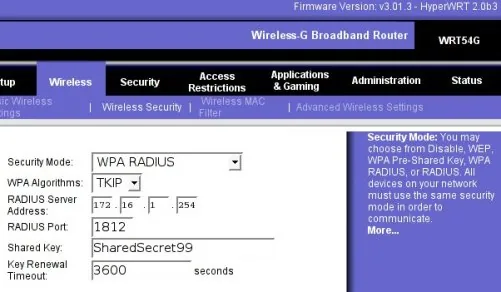
Before moving on to configuring the users we need to configure the AP that will be the client of our Radius service. The configuration is really very simple, you can configure the AP as you like, concretely I configured it as a router between two networks, the users one where the IPs are assigned by DHCP (192.168.2.0/24) and the one it (the AP) calls Internet, 172.16.1.253 according to the diagram. I like to call it the path that will lead to the internet, that is, a cable that goes against the firewall and through which it will communicate with freeRadius. For example, I usually set this firewall leg with the IP 172.16.1.254 and the 'Internet' leg of the WRT54G with the IP 172.16.1.253. Therefore, in the configuration file /etc/raddb/clients.conf this IP must have permissions to make requests to the Radius, for example, like the file I gave you:
client 172.16.1.253/32 {
        secret          = SharedSecret99
        shortname       = localhost
}
Notice that here another password appears, this 'pre-shared key' is used by the WPA-client (WRT54G) and the Radius server (freeRadius) to encrypt their communications. So we will have to give this key to the AP so that it can talk to our Radius server. Below I attach a screenshot of the part of the AP configuration where you have to specify that we will use a Radius server:
To configure a Windows client, the first thing you have to take into account is that the WIFI card you use has a firmware new enough to support WPA with EAP/TLS. If you don't know, try to apply the manual I attach on how to configure a WXP client and if you don't find the options I point out, surely your card doesn't support it. I also warn you that I only know how to configure it with WXP and SP2, so any proprietary software that comes with your wi-fi card, well, no idea how it works, and the rest of the win versions neither, no idea, I haven't been able to try it nor do I feel like doing it.
I have made you a PDF with a bunch of screenshots so that you know how to configure the WXP clients. You have to think that during the document two certificates are installed, root.der and root.p12. These two files are in the /etc/raddb/certs directory, remember that we generated them a while ago. So I recommend you copy them to a pen-drive and don't lose sight of them since we will need them to configure all the clients.
How to install the EAP/TLS clients on Windows XP SP2 in PDF format. This document is based on: HOWTO: EAP//TLS Setup for FreeRADIIUS and Wiindows XP Supplliicant also in PDF format.
As for the configuration of Linux clients, for the moment I haven't been able to try it, since my PCMCIA wi-fi card has a firmware that is too old, in the coming days I hope to be able to configure the internal card of the laptop which I have configured with ndiswrapper or linuxant with the linux drivers, but both systems allow me to use the wap_suplicant which is the software needed to authenticate with WPA/TLS from Linux, when I have that working I'll let you know. Don't worry, I don't plan to work many days in Windows at work, I get nervous seeing how everything crashes.
I attach some references I used to configure the whole thing:
-
8021X-HOWTO - This document describes the software and procedures to set up and use IEEE 802.1X Port-Based Network Access Control using Xsupplicant as Supplicant with FreeRADIUS as a back-end Authentication Server.
-
FreeRADIUS/WinXP Authentication Setup - This post describes how to build a FreeRADIUS server for TLS and PEAP authentication, and how to configure the Windows XP clients (supplicants). The server is configured for a home (or test) network.
-
HOWTO on EAP/TLS authentication between FreeRADIUS and XSupplicant - This document describes how to setup strong cryptographic authentication between XSupplicant and FreeRADIUS. This is accomplished using part of 802.1x authentication for wireless network. In particular it uses EAP/TLS extension, and TLS handshake.
Finally forgive the rambling I have written in this post, I'm sorry I couldn't make it shorter, but I only wish this helps as many people as possible. Thanks for your patience.
14 comments
Comments from the old blog, as they were written. Comments are closed.
—
Molt be mussol, felicitats per el joutú... només un petit detall, està mal l'enllaç al clients.conf, mira de corregir-ho si pots.
Per cert, lo únic que et falta, la configuració del wpa_supplicant es fàcil, això va al fitxer de configuració:
network={

       ssid="example"

       proto=WPA

       key_mgmt=WPA-EAP

       pairwise=TKIP

       group=TKIP

       eap=TLS

       identity="user@example.com"

       ca_cert="/etc/cert/ca.pem"

       client_cert="/etc/cert/user.pem"

       private_key="/etc/cert/user.prv"

       private_key_passwd="password"

}
i aixi llances el client:
wpa_supplicant -B -i<ifname> -c<config file> [-D<driver>]
En el meu cas, ifname és ath0, i driver madwifi... això variarà segons la tarja que tinguem i el driver que fem servir. Amb wpa_supplicant -h veurem amb support per a quins drivers ha estat compilat.
—
Ja he corregit el link de clients.conf, sorry per l'error però quan fots un rollo d'aquests per molt que t'hi fixis sempre et deixes coses. El problema que tinc amb lo del wpa_supplicant és que encara no he provat de configurar la targeta wifi interna del portàtil. Ja que quan ho vaig fer fa molt de temps no me'n vaig sortir, a veure si ara que han sortit unes quantes versions més noves ha millorat el tema.
—
[2] Pues ja ens explicaràs que tal ha evolucionat el ndiswrapper... per cert, al final et vas comprar la versió comercial? Si es així no estaría mal que fessis un review dels teus ;)
—
De moment no m'he comprat ni he provat res per això encara no he fet cap review, però quan ho hagi provat i em funcioni alguna cosa ho comento...
—
[4]
Ja em funciona!!! m'he instal·lat el ndiswrapper, és important pensar que el kernel no ha de suportar 4STACKS ni les USE flags de la gentoo han de tenir el tag 4stacks. Concretament m'he instal·lat la versió 1.0-rc4 i després he copiat els fitxers del driver de windows de la meva: Broadcom Corporation BCM4306 802.11b/g Wireless LAN Controller, concretament el bcmwl5.inf i el bcmwl5.sys a /etc/ndiswrapper i he comprobat amb el:
# ndiswrapper -l
Installed ndis drivers:
bcmwl5 driver present, hardware present
Si no esta carregat el podem carregar amb:
# ndiswrapper -i /etc/ndiswrapper/bcmwl5.inf
Després d'això hem de carregar el mòdul del kernel:
# modprobe ndiswrapper
Podem comprobar al /var/log/messages o amb un dmesg que s'ha carregat bé:
ndiswrapper version 1.0rc4 loaded (preempt=yes,smp=no)
ndiswrapper: driver bcmwl5 (Broadcom,10/28/2003, 3.40.25.3) added
ACPI: PCI interrupt 0000:02:04.0[A] -> GSI 5 (level, low) -> IRQ 5
ndiswrapper: using irq 5
wlan0: ndiswrapper ethernet device 00:90:96:a3:65:ec using driver bcmwl5
wlan0: encryption modes supported: WEP, WPA with TKIP, WPA with AES/CCMP
Ara ja podem comprobar que la targeta wireless s'ha carregat bé:
# iwconfig
lo no wireless extensions.
eth0 no wireless extensions.
wlan0 IEEE 802.11g ESSID:"druvs"
Mode:Managed Frequency:2.442 GHz Access Point: 00:12:17:B8:2E:12
Bit Rate:54 Mb/s Tx-Power:25 dBm
RTS thr:2347 B Fragment thr:2346 B
Encryption key:41ED-EE53-EE7C-84BF-005D-A8F7-C10F-0CE0-9E7D-A17F-A5FD-2ECD-7FF3-6A4C-4E73-BDC5
Power Management:off
Link Quality:95/100 Signal level:-54 dBm Noise level:-256 dBm
Rx invalid nwid:0 Rx invalid crypt:0 Rx invalid frag:0
Tx excessive retries:1609 Invalid misc:6740 Missed beacon:0
i podem configurar el wpa_supplicant tal i com indica el pof, concretament la comanda per llençar el wpa_supplicant que he usat és aquesta:
wpa_supplicant -B -iwlan0 -c/etc/wpa_supplicant.conf -Dndiswrapper
i si voleu comprobar si funciona correctament la negociació dels certificats:
wpa_supplicant -dd -iwlan0 -c/etc/wpa_supplicant.conf -Dndiswrapper
Ara he de marxar, corrent a japonès que vaig tard però espero tenir temps els propers dies per donar més detalls de tot això a l'article.
fibercool
Interesante post, tengo el mismo router :) Que programa has usado para dibujar el diagrama de red?
—
He usado el Viso 2003
—
He trobat una web d'un francès que parla d'aquest article, lo ben parti del seu post és que explica com configurar un client d'WPA en MacOSX que l'altre dia ho havia de fer i no sabia com es feia, aquí teniu la solució:
How to get freeradius, WRT54G and a OS X client working with WPA Enterprise
Albert_Angles
Hola Oriol:
Espero que t'enrecordis de mi. Soc l'Albert de la EUPMT i ara estic a NEWI fent
el projecte final de carrera del qual es tracta del seguent:
Seguretat de les xarxes wireless: metodes d'autenticacio i tecniques
d'encriptacio.
He dissenyat una xarxa en la que tin una xarxa Wifi i EL AP esta conectat amb
un router i aquest a traves de una VPN esta conectat a un altre router el qual
es gateway d'un servidor WEB. Es a dir es algu aixi : WLAN-VPN-LANB on a LANB
tinc el servidor Web. Vull autenticar utilitzant un portal captiu a tots els
usuaris que vulguin sortir de la WLAN i vulguin visitar el servidor Web que hi
ha a LANB. Vull que tots s'autentiquin abans de sortir de la WLAN.
M;he estat informant i pel que se, i jo vull tinc varies maneres:
- Usar portal captiu+ servidor freeRADIUS (em falta alguna cosa mes?)?
Pero tot i aixo tinc dubtes, jo el que vull evidentment es que l'encriptacio
entre el AP i els usuaris sigui WPA per exemple (podria ser WEP tambe??) i per
altra banda, quan els usuaris de la WLAN obrin el seu navegador i vagin al
servidor web de la LANB, doncs se'ls aparegui una plana web preguntant per el
login i el password. (vaja un portal captiu). Utilitzare com a AP el meu
linksys WRT54G.
- Puc instalar freeRADIUS+ portal captiu Chillispot en el meu linksys WRT54G?
- un portal captiu per defecte implementa un servidor Web apache?
- Vaja un dels sistemes famosos d'encripotacio es 802.1X/EAP. Client-NAS-
Servidor d'autenticacio.
- En algunes planes web m'he inormat del NoCatAuth pero tinc el dubte de:
Aquest implementa portal captiu+apache+servidor d'autenticacio. en altres
paraules si al meu AP instalo NoCatAuth, no caldre que instali freeRADIUS?
- Altre de les coses que volia dir-te es que en el meu projecte una vegada
tingui la xarxa dissenyada i tot i funcioni, es tracta de buscar i explotar
vulnerabilitas, ja sigui en la VPN, en el freeRADIUS, en el NoCatAuth, es a dir
provocar atacs, explotar vulnerabilitats. T'envio l'esquema de la xarxa.
- Tinc un portatil i un AP i Internet. Amb aixo puc provar de instalar un portal
captiu (per exemple chillispot o NoCatauth) amb servidor d'autenticacio ( i el que falti) en el
AP Linksys WRT54G?
Gracies per respondre'm Oriol, molt amable
cordialment
albert angles
Sisplau, les respostes envime-les al email: sotrik15hotmail.com , gracies
—
quin tio més pesat!
ALBERT: STFW
Ivo Sandoval
Po zi!
jajaja...
nhoa
Tinc problemes es aquesta linia de wifi angles local que tinc que fer?
a vegades em surt el recuadre de conexio demanant el nick i la contransenya, pero de vegades no em surt i tinc que restaurar el windows xp.
com puc solucionar-lo?
—
[12] nano, ho sento... però o t'expliques millor o no tinc ni idea de què m'estàs parlant.
knopppix
[12] hola nhoa
ets d'angles (el poble)si 0 n0?
es normal que et falli la auntentificació ja que la xarxa d'Angles falla sovint.
potser per diferentes causes
1ª el teu punt d'acces falla apagal i torna començar
2ª el servidor de la xarxa falla truca a l'ajuntament
3ª el teu pc esta ple de espias i virus??
be nhoa soc en Jordi espero que llegueixis aixo!!