Servidor Ubuntu com a AP wifi i Mikrotik com a servidor DHCP
Traducció de l’original en anglès. Llegeix-lo en: CastellanoEnglish
És important tenir molt clar l'escenari que configurarem en aquest cas, perquè és una mica particular. Aquesta és una evolució de l'entrada anterior: Servidor Ubuntu com a AP wifi i Mikrotik com a servidor DHCP
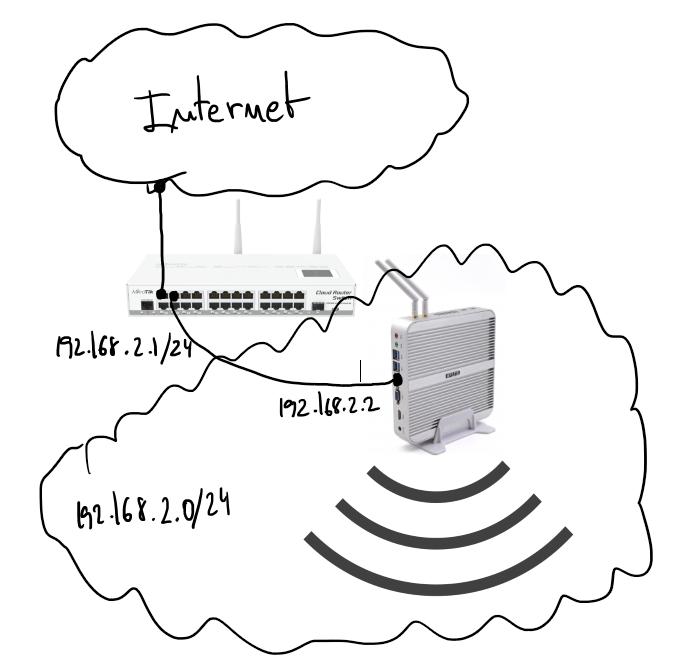
Hi ha un servidor amb Ubuntu 16.04 que ofereix servei wifi com a AP. La interfície wifi està en mode bridge amb el port ethernet i envia tot el trànsit a la passarel·la Mikrotik, on hi ha un servidor DHCP que s'encarrega de donar adreça IP als clients wifi.
Comencem configurant el bridge al servidor Ubuntu. Fitxer "/etc/network/interfaces":
source /etc/network/interfaces.d/*

auto lo br0
iface lo inet loopback

#ethernet interface
allow-hotplug enp2s0
iface enp2s0 inet manual

#wifi interface
allow-hotplug wlp3s0
iface wlp3s0 inet manual

# Setup bridge
iface br0 inet static
    bridge_ports enp2s0
    address 192.168.2.2
    netmask 255.255.255.0
    network 192.168.2.0
Pareu atenció a "bridge_ports": la interfície wifi no s'afegeix a la llista, i això és perquè fins que el hostapd no està en marxa no té sentit fer-ho. Veureu l'opció "bridge=br0" a hostapd.conf, que arreglarà aquest mal comportament.
Configuració de l'AP wifi, "/etc/default/hostapd":
DAEMON_CONF="/etc/hostapd/hostapd.conf"i "/etc/hostapd/hostapd.conf":
bridge=br0                # bridge interface
interface=wlp3s0          # wifi interface name
driver=nl80211
ssid=the_ssid_name        # name of your network
hw_mode=g
channel=1
macaddr_acl=0
auth_algs=1
ignore_broadcast_ssid=0
wpa=3
wpa_passphrase=the_secret_key   # secret key to joing with the wifi network
wpa_key_mgmt=WPA-PSK
wpa_pairwise=TKIP
rsn_pairwise=CCMP
logger_syslog=-1
logger_syslog_level=3
logger_stdout=-1
logger_stdout_level=1
Configuració del servidor DHCP al Mikrotik:
# setting the interface address, in my case ether4
/ip address
add address=192.168.2.1/24 interface=ether4 network=192.168.2.0

# setting up DHCP on interface 4 of the mikrotik device
/ip dhcp-server
add address-pool=dhcp-pool disabled=no interface=ether4 name=dhcp-pool

# network of the DHCP server
/ip dhcp-server network
add address=192.168.2.1.0/24 dns-server=8.8.8.8 domain=your_network.local gateway=192.168.2.1 netmask=24

# IP pool used by the DHCP server
/ip pool
add name=dhcp-pool ranges=192.168.2.65-192.168.2.70