
Quería montar una red wifi segura de un nivel alto, no como se hace ahora con WEP y otras tonterías. Así que instalé un servidor FreeRadius para trabajar con un Linksys WRT54G. La idea básica es instalar un HyperWRT en el WRT54G (consejo del Pof). Después lo configuro como WPA-Radius hacia el firewall donde instalé Freeradius. Este último paso es opcional porque el firmware estándar del WRT54G soporta WPA-Radius.
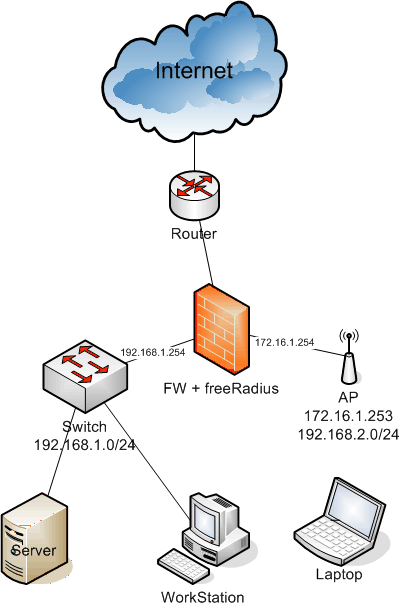
Esquema de la red; fijaos en el firewall y el AP, el resto no es importante:
Para configurarlo todo solo he seguido las instrucciones del 802.1x HOWTO. De todos modos os he hecho una pequeña guía:
-
Instalar Freeradius en el firewall: emerge freeradius
-
Configurar Freeradius para trabajar con EAP/TLS
-
Generar los certificados
-
Comprobar que el freeradius funciona correctamente
-
Configurar el AP (Linksys WRT54G)
-
Configurar los clientes con Windows XP con SP2
-
Configurar los clientes Linux
Los ficheros de configuración que he usado para el freeradius son estos:
-
/etc/raddb/radiusd.conf: Fichero de configuración general de Radius, debemos definir los sistemas de autenticación y otras cosas que queremos usar. Hay muchas partes que no he utilizado, así que las he dejado tal como venían. Quiero agradecer al Pof que me dejara sus ficheros de configuración para poder configurar los míos.
-
/etc/raddb/clients.conf: IPs y sistemas de red que pueden ser clientes radius; en nuestro caso el AP (172.16.1.253).
A pesar del poder del radius, la documentación y la falta de tiempo para experimentar os dejo esto, pero si alguien lo puede hacer mejor me gustaría saberlo.
Para la generación de los certificados la idea es hacerlos a partir de una entidad certificada, pero eso solo pasa en las películas y en las grandes empresas. Cojamos OpenSSL y hagamos nuestro trabajo. Si aún no lo tienes, ya lo sabes: emerge openssl. Está claro que no somos buenos en PKI y otras cosas parecidas, así que es mejor aprender con los scripts de freeradius y openssl, porque con algunas modificaciones podemos crear certificados para trabajar con nuestras redes wifi seguras.
Como os decía, vamos a usar los scripts de freeradius y openssl para generar los certificados, así que antes de nada vamos a la carpeta del freeradius donde hay una carpeta llamada "scripts" con: CA.certs, certs.sh y xpextensions. Os recomiendo revisar el orden de las ubicaciones dentro de los scripts porque yo tuve problemas con eso. Si os da pereza mirar los ficheros, podéis comprobar los míos en este pequeño paquete: certs.tar.gz, estos ficheros están modificados para trabajar desde la misma carpeta en la que estamos trabajando, os recomiendo crear una carpeta nueva y vacía. Una vez identificados los ficheros, debemos tener en la PATH el script CA.pl, que es un script de perl, pero no siempre se copia a la PATH, así que lo copié a /usr/bin y lo borré después de generar los certificados. También he incluido el fichero en el paquete, si os da pereza...
Una vez tengamos todas las cosas en una carpeta listas para trabajar podemos editar CA.certs para incluir nuestra información en las variables del inicio del fichero. No hace falta cambiar más variables, se hace automáticamente. No olvidéis la contraseña porque la necesitaremos cuando configuremos el servidor y los clientes.
Para generar los certificados solo hay que hacer:
# ./certs.shy la salida será algo como esto:
Generating DH parameters, 512 bit long safe prime, generator 2<br>This is going to take a long time<br>........................+......................................................+...........+................................+..........+.......................+...+...........................................+...............................+............+..............+.................................+.......+..+.................................................+....+....................+.........................................+..+......+................................................+........+.....+...............+...........+.+..................+...........+..................................................+............+......+.+.................+.+.........................+....+................+....+....+.....+.........................+............+......+.+..........................................................+..+...........................................+.........................+.............................+..................................................+...+...++*++*++*++*++*++*<br> See the 'certs' directory for the certificates.<br> The 'certs' directory should be copied to .../etc/raddb/<br> All passwords have been set to 'whatever'No os preocupéis por los mensajes, solo por si ocurre algún error. Ahora tendréis una carpeta nueva dentro de la carpeta en la que estáis, llamada certs, y dentro encontraréis todos los certificados para el servidor y para el cliente. Os recomiendo copiar el contenido de ./certs a /etc/raddb/certs, así no tendréis que cambiar los ficheros de configuración que os doy.
Lo más importante ahora es comprobar primero los ficheros de configuración que os he dado y comprobar que el servidor radius arranca sin problemas, cosa que desgraciadamente nunca pasa. Sobre el radiusd.conf no creo que tengáis muchos problemas, solo comprobad que las rutas hacia los certificados son las correctas que acabáis de crear. Comprobad también el parámetro: **private_key_password = **whatever. Cambiad 'whatever' por vuestra contraseña, la que habéis usado en la variable PASSWORD dentro del fichero CA.certs. Si no lo hacéis, cuando arranquéis el demonio con radiusd -X os pedirá una clave que se utiliza para cifrar simétricamente los ficheros con una clave privada, que es la contraseña de la que hablo. Si no lo hacéis, cuando hagáis /etc/init.d/radiusd start tendréis un error porque el servidor no podrá usar las claves para acceder a los certificados.
Solo hay que hacer: radiusd -X y si obtenéis la siguiente salida:
Ready to process requests.todo funciona bien. Solo hay que hacer CTRL+C y arrancar el demonio de Gentoo (/etc/init.d/radiusd start) o dejarlo tal como está en un terminal cliente, así podéis ver los registros que se generan para comprobar si todo funciona bien. Si queréis comprobar los registros del historial mientras el demonio está encendido, los encontraréis en /var/log/radius/. Los registros del arranque del demonio están en startup.log y los de las conexiones en radius.log. Para ver el registro en tiempo real solo hay que hacer: tail -f /var/log/raddb/radius.log
Antes de configurar los usuarios tenéis que configurar el AP como cliente radius. Podéis configurar el AP como queráis, pero yo lo configuré como router entre dos redes; la red de los usuarios con DHCP (192.168.2.0/24) y la llamada Internet por el AP (172.16.1.253). Me gusta configurar así la red; un cable que va al firewall donde se puede comunicar con el freeRadius. Por ejemplo; la interfaz del firewall con IP 172.16.1.254 y la interfaz 'Internet' del WRT54G con IP 172.16.1.253. Después tenéis que aseguraros de que la IP está permitida para trabajar con radius editando el fichero /etc/raddb/clients.conf como en el ejemplo siguiente:
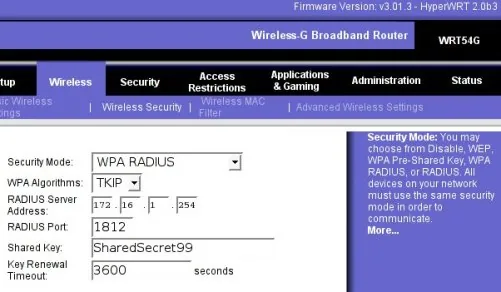
client 172.16.1.253/32 {<br> secret = SharedSecret99<br> shortname = localhost<br>}Ved que aquí aparece otra contraseña, esta 'pre-shared key' la utilizan el cliente WPA (WRT54G) y el servidor radius (freeRadius) para cifrar sus comunicaciones. Después tenéis que aseguraros de que esta clave está puesta en la configuración del AP. Aquí os adjunto una captura de pantalla de cómo debe ser la configuración de seguridad wireless del AP para trabajar con el servidor radius:
Para la configuración del cliente Windows, antes de nada tenéis que comprobar si la tarjeta de red wifi tiene el firmware correcto para trabajar con WPA con EAP/TLS. Si no lo sabéis, usad el manual siguiente de cómo configurar un WXP y si no encontráis las opciones que os muestro es que vuestra tarjeta no es válida. Solo lo he probado en un WXP SP2; para todo lo demás, no lo sé.
He hecho un fichero PDF con muchas capturas de pantalla para configurar fácilmente el cliente WXP. Tenéis que instalar dos ficheros de certificado; root.der y root.p12. Deberíais haberlos creado antes y los podéis encontrar en /etc/raddb/certs. Os recomiendo copiar estos ficheros en un pendrive y usarlo para todos los clientes.
Cómo instalar los clientes EAP/TLS con Windows XP SP2 en formato PDF. Este documento está basado en: HOWTO: configuración de EAP//TLS para FreeRADIIUS y Wiindows XP Supplliicant también en formato PDF.
Sobre la configuración de Linux; todavía no lo he probado porque el firmware de mi tarjeta wifi PCMCIA es antiguo. Pero voy a probar la tarjeta integrada en mi portátil que funciona con los drivers Linux ndiswrapper o linuxant, ambos preparados para usar wap_suplicant, necesario para la autenticación WPA/TLS en una máquina Linux. Cuando llegue a ese punto no os preocupéis, os lo contaré. No tengo ganas de trabajar mucho con Windows, me pongo nervioso en el trabajo viendo ese caos.
Os adjunto algunas referencias que he usado y que me ayudaron:
-
8021X-HOWTO - Este documento describe el software y los procedimientos para configurar y utilizar el control de acceso a la red basado en puertos IEEE 802.1X usando Xsupplicant como suplicante y FreeRADIUS como servidor de autenticación de backend.
-
Configuración de la autenticación FreeRADIUS/WinXP - Este apunte describe cómo construir un servidor FreeRADIUS para la autenticación TLS y PEAP, y cómo configurar los clientes (suplicantes) de Windows XP. El servidor está configurado para una red doméstica (o de pruebas).
-
HOWTO sobre la autenticación EAP/TLS entre FreeRADIUS y XSupplicant - Este documento describe cómo configurar una autenticación criptográfica fuerte entre XSupplicant y FreeRADIUS. Esto se consigue utilizando parte de la autenticación 802.1x para red inalámbrica. En particular usa la extensión EAP/TLS y el handshake TLS.
Pretendo que esto ayude a tanta gente como sea posible. Gracias por vuestra paciencia.
39 comentarios
Los comentarios del blog antiguo, tal como se escribieron. Los comentarios están cerrados.
Otto Kucera
hi!
your manunal helped me a lot. it tryed to read your sample configs but the links does not work. could you send the sample config per email? my adress: ok@geeks.at
regards,
otto
—
Please try it, now.
Thank you.
satrio
i tried to download your certicficate...but its not valid...do you have the latest?
satrio
i would like to ask you a couples of questions:
1. in your client.conf your secret key is SharedSecret99 but in your radiusd.conf your private_key_password is whatever, is it ok to have different?
2. what is this mean "ippool main_pool {
range-start = 192.168.1.4
range-stop = 192.168.1.254
netmask = 255.255.255.0
cache-size = 800
session-db = ${raddbdir}/db.ippool
ip-index = ${raddbdir}/db.ipindex
override = no"?
3. is your radius connected to database to store the user and password list?
im sorry to ask you a lot of questions, its just im doing my thesis to build a radius server and the access point is wrt54g also...but it doesnt work, and my deadline is coming up.will you help me?
satrio
ad_recv: Access-Request packet from host 192.168.1.1:2061, id=0, length=166
User-Name = "linksys"
NAS-IP-Address = 192.168.1.1
Called-Station-Id = "0014bf04a514"
Calling-Station-Id = "000e3574ca4d"
NAS-Identifier = "0014bf04a514"
NAS-Port = 51
Framed-MTU = 1400
State = 0xb23b333336fba1b91206537df02cd417
NAS-Port-Type = Wireless-802.11
EAP-Message = 0x020300210d8000000017150301001208f9e73fcdfba3b0ed5dd3c41101dd967eb1
Message-Authenticator = 0xc0f6b9b2c301f8a7f362abe41fad9227
Processing the authorize section of radiusd.conf
modcall: entering group authorize for request 27
modcall[authorize]: module "preprocess" returns ok for request 27
rlm_eap: EAP packet type response id 3 length 33
rlm_eap: No EAP Start, assuming it's an on-going EAP conversation
modcall[authorize]: module "eap" returns updated for request 27
rlm_realm: No '/' in User-Name = "linksys", looking up realm NULL
rlm_realm: No such realm "NULL"
modcall[authorize]: module "realmslash" returns noop for request 27
rlm_realm: No '@' in User-Name = "linksys", looking up realm NULL
rlm_realm: No such realm "NULL"
modcall[authorize]: module "suffix" returns noop for request 27
users: Matched entry DEFAULT at line 96
modcall[authorize]: module "files" returns ok for request 27
modcall: group authorize returns updated for request 27
rad_check_password: Found Auth-Type EAP
auth: type "EAP"
Processing the authenticate section of radiusd.conf
modcall: entering group authenticate for request 27
rlm_eap: Request found, released from the list
rlm_eap: EAP/tls
rlm_eap: processing type tls
rlm_eap_tls: Authenticate
rlm_eap_tls: processing TLS
rlm_eap_tls: Length Included
eaptls_verify returned 11
eaptls_process returned 7
rlm_eap_tls: Received unexpected tunneled data after successful handshake.
rlm_eap: Handler failed in EAP/tls
rlm_eap: Failed in EAP select
modcall[authenticate]: module "eap" returns invalid for request 27
modcall: group authenticate returns invalid for request 27
auth: Failed to validate the user.
Delaying request 27 for 1 seconds
Finished request 27
Going to the next request
Waking up in 6 seconds...
--- Walking the entire request list ---
Sending Access-Reject of id 0 to 192.168.1.1:2061
EAP-Message = 0x04030004
Message-Authenticator = 0x00000000000000000000000000000000
Cleaning up request 27 ID 0 with timestamp 43dc0fa0
satrio
i still cannot login from my laptop..i followed your steps...
thats the message on the server, do you know why?
if you dont mind, would you sent me your whole conf file? just the raddb folder would be help me a lot...
thx man
—
[3] my certificate is out of date from 25th of January. If you wanna another certificate please make your own like is indicated in this post. If you have any problem in the process may be I can help you.
—
[4]
1. isn't the same password, whatever is a symetric password to access to certificate. SharedSecret99 is the password to establish a secure path over local network to connect my AP to my RADIUS server.
2. if you look in default configuration file (radiusd.conf) you can see this information about this part of config file:
# Do server side ip pool management. Should be added in post-auth and
# accounting sections.
#
# The module also requires the existance of the Pool-Name
# attribute. That way the administrator can add the Pool-Name
# attribute in the user profiles and use different pools
# for different users. The Pool-Name attribute is a *check* item not
# a reply item.
3. my passwords are stored in plain text file (/etc/raddb/users)
—
[6] my /etc/raddb folder is by default except my radiusd.conf and clients.conf, that files are attached in this post.
Maybe you have a problem with you radius version I only tried my configuration with this version:
radiusd -v
radiusd: FreeRADIUS Version 1.0.5, for host , built on Oct 1 2005 at 18:22:05
Copyright (C) 2000-2003 The FreeRADIUS server project.
There is NO warranty; not even for MERCHANTABILITY or FITNESS FOR A
PARTICULAR PURPOSE.
You may redistribute copies of FreeRADIUS under the terms of the
GNU General Public License.
For more information about these matters, see the file named COPYRIGHT.
If you install this version of radius and re-generate your certificates. It works sure then the problem only can be your firmware in AP or your client configuration.
satrio
im sorry to message you this much, coz i really2 need help.
after you saw my log, you probably notice this:
rlm_eap_tls: Received unexpected tunneled data after successful handshake.
rlm_eap: Handler failed in EAP/tls
rlm_eap: Failed in EAP select
do you know what and why is that?
do want me to show you my radiusd.conf, users.conf, clients.conf, eap.conf files?
my radius version is 1.02..is that ok?
—
I'm looking for your error message in goolge and I found this (solution) Received unexpected tunneled data after successful handshake. As I said before you have a problem with your certificates.
Your radius version is older than mine, I don't know if your version has any important diferent working with certificates. Maybe upgrade your version to 1.0.5 is a good idea.
IMHO you have not to modify your config files only upgrade version of radius and try it, then if it doesn't work regenerate your certificates like my post or like EAPTLS.pdf document.
Good luck
Satrio
many times i tried to generate my certificate but its always not valid. the message was digital signature is not valid and the last time i tried the certificate is not valid.
do you have any idea what is wrong?
Satrio
should i download and install the hyperWRT?
—
what is your firmware? as you can see in the post my firmware is hyperWRT 2.0b3
Satrio
thx to you, now my radius is working.but when my laptop trying to connect, the radius didnt ask about username and password. the radius only check the certificate. how to make login window pop up on my laptop...and the radius will check if it is a correct login and password or not?
—
[15] My auth system works as you say, but if you want an user authentication you need to modify a little your radiusd.conf file. If you want you can try to use EAP/TTLS insted of EAP/TLS it supports users authentication, accounting and anything else.
Now I don't remember all you need to do user authentication because I configure it for 1 year ago. And I don't have this details now. But if you get this please send me this information to extend my post.
Satrio
hello...my radius is running perfectly...but the radwho is empty....any idea why?
Carita
milieu etrange http://www.milieu-etrange.0chattes.com [URL=http://www.milieu-etrange.0chattes.com]milieu etrange[/URL]
marcelo
Hi people i´m from chile your how to was great I spent lot of time trying to find a good how to. sorry about english bye
zmkgpqfx
[URL=http://yooukenv.com]zbcofxmj[/URL] huvfptce jfhaclmt http://ivzuzguk.com omzgooaf eggkhbwj
Yusri
Hi,
My questions.
1) Why do you need to upgrade the firmware in the AP? Can you just use an unupgrade AP?
2) How can i make the radius accepts certificate and mac address for authentication?
—
[21]
1) It's not necessary upgrade the firmware. I upgrade it for other reasons, like access to AP via telnet or SSH.
2) IMHO it's not possible to authenticate the AP with Radius via Certificate and MAC.
Yusri
I follow your guide but i got an error in WXP (system event viewer).
"The certificate received from the remote server was issued by an untrusted certificate authority. Because of this, none of the data contained in the certificate can be validated. The SSL connection request has failed. The attached data contains the server certificate."
My radius keep sending a access-challenge.
What exactly i miss? Is it problem with the certificate? I use freeradius in Fedora core 9.
How can i solve this problem?
—
[23]
Are you installed root certificate of certificate authority?
Yusri
Yes, exactly what u wrote in this step.
I tried to find someones tutorial and i found that somes use root.der and cert-clt.p12. But you use root.de and root.p12 in WXP.
So, whats the different? Does it effect my authetication session?
—
[25]
It's the same root.der is the root certificate of Certificate authorithy and root.p12 is a client certificate. You can see my cookbook for EAP-TTLS maybe it can help you: cookbook eap-ttls
Yusri
Suddenly, i successfully configure radius to accept WAP+EAP TLS authentication. I dont know how. Just followed your steps you gave.
The problem now is, the authentication only depend on EAP. How can i make a control access for the users that listed in users file and SQL? I failed to do this.
—
[27]
If you want authenticate user you need TTLS no TLS. You can see this: Securing wi-fi net with EAP/TTLS it is a wiki entry but If you need help you can ask me all you want because I write this cookbook.
Yusri
My next problem, if you dont mind.
User authentication is a success. But any invalid authentication, freeradius still accept. How can i reject invalid or unauthorize user. I tried both on file and sql, but failed. Help me. Hope this is the last. :)
—
[29]
What is your WPA supplicant client? IMHO this a problem of a WPA supplicant it is not a problem of server. You can trace authorization via log file.
Yusri
I think my problem is the same with Satrio (above). Its only checked certificate. It checked username but wether its valid or not, the system still aceept it because of the certificate. Im using XP supplicant SP1 with wifi patch.
—
[31]
You need third party supplicant XP doesn't support TTLS itself. Your problem is that only is only working your TLS part not TTLS. You doesn't request your PAP or CHAP auth because Windows doesn't require it.
Yusri
GREAT! It is a success. I used SecureW2. Works fine.
1 more thing, i also like to validate the mac address along with username, so how can i write ni "users" and "sql"?
—
[33]
I don't know how can you validate MAC address too. I never do that.
Yusri
Oriol, meet u again.
I successfully configure radius for EAP/TTLS. What i did was using SecureW2 as a supplicant. I set it to authenticate the username and validate the MAC address.
I tried to make security testing. I removed the certificate in the client (XP) and made the wifi connection again. The connection was a success.
In theory, the wifi connection also involve certificate to authenticate. So, without certificate, authentication will fail. Am i right? It seem like my client dont need any certificate. What to make radius server reject client that not has certificate?
—
[35]
I don't know what is your problem, because I don't use windows. In my linux boxes when I remove client certificate it doesn't work. May be you have a mistake in your radiusd.conf file...
Jordan
Is it possible to include in freeradius configuration checking mac adress (not in WRT54)?
—
[37]
May be, but I never find it.
sdsd
[url=http://blog.ccidnet.com/blog-htm-do-showone-uid-71719-type-blog-itemid-246811.html...]Çå³ýÍøÉϸºÃæÐÅÏ¢[/url]
[url=http://blog.19lou.com/10698179/action-viewpro...]Çå³ýÍøÉϸºÃæÐÅÏ¢[/url]