Hello, oriolrius.blog
Test post: how the new blog works, and everything a post can show.
Translation of the original in Catalan. Read it in: CatalàCastellano
This is the first post on oriolrius.blog. It is a test, but a test with real text: it explains how the new blog works, and on the way it shows every element a post can use.
The architecture in one picture
The blog started on 31 July 2000. For 25 years it lived in a WordPress. Now the text of each post is a Markdown file in a Git repository, and the website is static. The binary files live somewhere else.
Text in Git, binaries in RustFS
Git is good with text and bad with photos. So each type of file goes to its own place:
| What | Where it lives | Who sees it | Example |
|---|---|---|---|
| Post text | Git, content/posts/ |
Everyone (static site) | ca.md, es.md, en.md |
| List of binaries | Git, media.yaml |
Only the build | keys and sizes |
| Originals (with EXIF and GPS) | RustFS, private bucket | Nobody | foto-hacker.21ee6a29.jpg |
| Web versions | RustFS, public bucket | Everyone | ….w960.webp |
Publishing a post step by step
The same stack, with icons
Diagrams can use the PlantUML icon libraries: technology logos, Font Awesome, AWS, Azure, Kubernetes, C4 and more. They all come with the PlantUML server, so they work with no Internet connection.
And the C4 model tells the same story from the reader's side:
Where the images live
Photos, audio and video do not go into Git. When I publish a post, the blogmedia tool does this:
- It uploads the original to a private bucket. The original keeps the EXIF data and the GPS position, and it never goes to the Internet.
- It makes four WebP versions with no metadata, and uploads them to the public bucket.
- It writes
media.yamlnext to the text, and deletes the binary file from the folder.
The Markdown still says ./foto-hacker.jpg. The website reads media.yaml and puts in the address of the file server, with all the sizes. The browser picks the size it needs.
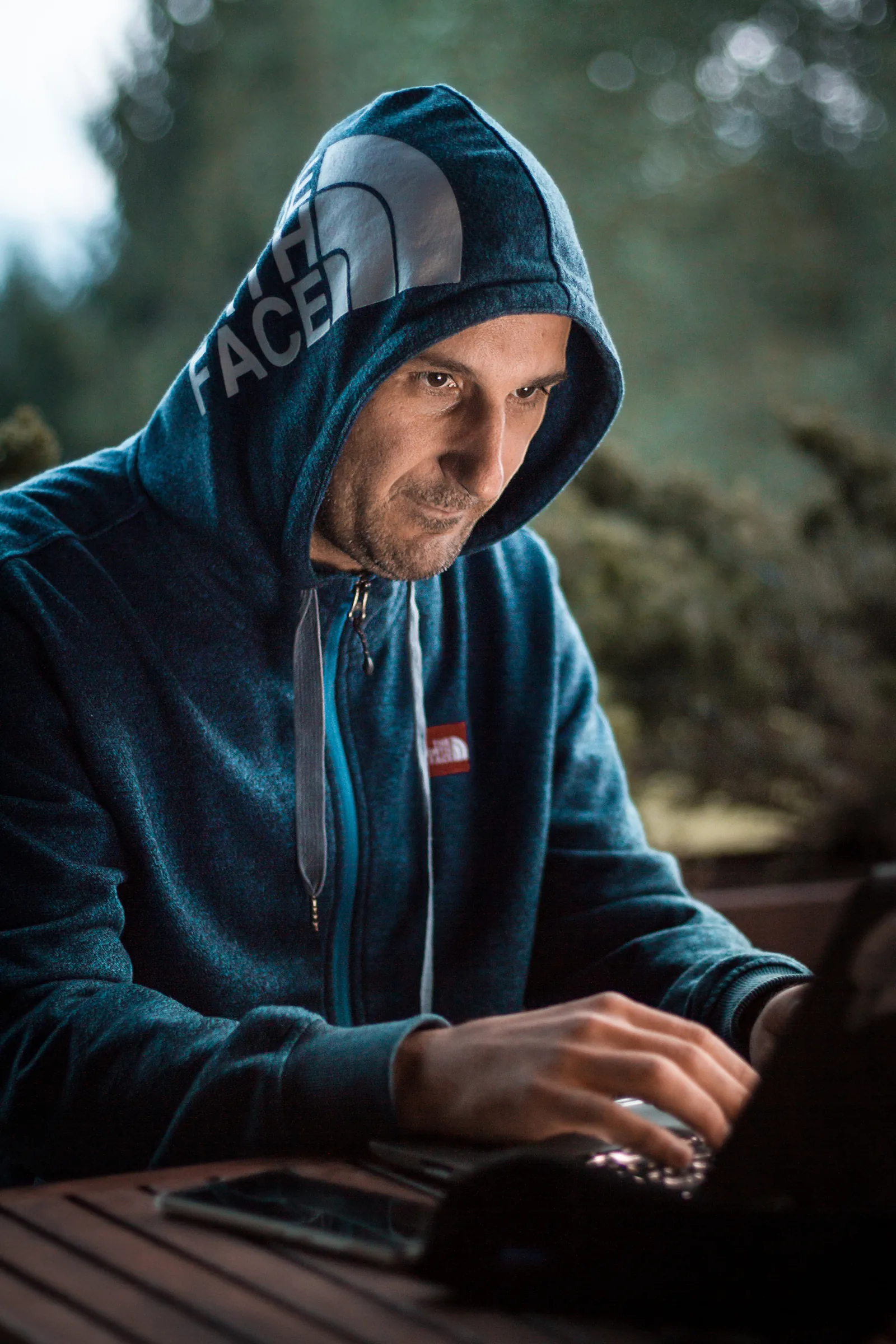
Image sizes
These are the real sizes of the photo above. The original is 14 MB; a phone browser downloads 32 kB.
| Version | Width | Height | Size | Typical use |
|---|---|---|---|---|
| Original (private) | 3,456 px | 5,184 px | 14.0 MB | none: it stays here |
w480 |
480 px | 720 px | 31.8 kB | phone |
w960 |
960 px | 1,440 px | 103.7 kB | laptop |
w1600 |
1,600 px | 2,400 px | 305.1 kB | large screen |
w2400 |
2,400 px | 3,600 px | 842.0 kB | retina screen |
Why WebP
WebP takes much less space than the original JPEG1, and all current browsers read it. The metadata does not go through: the GPS position of the photo stays only in the private original.
The code
The whole workflow fits in three commands. To copy them, use the button of each block, or select the text and press Ctrl + C.
just media-up                                         # local RustFS and PlantUML
just media-publish content/posts/2026/11/16/hola-oriolrius-blog
just dev                                              # http://localhost:18573
The media.yaml file it writes is text, so Git can compare it between versions:
foto-hacker.jpg:
  sha256: 21ee6a29bb52cfdec438eab1d6303add5f721e8ab9a3ef8e21ddfdc646def10e
  bytes: 14016841
  original: posts/2026/11/16/hola-oriolrius-blog/foto-hacker.21ee6a29.jpg
  variants:
  - {width: 480, key: posts/2026/11/16/hola-oriolrius-blog/foto-hacker.21ee6a29.w480.webp}
And this is the line of Python that sets the name of each file in the bucket:
tag = sha[:8]                                   # 8 hex characters of the SHA-256
key = f"{prefix}/{stem}.{tag}.w{v.width}.webp"  # the name changes when the content changes
A little mathematics
Each file name holds its hash, so the server can tell browsers to keep the file for ever (Cache-Control: immutable). But 8 hexadecimal characters give only values: what is the probability that two different files get the same name?
This is the birthday problem. With files and possible values:
With the 1,798 posts of the blog and about 10,000 images, : about 1 %. Also, a collision is a problem only when the two files are in the same folder, because the key also holds the path of the post. In practice, the risk is zero.
25 years in one image
This chart is a PNG made with Python. It took the same path as the photo: from the post folder to the object server.
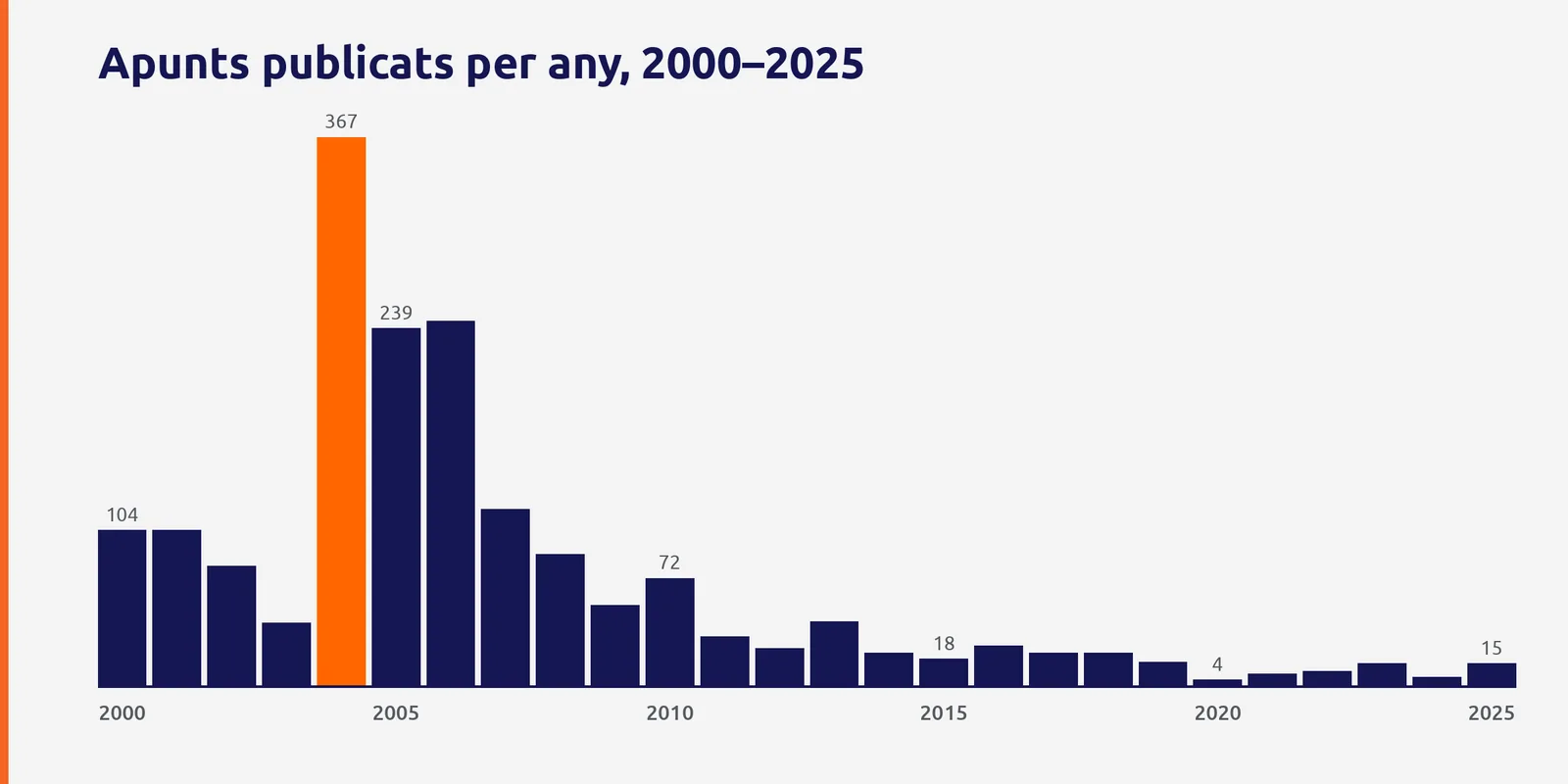
2004 has the orange bar: 367 posts, almost one a day. After that the pace goes down, but the blog does not stop.
I write what I learn so I do not forget it, and what I live to understand it.
What comes next
- New design (option A, "The screen")
- Images in RustFS, out of Git
- Each post in Catalan, Spanish and English
- Diagrams, tables, formulas and contents
- Migrate the 1,798 WordPress posts, with their images
- Publish everything on oriolrius.blog
Technical details of the development environment
| Service | Address | What for |
|---|---|---|
| Astro (dev) | http://localhost:18573 |
the website |
| RustFS S3 | http://localhost:19000 |
upload and serve binaries |
| RustFS console | http://localhost:19001 |
look at the buckets |
| PlantUML | http://localhost:18574 |
diagrams at build time |
None of these services goes to the Internet: everything runs in Docker on the computer.
Thank you for reading this far. If something does not work well, this post will show it2.