VNC session with TCP proxy over XMPP
Design of a VNC session between two machines behind NAT, with XMPP bots and a TCP proxy with a public IP.
Translation of the original in Spanish. Read it in: CatalàCastellano
Part 5 of 6XMPP
- XMPP: introduction
- XMPP with BOSH: using HTTP as a transport protocol
- Telepathy Glossary
- Articles about XMPP
- VNC session with TCP proxy over XMPP
- XMPP tools
This page was on the oriolrius.cat wiki (2009–2012), under the name "vnc-proxied-session-w-xmpp". I bring it back here as it was.
Scenario
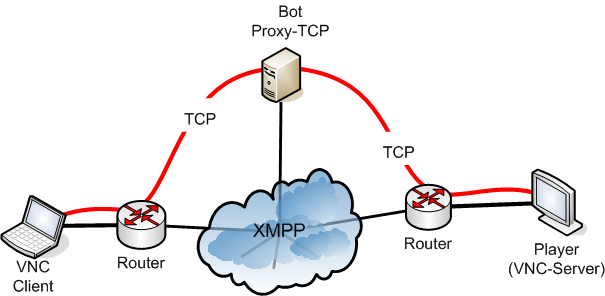
Description of the scenario
- VNC server: computer with a VNC server, plus an XMPP bot to publish the 'share screen' resource on the internet. This bot is also in charge of establishing the client-client connection between the local VNC server and the TCP#1 port published by the TCP proxy's bot.
- Bot: this is the TCP proxy's bot, in charge of publishing the ports #1 and #2 TCP and joining them behind the scenes, allowing the sockets coming from the VNC server and the VNC client to connect.
- VNC client: it also has its XMPP bot through which it launches the connection request with the VNC server, but it does this through the TCP proxy's bot.
Both VNC elements are behind a network with NAT, but the TCP bot is a computer with all its ports visible from the internet, in other words, it has a public IP. It is important to note that the security of this last element is based on the fact that:
- the ports opened for the VNC ends to connect to are random.
- the port information travels through the XMPP network which can be encrypted.
- the sockets between the VNC client and the TCP proxy can only be started if the source IP is accepted by the ACL.
- if necessary, the TCP proxy's sockets could be simply encrypted.
Description of the connections
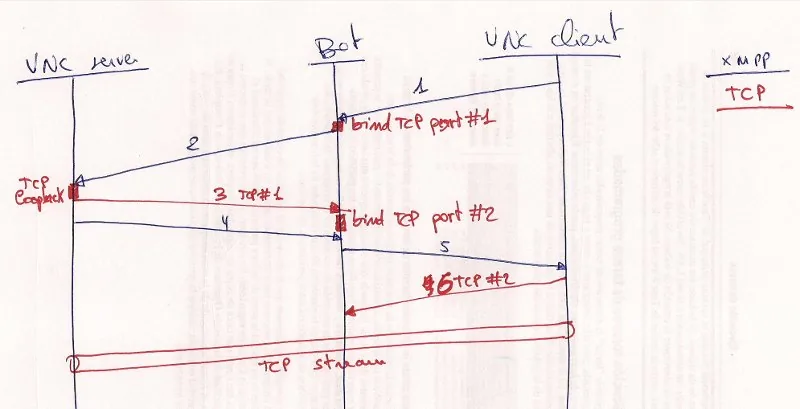
(1) The VNC client sends an XMPP message to the Bot, this message is a request to connect with screen #X and contains the following data: JID_screen with the resource identifier, source IP that will connect to player #X.
(2) The bot, on receiving the request, does the following tasks:
- it publishes two random TCP ports (in listening mode) - port #1 and #2, both connected crosswise, in other words, what one listens to is written to the other and vice versa.
- Port #2 only allows connections from the IP indicated by the VNC client.
- it sends an XMPP message to the VNC Server, reporting: IP:Port where the server must connect.
(3) The VNC Server launches two TCP connections, one towards the local VNC server and another towards the IP:Port that the bot has told it.
(4) When these two links have been confirmed, the bot is told via XMPP that these connections are already OK.
(5) The bot informs the VNC Client via XMPP of the IP:Port#2 where it can connect to connect directly against the screen's VNC server.
(6) The VNC client opens a TCP socket against the IP:Port#2 and communicates through the transparent TCP proxy that the Bot has created.
The idea of this kind of link is based on the concepts of Telepathy's DBUS-Tube and TURN servers for NAT traversal.