cookbook: python logging
Translation of the original in Catalan. Read it in: CatalàCastellano
I often write a lot of system scripts using python as the programming language, and well, especially when those scripts have to be launched using 'crontab' it is very handy to have a good 'log' to know how things are going. So last week I decided to get to grips with python's 'logging' topic and now the way I make 'logs' that I use by default in my scripts is:
Snippet of python code I put in the scripts:
import  logging,logging.config
# logging
logging.config.fileConfig('script_logging.ini')
#logger = logging.getLogger('errorpantalla')
logger = logging.getLogger('errorfitxer')
logger.setLevel(logging.INFO)
After importing the 'logging' library the configuration file where the 'logging' parameters are defined is loaded. Once loaded, I uncomment one or both of the lines below depending on whether I want logs on screen or only to a file. The last line only states up to which debug level I have to show logs.
The configuration file:
[loggers]
keys=root,errorpantalla,errorfitxer
[handlers]
keys=fitxer,pantalla
[formatters]
keys=form01
[logger_root]
level=DEBUG propagate=1 channel= parent= qualname=(root) handlers=
[logger_errorpantalla]
level=DEBUG propagate=1 channel=errorpantalla parent=(root) qualname=errorpantalla handlers=pantalla
[logger_errorfitxer]
level=DEBUG propagate=1 channel=errorfitxer parent=(root) qualname=errorfitxer handlers=fitxer
[handler_fitxer]
class=handlers.RotatingFileHandler level=DEBUG formatter=form01 filename=paht_to_log_file/log_file mode=a maxsize=0 backcount=1 args=('paht_to_log_file/log_file', 'a', 0, 1)
[handler_pantalla]
class=StreamHandler level=DEBUG formatter=form01 stream=sys.stderr args=(sys.stderr,)
[formatter_form01]
format=%(asctime)s %(levelname)s %(message)s datefmt=
I also found a small script, which loads a GUI to generate the configurations of the 'logs' configuration files, really useful and simple to use:
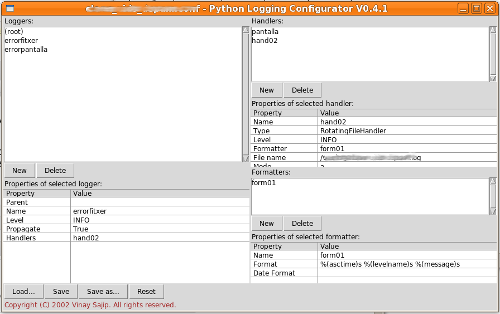
I found this GUI in the package: logging-0.4.9.6.tar.gz specifically in the 'tests' directory. If you don't want to search that much you can also download it directly: logconf.py.