Controlling fan speeds in Linux (fancontrol)
Translation of the original in Catalan. Read it in: CatalàCastellano
I had never had this need, in fact, I knew lm-sensors, sensors, fancontrol and pwmconfig which are the tools I have used to solve this issue. But I really had not started digging into this topic. But the truth is that it has not been that complicated and it looks very powerful. Before going on I wanted to point out that what I have tested it with was:
- Motherboard: Intel D945GCLF2
- OS: Ubuntu 8.10
Well then, the first thing is to run
pwmconfig
which will let us detect which monitoring systems our system has. When you run it you will see that it is a wizard that keeps asking us very simple questions. Its purpose is to tell us which kernel modules have to be configured and to create the
/etc/fancontrol
file, this file is needed to be able to launch
fancontrol
afterwards. Basically to set the behaviour of the fans with these parameters:
- INTERVAL how often the sensor states have to be checked
- FCTEMPS which temperature sensors the system has
- FCFANS which fans the system has
- MINTEMP Minimum temperature of sensor X
- MAXTEMP Maximum temperature of sensor X
- MINSTART Minimum temperature at which sensor X has to be for the fan to start
- MINSTOP Minimum temperature at which sensor X has to be for the fan to stop
- MINPWM minimum PWM value we assign to the fan
- MAXPWM maximum PWM value we assign to the fan
Now it is time to explain what this
PWM
thing is, well it is the signal used to control the fan speed. How can we know how many revolutions per minute of the fan our PWM values correspond to (RPM), well when running pwmconfig if we look carefully a table of values is created where you can see the correspondence between PWM and RPM. So, if for example we want our fan to be stopped at the minimum temperature of a sensor we can assign the PWM value that corresponds to 0 RPMs. It is very important that when pwmconfig does the relevant tests to know the PWM-RPM relation we notice that the fan keeps changing speed until it stops. If this does not happen it means that something is failing and that the fans cannot be controlled. For all this to be so we only have to launch the process
fancontrol
.
If what we want is to know at what temperatures our sensors are, what has to be done is to run the command:
sensors
. This one will inform us of the temperatures of all the sensors it has found and the fan speeds. Next I am putting a screenshot so that you can see how it looks:
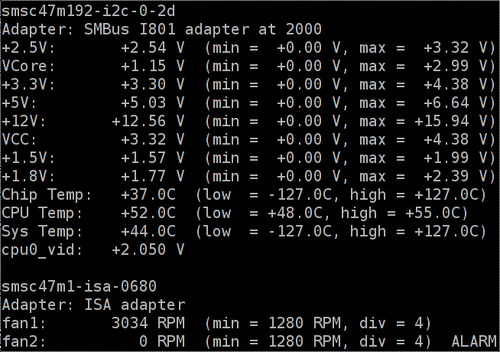
If you launch sensors with a watch, that is,
watch sensors
you will be able to see in real time how the fan speeds and the sensor temperatures keep changing. In my case all this is more than enough for what I want. But if what you want are graphical tools to monitor all this data there are a lot of applets, desklets, tray icons and the like both for kde and gnome that will let you check this data.