HOWTO: advanced dynamic DNS package for pfSense
How I programmed the 'dd_adv' package for pfSense: a dynamic DNS service that gets the public IP through the interface we choose, step by step and with all the code.
Translation of the original in Catalan. Read it in: CatalàCastellano
This page was on the oriolrius.cat wiki (2008–2012). I recover it here as it was.
This document describes the steps I have followed to program a 'dynamic DNS' configuration service with a behaviour different from pfSense's own default service. This document can also serve as a guide in case someone wants to make their own pfSense packages to customise certain behaviours of the firewall.
If you have doubts, questions or corrections to make, please make them in the blog post:
My first pfSense package 'dd_adv'
How 'dynamic DNS' works by default in pfSense
It has to be acknowledged that the support is for many public, and paid, services to publish a mnemonic for a dynamic IP. Which makes it very good. But there are several behaviours of the support pfSense has for these functions that did not fit my needs. The way this support is programmed, what pfSense does is take the public IP of the WAN interface and every time it changes the public IP is updated in the remote DNS service.
The problem
My problem comes from two places: on the one hand, I don't have the IP assigned to the interface with internet, but to another interface. On the other hand, the interface that has internet doesn't have the public IP assigned directly to it, but rather a router has it and through a NAT process gives it connectivity to the internet. So the problem is, on the one hand, knowing over which interface we will access the internet and, on the other hand, which is the public IP through which the network is accessed. As a side effect we have yet another problem because the public IP is not assigned to the pfSense interface; I suppose it is obvious that the problem is that we don't know when it changes. Therefore, we don't know when we have to update it in the dynamic DNS service.
The solution
The solution I have adopted is to create a new service that, through a pooling service, what it does is periodically ask the internet what the public IP of our interface is. On top of that it must be possible to select which is this interface over which we want to check what the public IP is. Since we have to force the traffic generated to discover the public IP to go out through the interface that really has the internet connection. This case, however strange it may seem, is very common, because in an office or similar we may find ourselves needing to have two lines going to the internet, one that will be on the pfSense WAN interface and another that goes through another interface. Often on the WAN interface we have the main internet output and on another interface the backup output. A common example these days is to use an ADSL on the WAN and another output through a Vodafone 3G router or similar on another interface.
Changing the pfSense package repository
To create a pfSense package, the first thing to do is to stop using the official package repository, creating on our own server our package repository that can point to the rest of the public packages. But which, in addition, can have our own packages added to the list. In order to do this, first of all we need an HTTP server with PHP support. Then we go to the server and there we download the 'xmlrpc.tar.gz' file from the pfSense server and uncompress it in the root of one of the virtual domains or of the real domain we have on the HTTP server. The idea is that if we go to 'http://host/pfSense/xmlrpc.php' the pfSense XML-RPC service is executed there; on the other hand there is another directory that will be created when uncompressing the 'xmlrpc.tar.gz' package, this directory is called 'packages'. There we find two files, one of them 'pkg_config.7.xml'. This file contains the list of the packages that can be seen in the 'packages' menu of pfSense, so this is where we will add our package right between the <packages>...</packages> tags.
Steps:
/var/www/localhost/htdocs # wget http://www.pfsense.org/xmlrpc.tar.gz
/var/www/localhost/htdocs # tar xvfz xmlrpc.tar.gz
/var/www/localhost/htdocs/packages # vim pkg_config.7.xml
We add our package to the pkg_config.7.xml file:
...
	<package>
		<name>DDNS_adv</name>
		<website>http://oriolrius.cat</website>
		<descr>Dynamic DNS advanced parameters for custom functonalities</descr>
		<category>Services</category>
		<config_file>http://mini4.joor.net/dd/dd.xml</config_file>
		<version>0.1</version>
		<status>ALPHA</status>
		<maintainer>oriol@joor.net</maintainer>
		<configurationfile>dd.xml</configurationfile>
		<required_version>1.2.1</required_version>
	</package>
  </packages>
</pfsensepkgs>
Notice that basically it is about referencing the name of the package, description, version, its status and other data of the author. But the most important thing is to say where the configuration file is, basically it is about specifying a URL from which an XML will be downloaded that we have to define describing where the package is installed and how it is integrated inside the pfSense system. In this case notice that this information is at:
<config_file>http://mini4.joor.net/dd/dd.xml</config_file>Now we need to log in to pfSense via SSH or through its console and modify the file '/etc/inc/globalconf.inc'. Specifically we have to look for a variable called '$xmlrpcurlbase' and put the host where we have our new package server. In our case it looks like this:
...
	$xmlrpcurlbase='oriol.joor.net',
...
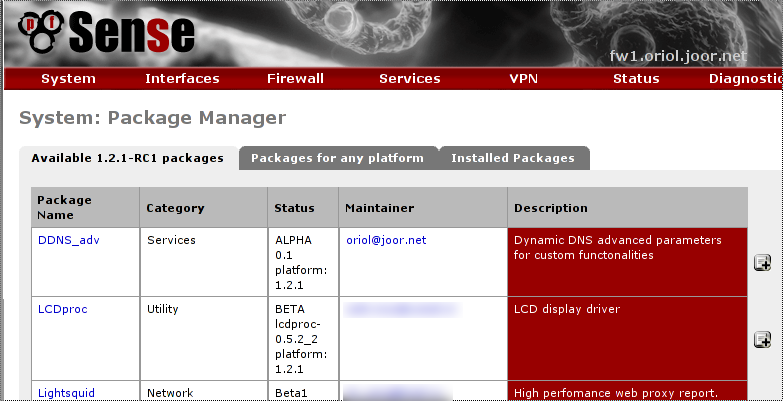
After this, if we go to the 'packages' menu we can already see our package in the list of packages to install:
Package configuration file
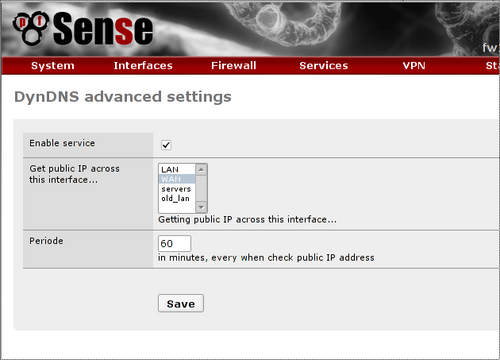
As I have already said, this file contains the details of how the package has to be installed and how it will integrate with pfSense. By this I mean it says where the other necessary files have to be taken from, where they have to be copied and with what permissions inside pfSense, whether any new option has to appear in the menu, what fields the form has to have to define the configuration parameters of our new service. In addition the necessary hooks can also be defined so that the installation, configuration and other processes fit our needs. To make the whole hooks subject clearer I will explain how I have had to use it in my case: the only thing I have needed is to capture the moment when the configuration is saved in the form and after that generate the configuration file we need for the daemon to work properly. It is very good to have all the pfSense libraries available to do all this, although you have to read the code to understand how they work because I haven't found documentation. But it allows us, for example, to integrate the configuration parameters of our package into the general system configuration file.
The configuration file I have made is 'dd.xml':
<?xml version="1.0" encoding="utf-8" ?>
<!DOCTYPE packagegui SYSTEM "./schema/packages.dtd">
<?xml-stylesheet type="text/xsl" href="./xsl/package.xsl"?>
<packagegui>
<name>ddns_adv</name>
<version>0.1</version>
<title>DynDNS advanced settings</title>
<configpath>['installedpackages']['ddnsadv']['config']</configpath>
  <additional_files_needed>
    <prefix>/usr/local/pkg/</prefix>
    <chmod>0644</chmod>
    <item>http://oriol.joor.net/dd/dd.inc</item>
  </additional_files_needed>
<additional_files_needed>
<prefix>/etc/rc.d/</prefix>
<chmod>0700</chmod>
<item>http://oriol.joor.net/dd/dd_service</item>
</additional_files_needed>
<additional_files_needed>
<prefix>/usr/local/sbin/</prefix>
<chmod>0700</chmod>
<item>http://oriol.joor.net/dd/dd_adv.php.sh</item>
</additional_files_needed>
<additional_files_needed>
<prefix>/etc/inc/</prefix>
<chmod>0644</chmod>
<item>http://oriol.joor.net/dd/dyndns_bis.class</item>
</additional_files_needed>
  <service>
    <name>dd_adv</name>
    <rcfile>dd_service</rcfile>
    <executable>dd_service</executable>
  </service>
<menu>
<name>DDNS adv</name>
<tooltiptext>Dynamic DNS advanced settings</tooltiptext>
<section>Services</section>
<url>/pkg_edit.php?xml=dd.xml&id=0</url>
</menu>
<fields>
<field>
<fielddescr>Enable service</fielddescr>
<fieldname>enabled</fieldname>
<type>checkbox</type>
</field>
<field>
<fielddescr>Get public IP across this interface...</fielddescr>
<fieldname>selectinterface</fieldname>
<description>Getting public IP across this interface...</description>
<value>wan</value>
<multiple>false</multiple>
<size>5</size>
<type>interfaces_selection</type>
</field>
<field>
<fielddescr>Periode</fielddescr>
<fieldname>periode</fieldname>
<description>in minutes, every when check public IP address</description>
<size>3</size>
<type>input</type>
</field>
</fields>
<include_file>/usr/local/pkg/dd.inc</include_file>
<custom_php_resync_config_command>sync_package_dd();</custom_php_resync_config_command>
</packagegui>Next I comment on the most important fields and sections of the file, I will start with the following tag:
<configpath>['installedpackages']['ddnsadv']['config']</configpath>Here it is indicated in which part of the pfSense general configuration file the configuration will be saved, this configuration file is an XML file called 'config.xml' which is basically the file that is downloaded when making a backup of the system. As it is an XML file it is easy to refer to a position inside it in the form of a multi-dimensional array. Furthermore, since my package is not part of the default packages I place it in the installed packages section, then I indicate two arbitrary names from which I will later be able to access the configuration parameters defined further on in the same file.
The sections enclosed within tags: 'additional_files_needed', look like this and refer to files that have to be installed during the package installation process:
<additional_files_needed>
<prefix>/usr/local/pkg/</prefix>
<chmod>0644</chmod>
<item>http://oriol.joor.net/dd/dd.inc</item>
</additional_files_needed>Notice that it defines where the installed file will go, the permissions with which the file will be copied and from which URL it will be downloaded. Through these sections is where we can reference the binary packages (tar.gz or similar) that can contain the compiled code necessary for it to run inside pfSense.
In case our package has to run as a daemon, we can define what the service will be called and so later, through the pfSense daemon control functions, it can be started, stopped, restarted or launched when pfSense boots.
<service>
<name>dd_adv</name>
<rcfile>dd_service</rcfile>
<executable>dd_service</executable>
</service>Often the files referenced in this section are expected to be found in /etc/rc.d; in my case, the daemon will be launched via '/etc/rc.d/dd_service'.
In the 'menu' tags it is defined in which menus the configuration screen that will be defined further on in the same XML file will be called. The menu section has as its only difficult to understand piece the PATH of the URL that will be called. Basically what is done is to call an interpreter that will be able to build the configuration screen of the package from the XML:
<menu>
<name>DDNS adv</name>
<tooltiptext>Dynamic DNS advanced settings</tooltiptext>
<section>Services</section>
<url>/pkg_edit.php?xml=dd.xml&id=0</url>
</menu>Inside the 'fields' tags the description of the fields is enclosed: 'field', these specify what will be seen in the form and what the user will be able to configure and also what will be saved in the general configuration file. If you take a look at this section you will realise that the code is very self-descriptive and very simple to understand. Basically there is the name of the field, the description and the type of data to save/ask for.
Another important tag is the 'include_file' one, often with the same name as the XML file; in our case the XML file is called 'dd.xml' and therefore this file is called 'dd.inc'. It is a file with the PHP functions necessary for the hooks we need:
<include_file>/usr/local/pkg/dd.inc</include_file>Finally the time comes to define which hooks we will use; in my case I only use one defined with the 'custom_php_resync_config_command' tag:
<custom_php_resync_config_command>sync_package_dd();</custom_php_resync_config_command>which as can be seen only calls a function that is defined in 'dd.inc'; this hook makes this function run after saving the configuration of the form. In case we don't want to define the code in the INC file we can also do it between the two tags, the opening and the closing one of the hook. Although from my point of view it is always tidier and cleaner to only call functions from the hooks and leave all the PHP code in the INC file.
The /usr/local/pkg/dd.inc file
In this file I only define one important function which, as already described above, only serves to give the system the behaviour we need after something has been changed in the configuration of the service:
<?php
require_once("config.inc");
require_once("functions.inc");
require_once("dyndns_bis.class");
require_once('globals.inc');
require_once('service-utils.inc');

function dd_notice ($msg) { syslog(LOG_NOTICE, "dd: {$msg}"); }
function dd_warn ($msg) { syslog(LOG_WARNING, "dd: {$msg}"); }

function sync_package_dd() {
	global $config;

	if ($config['installedpackages']['ddnsadv']['config'][0]['enabled']=='on') {
		$if = $config['installedpackages']['ddnsadv']['config'][0]['selectinterface'];
		$periode = $config['installedpackages']['ddnsadv']['config'][0]['periode']*60;

		$script = <<<EOD
#!/bin/sh

while true;
do
	/usr/local/sbin/dd_adv.php.sh
	sleep $periode
done

EOD;
		file_put_contents('/usr/local/sbin/dd_adv.sh',$script);
		system('chmod 700 /usr/local/sbin/dd_adv.sh');
		system('/etc/rc.d/dd_service restart');
		dd_notice('started');
	} else {
		system('/etc/rc.d/dd_service stop');
		dd_notice('stoped');
	}
}

?>
In my case, what I do is remake the file '/usr/local/sbin/dd_adv.sh'. This file is a file that has an infinite loop that repeats every N minutes, N being a parameter defined in the configuration of the service. In each of the iterations a piece of PHP code is executed which is in charge of updating the IP, if needed.
All this is done in case the service has been enabled from the configuration interface, but if the service has not been enabled directly what we do is empty the file '/usr/local/sbin/dd_adv.sh'. The aim of this, although the service is also stopped, is that if the firewall is restarted and the service is launched, when it calls the file in question, since it will have no content it will not do the iteration. Therefore, it will be the same as if it had not been launched. Maybe there is a more elegant way of doing this but I think it fulfils its function, so I haven't complicated it any further.
Going back to the 'dd.inc' file, if you look closely it also defines two more functions, 'dd_notice' and 'dd_warn', which are basically used to send messages to syslog in case in the main function we need to send something about the status of the service.
The '/usr/local/sbin/dd_adv.sh' file
This daemon, as we have seen, is created at configuration time depending on the parameters it has assigned. I have described its functionality a few lines above and it is quite simple, but since it has an entity of its own below I paste one of the possible appearances it can have:
#!/bin/sh

while true;
do
	/usr/local/sbin/dd_adv.php.sh
	sleep 600
done
As you can see, what it does is run the shell script programmed in PHP and called 'dd_adv.php.sh' and then wait 600 seconds until asking again for the execution of this script. Therefore, here we have the pooling service.
File '/usr/local/sbin/dd_adv.php.sh
The code of this script is made in PHP but it will be launched as a shell script; as we can see in the code of the 'dd_adv.sh' file, it is launched periodically and the only thing it does is create static routes that force pfSense to use the interface defined in the configuration to reach 'http://checkip.dyndns.org', this website informs us of the IP we have used to connect to it. Therefore, our public IP. Then, through the 'dyndns_bis.class' class we update the IP, if needed. Now we can delete the static routes and leave everything as it was.
It should be noted that the script takes into account that the website that is accessed can have more than one IP. That is why as many routes are created as IPs the website that informs us of our IP has. Furthermore, we should notice that we rely on several internal pfSense libraries to collect information such as the system configuration, to know what the gateway of the interface defined as the alternative internet output interface is, and in order to interact with the dynamic DNS service we use the 'dyndns_bis.class' library, which is a modification of the original pfSense 'dyndns.class' library.
#!/usr/local/bin/php -q
<?php

require_once('/etc/inc/config.inc');
require_once('/etc/inc/functions.inc');
require_once('/etc/inc/dyndns_bis.class');
require_once('/etc/inc/pfsense-utils.inc');

$s = "checkip.dyndns.org";

	// getting interface gateway
        $if=$config['installedpackages']['ddnsadv']['config'][0]['selectinterface'];
        $gw=get_interface_gateway($if);

	// add static routes to $s;
	$ips=gethostbynamel($s);
	foreach ($ips as $ip) {
		$ruta="route add -net ".$ip."/32 ".$gw;
		system($ruta);
	}

	// get public IP address via fixed interface
	$h=new updatedns_bis($config['dyndns']['type'],
                      $config['dyndns']['host'],
                      $config['dyndns']['username'],
                      $config['dyndns']['password'],
                      $config['dyndns']['wildcard'],
                      $config['dyndns']['mx']);
	// dump result
	var_dump($h);

	// remove static routes to $s
	foreach ($ips as $ip) {
		$ruta="route del -net ".$ip."/32 ".$gw;
		system($ruta);
	}

?>
Class '/etc/inc/dyndns_bis.class'
This class is a very, very simple modification of the pfSense 'dyndns.class' code; basically it adds a new private method that obtains the public IP of the interface after connecting to 'http://checkip.dyndns.org'. So, in the rest of the classes, every time it tries to get the public IP by accessing the IP of the WAN interface I have modified the code so that what it does is access the website in question.
I don't paste the code of the class here because it is very long, you can find it at: URL_CODI; note that the code of the class is quite well done and implements a cache service, so that in case the IP has not changed an update of it is not sent; it also controls the 'timestamp' of when the last update was made so that a minimum time can be controlled for how often the IP has to be updated even if it has not changed. All in all it has saved me a lot of work when it comes to not having to build my own IP update system.
Perhaps what is a bit more curious is to see how the information received from the website that gives us the public IP is parsed; by the way, I didn't write this code myself but found it through the pfSense forums. So I take the opportunity to thank 'Tri Tu', the author of the code.
/* Private function for getting real IP */
/* Author: Tri Tu */
function _checkip() {
   log_error("DynDns: Running _checkip() for real WAN IP");
   $ch = curl_init();
   curl_setopt($ch, CURLOPT_URL, 'http://checkip.dyndns.com');
   curl_setopt($ch, CURLOPT_HEADER, 0);
   curl_setopt($ch, CURLOPT_RETURNTRANSFER, TRUE);
   $data = curl_exec($ch);
   curl_close($ch);
   list($part1, $part2) = split(': ', $data, 2);
   list($ip, $junk) = split('<', $part2);
   return $ip;
}
By the way, notice that it uses CURL to make the HTTP request; in case you don't know this library I recommend you take a look at it because I think it really is one of the best HTTP, HTTPs and similar client libraries I have seen. Both for PHP and for C, C++, Python and many other languages.
Service launcher
The only file we have left to explain is quite simple, it is the one that goes in /etc/rc.d/dd_service and which is in charge of launching the shell script that iterates infinitely watching whether the IP has changed. In this file I have not used the internal pfSense libraries to program it because these do not support launching daemons that are 'shell scripts'. So, I have made a very basic implementation of the functionalities needed to be able to launch, stop and restart the daemon:
#!/bin/sh

start()
{
        /usr/local/sbin/dd_adv.sh > /dev/null 2>&1 &
}

stop()
{
        PID=`ps ax | grep "/bin/sh /usr/local/sbin/dd_adv.sh" | grep -v grep | cut -c 1-7`
        kill -9 $PID
}

# main

        case $1 in

        start)
                start
                return 0
                ;;
        stop)
                stop
                return 0
                ;;
        restart)
                stop
                start
                return 0
                ;;
        *)
                echo "usage: $0 <start|stop|restart>"
                return 1
                ;;
        esac