Evolution 'search folders'
Translation of the original in Catalan. Read it in: CatalàCastellano
I saw this Evolution feature a long time ago, but it had never occurred to me how to get the most out of it with my way of using email. As you know for a long time I have had my folders organised trying to follow the idea of GTD. Well then, despite that I had certain problems following some mailing lists and other information that arrives in my email but that is of a more secondary or personal nature. I have found the solution thanks to these very special folders that allow me to group emails by working with quite different parameters.
In case this thing about search folders does not ring a bell, I would define them as folders with virtual contents, that is, imagine that you have several email accounts configured, then you will have several inbox folders; if in addition each of the accounts has several folders created, that will mean that the various inbox do not fit on the screen. Then you will always have to be scrolling to keep up with the new emails that come into the various accounts and the various folders of each account.
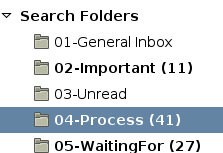
List of search folder type folders:
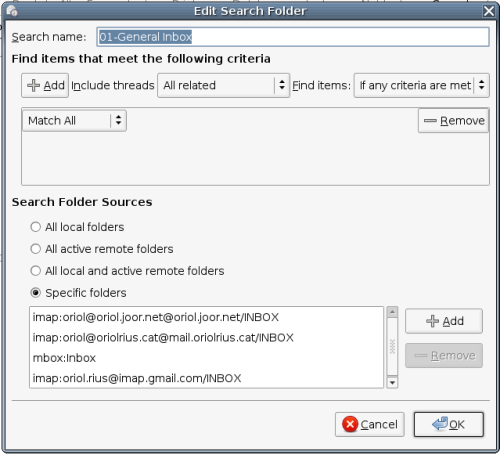
The solution is as simple as configuring, for example, a general inbox:
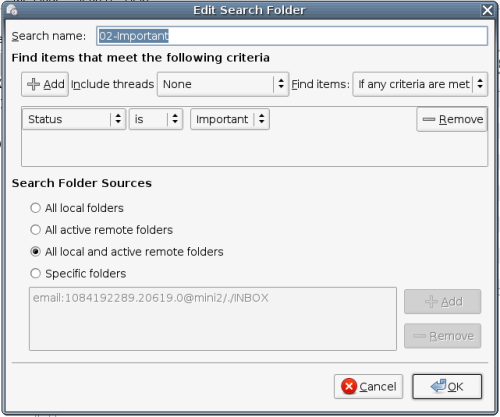
Another search folder I have configured is one that groups all the messages I have marked as important, I usually use this a lot for various purposes. For example, replying to emails on mailing lists, knowing important tasks that are already waiting to be done, or important things I expect to arrive already done, etc.
Besides these two examples I have mentioned I have a few more folders of this type, such as the one for unread messages, tasks to do, pending tasks, etc. for me this idea has really changed the way I use Evolution.
Do not forget that the messages really do not have to belong to the same email account and that the virtual folder is not a real folder. So, you cannot drag items into it. However, you can drag emails from inside it to another, non-virtual folder. So the focus of my Evolution workspace has changed a lot and now I always work with the view set on the part where these special folders are and on top of that I have all the folders of the main email account open. This way I can keep dragging and organising the tasks as I did before.
2 comments
Comments from the old blog, as they were written. Comments are closed.
Gaspar
Hola Oriol.
Merci, no coneixia aquesta funcionalitat.
Penso que se t'ha escapat una imatge a l'article"search-folders-002.png"
—
[1]
Ostres, doncs a mi si que em surt la imatge. T'ho pots mirar borrant el caché a veure si encara et passa. Gràcies.