TrueCrypt and Onekript - keeping information safely stored away
Translation of the original in Catalan. Read it in: CatalàCastellano
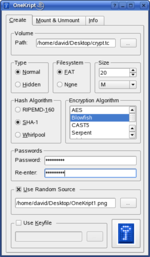
Thanks to Oriol, a good few months ago I discovered
which he used from windows. In fact, I really loved the tool, especially for its simplicity. I've often come across users worried about storing confidential information on their laptop,
pendrive
, etc. and I never knew which tool I could recommend to them to do these tasks simply and at the same time efficiently. Well then, this application integrates very, very well with windows and is a good solution to this problem.
Although it is fully supported on linux, the generic support is only via CLI, so it's a bit cumbersome to use it from linux without keeping in mind all the parameters needed to work with the tool. Well then, today I have discovered
through
. It's a tool that integrates with
and greatly simplifies the use of TrueCrypt on linux.
In fact, I don't use
and therefore, until this is supported in
I have no great advantage when it comes to using this tool from linux, but I didn't want to miss the opportunity to recommend good software for keeping our private data on storage devices.
The main features of this software are:
- Creates a virtual encrypted disk within a file and mounts it as a real disk.
- Encrypts an entire hard disk partition or a storage device such as USB flash drive.
- Encryption is automatic, real-time (on-the-fly) and transparent.
- Provides two levels of plausible deniability, in case an adversary forces you to reveal the password:
- Hidden volume (steganography more information may be found here).
- No TrueCrypt volume can be identified (volumes cannot be distinguished from random data).
- Encryption algorithms: AES-256, Blowfish (448-bit key), CAST5, Serpent, Triple DES, and Twofish.
- Mode of operation: LRW (CBC supported as legacy).
UPDATE
: updated information about Truecrypt alternatives can be found
.