They gave me a RIM Blackberry Pearl 8100 (from Vodafone)
Translation of the original in Catalan. Read it in: CatalàCastellano
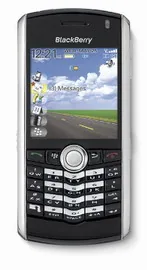
This week they gave me a new company mobile phone; in fact, I still don't know it in depth but I've already done many more things with it than with my previous phone. Until now I had the Blackberry 7100v, which no matter how much they said you could read email and do a thousand things with it, was so unusable that I didn't find it practical at all. Not to mention how big it is and how uncomfortable the trackwheel is to use.
Well then, this week, as I was saying, I have a replacement for the 7100v model, now I have the 8100. To start with I'm already using email (mail-push). So, wherever I am, I receive in real time the emails that arrive in any of my 4 mailboxes. The 3 professional ones and the personal one, all of them grouped under one IMAP account, with their corresponding antispam and antivirus filters. I can also access gmail through the browser and bloglines without too many problems.
As for email, not everything is wonderful, since I've found quite a few drawbacks that I don't know whether they aren't supported by the device or I simply don't know how to configure them, and I've tried several times. Things I'd like to be able to achieve:
- See all the folders of my IMAP account, not just the inbox as until now.
- That sent emails are put in the sent folder of the IMAP account; now they stay stored in the blackberry but not on my IMAP server.
- Being able to choose my sender address; although I only have one IMAP account configured, inside there are 4 mailboxes and when I reply to a message or write a new mail I'd like to be able to choose which sender to use, as in evolution.
- Automatic synchronisation of the email status. That is, if a new email arrives and I read it through webmail or my MUA, in the blackberry it should show as read and not as new, which is what happens now.
I still haven't got the hang of the typing system it includes, although it looks like it will be quite fast once I control it. Right now, though, I look like a turtle answering emails, sms or anything else with the device.
On the other hand, I'd also like to make use of the GPRS/EDGE connection to use it through bluetooth or USB and use it as a modem to connect to the Internet, so I wouldn't need to carry the Vodafone VRA around.
I have to start researching how to synchronise the calendar and the address book with evolution, so everything will be even more useful to me. If I could also link this with Tasks Pro it would be the bomb, although this part I see as a bit more difficult.
Through the Blackberry Blog I've seen that it also supports GPS through software called Spot and any Bluetooth GPS that supports the NMEA protocol. Anyway, I think I won't end up buying this, since I'd say it's more useful to have the GPS on the nokia 770 because it has a much bigger screen. Although the GPS software won't come out until these Christmas holidays.
I hope the next few weeks aren't as crazy as these last weeks and I can dedicate myself to squeezing a bit more juice out of the Blackberry 8100. In case anyone is curious about the features of the device, I recommend the review that the people at Mobile Burn have done.
13 comments
Comments from the old blog, as they were written. Comments are closed.
Daniel
Has provat d'instal.lar l'aplicació Gmail mobile, diuen que va molt bé. Jo me l'he instal.lat però al fer el loading... dona un error de java(null pointer). En saps alguna cosa?
—
[1]
No sé quina aplicació vols dir jo llegeixo gmail a través de http://gmail.com si em dius on és l'aplicació la provo i et dic alguna cosa.
El que si que uso és el Google Maps per BlackBerry i va molt bé. Ja m'han tret de més d'un dubte.
Daniel
[2] Si vas a gmail.com/app et pots descarregar l'aplicació. Si funciona és molt millor, més info:
http://mail.google.com/support/bin/topic.py?topic=1580...
Daniel
Per cert, també et pots instal.lar el Google Talk si tens connectat el mòbil al PC anant a http://www.blackberry.com/Googletalk...
—
[4]
Ja veus que guapo, ja me les he instal·lat tan la de GMail com la de GTalk, amdues em funcionant perfectamnet. Si a això i sumem que la de GMaps que també va genial. Tinc el kit-google al mòbil. Realment ja no em falta de res... hi hi hi!
Moltíssimes gràcies per la informació la veritat és que no m'havia posat a buscar massa aplicacions pel mòbil. A part del funambol, bbreply i alguna més que no recordo no tenia res més.
El que ara he de trobar és una aplciació que em sincronitzi el calendari de google (gcalendar) amb el de la blackberry. Perquè el funambol té molt verd encara el sincronitzador de calendari amb gcalendar i quan ho sincronitzo des de l'evolution, cap a gcalendar i cap a la blackberry tot plegat es converteix en un desastre.
Daniel
[5] Existeix el GCalSync, la vaig provar i algu em feia, però em sembla que no m'acabava d'anar del tot. AL final me la vaig borrar, no em feia massa gràcia.
Espero que treguin la aplicació per mòbil de google calendar aquests cracks :D
Daniel
[5] Amb quina companyia tens el mòbil. Ho dic pq no sé si hi pot tenir a veure el tema de què no em vagi el Gmail (quina ràbia). No tens idea de què pot passar-me?
—
[6]
si la vaig trobar aquesta aplicació també, però l'he provat poc.
—
[7]
jo tinc Vodafone.
Gabriel
Jo tinc el google maps i el BB Maps en la BB Pearl i ambdos funciones prou be. També he aconseguit posar un GPS el Holux GPSlim240 via bluetooth i l'he aconseguit emparellar. Aquest cap de setmana veure si pirula com a gps. Creec que com a minim m'hauria de donar la posició. De totes formes no ens podem fer ilusions i no funcionará mai com un GPS tipus TomTom, perquè a les mateixes operadores no els interessa. Posaran problemes. És una questió de llicències i cales. Van en contra del que vol la gent. Informació gratuita. Màxima facilitat a tot.
joaquim
Hola
Jo tambe estic interessat en usar la BB com a modem per Mac.
He provat varis scripts que he trobat a la xarxa pero no funcionen Hem dona el error:
Tue Aug 21 20:46:05 2007 : Connecting via BlackBerry 8300.
Tue Aug 21 20:46:05 2007 : Making EDGE connection.
Tue Aug 21 20:46:08 2007 : Serial connection established.
Tue Aug 21 20:46:09 2007 : Using interface ppp0
Tue Aug 21 20:46:09 2007 : Connect: ppp0 <--> /dev/cu.Bluetooth-Modem
Tue Aug 21 20:46:10 2007 : Remote message: vodafone
Tue Aug 21 20:46:10 2007 : PAP authentication succeeded
Tue Aug 21 20:46:11 2007 : LCP terminated by peer
Tue Aug 21 20:46:14 2007 : Connection terminated.
Tue Aug 21 20:46:19 2007 : Serial link disconnected.
joaquim
Hola
Jo tambe estic interessat en usar la BB com a modem per Mac.
He provat varis scripts que he trobat a la xarxa pero no funcionen Hem dona el error:
Tue Aug 21 20:46:05 2007 : Connecting via BlackBerry 8300.
Tue Aug 21 20:46:05 2007 : Making EDGE connection.
Tue Aug 21 20:46:08 2007 : Serial connection established.
Tue Aug 21 20:46:09 2007 : Using interface ppp0
Tue Aug 21 20:46:09 2007 : Connect: ppp0 <--> /dev/cu.Bluetooth-Modem
Tue Aug 21 20:46:10 2007 : Remote message: vodafone
Tue Aug 21 20:46:10 2007 : PAP authentication succeeded
Tue Aug 21 20:46:11 2007 : LCP terminated by peer
Tue Aug 21 20:46:14 2007 : Connection terminated.
Tue Aug 21 20:46:19 2007 : Serial link disconnected.
joaquim
finalmet hem funciona,
He posat el script per a la BB 8300 a dintre de /Library/modem scripts i posteriorment he configurat la connexio de bluetooth del Mac via la BB
com a número de telefon - abans utilitzaba *99# o be *99***1# - el correcte es posar-hi airtelnet.es
Usiari. vodafone
Password. vodafone
a mi hem funciona perfectament amb la Pearl i el Ibook amb Mac os X a una velocitat de 460000 bps
Per a Qualsevol dubte pots enviar-me un mail