SVN: Tortoise for Linux and Nautilus-scripts
Translation of the original in Catalan. Read it in: CatalàCastellano
For windows we have TortoiseSVN available, an application that is installed as context options in the windows explorer. It lets us work with the VCS in a super comfortable way. In fact, subversion becomes one of the simplest things thanks to this application and you end up getting hooked on the tool.
Well then, this tool, as often happens, doesn't exist for linux and more specifically as a nautilus extension for gnome, even less so. But today I've installed a nautilus script (a concept I didn't know about until today) that lets us, in a rather rudimentary but effective way, work with the nautilus context menu directly against subversion. Without having to go out to the console to manually launch the most typical commands.
Specifically I found the script on mariuss' blog in the article Nautilus Script for Subversion; it explains how he sweated over this script. In fact, I read up on these nautilus scripts and they're trivial to make. When I've mastered them a bit more I'll explain how they're done. For now I'll leave you with the itch.
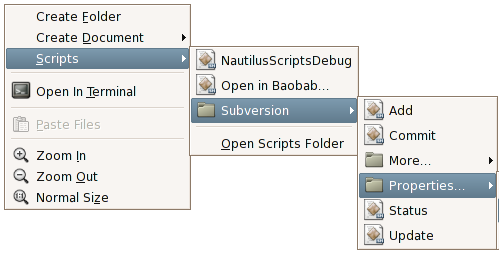
If you use subversion and don't want to be going up and down the command line every five minutes, I recommend you unzip the file: nautilus-svn-scripts-0.9.2.tar.gz inside the ~/.gnome2/nautilus-scripts directory, then restart nautilus and that's it, you can now see the context menu by pressing the right mouse button, the menu is something like this:
2 comments
Comments from the old blog, as they were written. Comments are closed.
javiVF
Esta molt xulo el nautilus i les seves extensions, pega una ullada a nautilus actions que es un projecte per afexirli "features" al nautilus. Jo encara no l'he pogut provar pero pinta força be :)
PD: Felicitats per partida doble mussol! ( ja sas, mas vale tarde que pronto ;)
—
[1] m'ho he mirat una mica per sobre i és una passada el món que hi ha aquí al darrera. A veure si m'ho miro amb calma ja que hi ha alguna extension que no he trobat i que potser em fassi ja que fa molt de temps que la trobo a faltar.
Moltíssimes gràcies per la referència.