VMWare ESX Server and Ubuntu Breezy on top of a Gentoo
Translation of the original in Catalan. Read it in: CatalàCastellano
I have to admit that, despite having used linux for a long time and having tried many distributions, I'm not very fond of constantly trying out which distribution is better; in fact, I've always thought it's better to know one distribution thoroughly. Even if they don't say it's the best, but the point is that I'd say that serves you better in life than going around testing which one is the coolest, most comfortable, etc.
As a result of that we could say I've only worked with two distributions in all these years, Slackware and, for the last 5 years (approximately), Gentoo. But because of certain life needs these last two weeks I've installed VMWare Workstation on the laptop's Gentoo and then I created a virtual machine where I installed Ubuntu 5.1 Breezy Bedger.
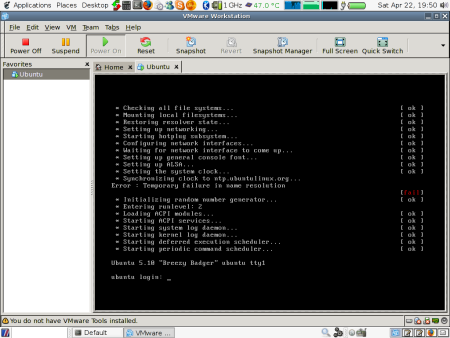
Well then, with the typical problems that what I'm telling you involves: not finding files where you're used to them being, not knowing how daemons are launched, where the startup configurations go, and the most serious thing of all, that apt-get business is torture, fast as hell, but torture....bloody hell!! where's my emerge?
I have to admit the graphical environment is very easy to use with all its tools and frills, but I've focused on the "server" type installation, that is, without a graphical environment, since I had to set it up as a server and not as a workstation. So I had to suffer.
I also wanted to tell you about my first experience with VMWare ESX Server. What a blast mate! this really is a good idea, I know that now the Xen friends will come out saying there's a good free version that does something similar. But really I'd say that for the moment the features can't be compared.
The beauty of the ESX version is that it installs a Linux with proprietary kernel modules. Then through a web page you can set up your virtual machines, which you can have running, stopped, suspended, in high availability, however you like. What's more, those machines can share the hard drive, that is, the storage. Normally connected by fibre and with a good number of gigs so that things don't run out.
The virtual machines you create can be booted through the console application, which is available for quite a few operating systems, even Gentoo's portage. With the console we can use an ISO of a CD, DVD or whatever we want to boot the machine for the first time and install whatever operating system we want. Specifically, on the server where I installed Ubuntu there were several Windows 2000 and 2003 running. Once you finish setting up SSH you can stop the console and start working remotely over the network.
I think this way of working will impose itself again in the future. I say again because this idea was invented and put into practice many years ago, by the famous main frames; the problem we had until now was that we couldn't run PC operating systems inside those systems, and with applications like this one and others similar all that is now a reality.
I'm sure that as these such interesting systems reach the mass market, a huge number of companies will change their server setup philosophy. Since it's very convenient to be able to create machines on demand with the characteristics you want and also to modify their characteristics when they become too small (RAM, disk, etc). What's more, since they are virtual machines, if the mother machine becomes too small we can put in more powerful ones and the only thing we have to do is drag the virtual machine from one to the other and in a few seconds we can boot it again.
With how complicated a hardware migration always is and how simple it becomes in systems of these kinds. So simple that it's no problem at all, just a pure formality. Moreover I can assure you it works as I say, it's not the typical feature that never works afterwards. Bear in mind that sharing the storage means we don't have to migrate any data, only the profile, and if the storage becomes too small we can add disks and even add another backplane to the one we already have so that more disks fit, and it will be the RAID that takes care of making them visible to the system.
So there's another itch for you: trying VMWare ESX or Xen, although from what I understand the second one only works with virtual machines running linux. So we won't be able to have a heterogeneous server network inside our mother machine. But time will tell, I'm sure that soon it will be able to do that and more.
6 comments
Comments from the old blog, as they were written. Comments are closed.
Kimi
Hola! Fa temps que vaig llegint tots els teus articles i comentaris, i ara he vist que tenies aquest articles sobre VMware EDX Server, doncs be; jo ja fa dies que estic batallant amb un Ubuntu 7.10 i li estic instal·lant el VMware i...sembla ser que està ben instal·lat i els "serveris" aixecats, però quan vaig al Client de Windows per a fer la connexió al meu Servidor d'VMware, doncs em dona un error de llibreria!!!
Mira aquest es el comentari que vaig fer a un foro d'Ubuntu especialitzat i de moment, res de res:
Hola, he seguido todos los pasos de la documentación de:
http://www.ubuntu-es.org/index.php?q=node/67027...
y me pasan éstos problemas:
Cuando me pide el serial...lo introduzco, he probado varios y me dice:
Type XXXXX-XXXXX-XXXXX-XXXXX or 'Enter' to cancel: 92M44-YYGDK-2F38J-4320R
/usr/lib/vmware/bin/vmware-vmx: error while loading shared libraries: libXtst.so.6: cannot open shared object file: No such file or directory
The serial number 92M44-YYGDK-2F38J-4320R is invalid.
Please enter your 20-character serial number.
Si paso de este mensaje, se instala correctamente, pero cuando voy a la consola de gestión, me dice el siguiente error:
The process exited with an error:
/usr/lib/vmware/bin/vmware-vmx: error while loading shared libraries: libXtst.so.6: cannot open shared object file: No such file or directory
End of error message.
Alguien sabe que puede pasar???
Para vuestra info, my pc es: Pentium 4 a 2,14Ghz con 512Mb de RAM y está instalado naturalmente bajo un Ubuntu 7.10.
A veure si tu tens idea!! Moltes gràcies i segueix així!!!
—
[1]
doncs la cosa és ben senzilla, l'executable té una dependència cap a la llibreria:
libXtst.so.6: cannot open shared object file: No such file or directory
i no la troba, potser la tens però en una verió diferent. Jo la buscaria amb
find /usr/lib -name "libXtst*so*"
un cop localitzada li faria un link cap al fitxer que no et troba. Si no la tens instal·lada doncs la instal·les i llestos. És una tonteria. Sort!
Kimi
Hola! Moltes gràcies, ja la he trobat a partir del que has comentat, però com faig el link que comentes, perdona per la meva ignorància!!!
—
[3]
Simplement amb un
ln -s /path_on_es_fitxer/fitxer1 /on_hauria_de_ser/fitxer1
Kimi
[4] Hola, ja ho he fet així: ln -s /usr/lib/libXtst.so.6 /usr/lib/vmware/bin/ i continua donant el mateix error, també ho he probat amb: ln -s /usr/lib/libXtst.so.6 /usr/lib/vmware/bin/vmware-vmx...sento ser una mica pelma!
—
Dubto molt que l'vmware vagi a buscar aquest fitxer als directoris que tu l'has linkat. Això ho hauries de buscar fent un strace, per exemple. Pots fer això:
strace -f -o debug.txt vmware
Després busques al fitxer debug.txt si hi ha crides a libXtst.so.6 i mires a quins directoris es fan i a un d'aquests directoris és on has de fer l'enllaç.
Espero haver-me explica bé.