Editing the GNOME menu
Translation of the original in Catalan. Read it in: CatalàCastellano
Benja asked me on Friday how I edit the GNOME menu and I thought: blimey, I did that a long time ago and I don't remember how. In fact, the base GNOME 2.12 package ships a fairly simple menu editor. It's called gmenu-simple-editor, basically meant only to show or hide menu options. But today I specifically wondered how I could make some applications that are not native to GNOME appear in my menus; in fact they are two applications that run on the Java JRE engine and that I wanted to be able to launch without having to go out to the CLI.
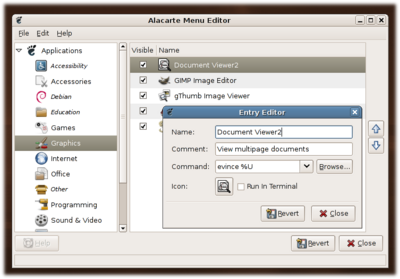
Well then, on the gentoo forums I found this thread Gnome 2.12.1 menu editor fails to launch. The solution came in the form of an application that right now is not in gentoo's portage but that has an ebuild in gentoo's bugzilla; specifically I'm talking about alacarte (bug 111376). It's a very easy-to-use editor and looks very similar to the editor that ships with GNOME by default.
Here is a summary of the steps to install it:
# mkdir -p /usr/local/portage/x11-misc/alacarte/files
# cd /usr/local/portage/x11-misc/alacarte/
# wget http://bugs.gentoo.org/attachment.cgi?id=72041
# PORTDIR_OVERLAY="/usr/local/portage"
# export PORTDIR_OVERLAY
# ebuild /usr/local/portage/x11-misc/alacarte/alacarte-0.8.ebuild digest
# echo dev-python/pyxdg ~x86 >> /etc/portage/package.keywords
# echo x11-misc/alacarte ~x86 >> /etc/portage/package.keywords
# emerge x11-misc/alacarte
With that the application is ready, if you want to see what it looks like:
A few days ago GNOME 2.14 came out, although I still don't have it installed, and I'd say it already ships a proper editor by default. What I don't know for sure is whether it is alacarte itself or another one.