Removing the recycle bin and the rest of the desktop icons
Translation of the original in Catalan. Read it in: CatalàCastellano
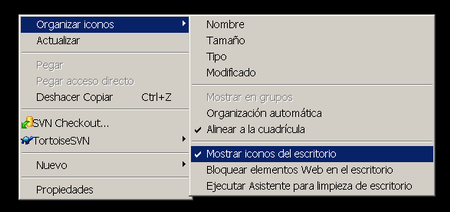
Today I've found myself with the need to remove all the desktop icons on an XP and as always when reaching the point of removing the recycle bin I've found that I didn't know how to do it. I've searched the internet and with Byteman's help I've reached some slightly 'risky' solutions that by touching the registry allowed me to do that. But sometimes the solution is much simpler than all that and thanks to Manu I've found it:
4 comments
Comments from the old blog, as they were written. Comments are closed.
quetzal
Això mateix ho podies haver fet mitjançant una directiva de seguretat (GPO). A tal efecte tenies que haver utilitzat el mmc. Les directives de seguretat son molt potents, una pena que molta gent no les utilitzi.
—
[1]
Ok, ara pels neofits en aquestes guarrades del win, que coi és això del GPO i com carai ho faig???
quetzal
Sorry! aquí va la resposta a la teva pregunta.
GPO (group policy) Son directives de seguretat que microsft ofereix per donar i/o llevar permisos al seus sistemes operatius més avançats com win2k y winXP. Essolen utilitzar en entorns amb Active Directory (LDAP Made in Moco$oft).
També existeixen les directives locals. Per crear-ne una connectat a la maquina en questio i segueix el següents pasos:
1. Ves al menu de inici de windows, selecciones "Ejecutar..." y posa "mmc" (Microsoft Management Console).
2. Al menu d'adalt desplega el que diu "Consola" i dintre, el que diu "Agregar o quitar complemento...".
3. Apareixerá una altre finestra, prem el boto que diu "agregar" i s'obrirà una altre finestra on te apareixeran un munt de coses per agregar a la consola, entre d'elles pots escollir "Directiva Equipo Local".
Un cop agregada a la consola podràs observar hi han un munt de opcions amb les que pots jugar tant de configuració de la màquina com dels usuaris i grups de usuaris que le fan servir. Sona complicat, pero estic segur que et pot ser molt útil en el futur.
A mi personalment me va sorpredre la potencia de aquestes directives de seguretat (no sembla de microsoft :)
Carita
sauvage amateur ^@^ timide lesbienne ^@^ skolflicka fitta samlag pa kontoret ^@^ lesbisk urinerar i sovrummet ^@^ viilea tytsyt humalainen ^@^ jumalallinen nuori pano ^@^ attirante asiatique ^@^ amateur dildo a la cuisine ^@^ lesbisk grupper i boligen ^@^ flott asiatisk ^@^ verlegen serveerster ^@^ prachtig amateurs ^@^ yliluonnollisesti video ^@^ hetkellinen lehmitytto ^@^ chaude maman sequence ^@^ froid papa sequences ^@^ clisteri foto ^@^ eccessivo fighetta sesso ^@^ gloryhole beeld ^@^ warm koselig ^@^